

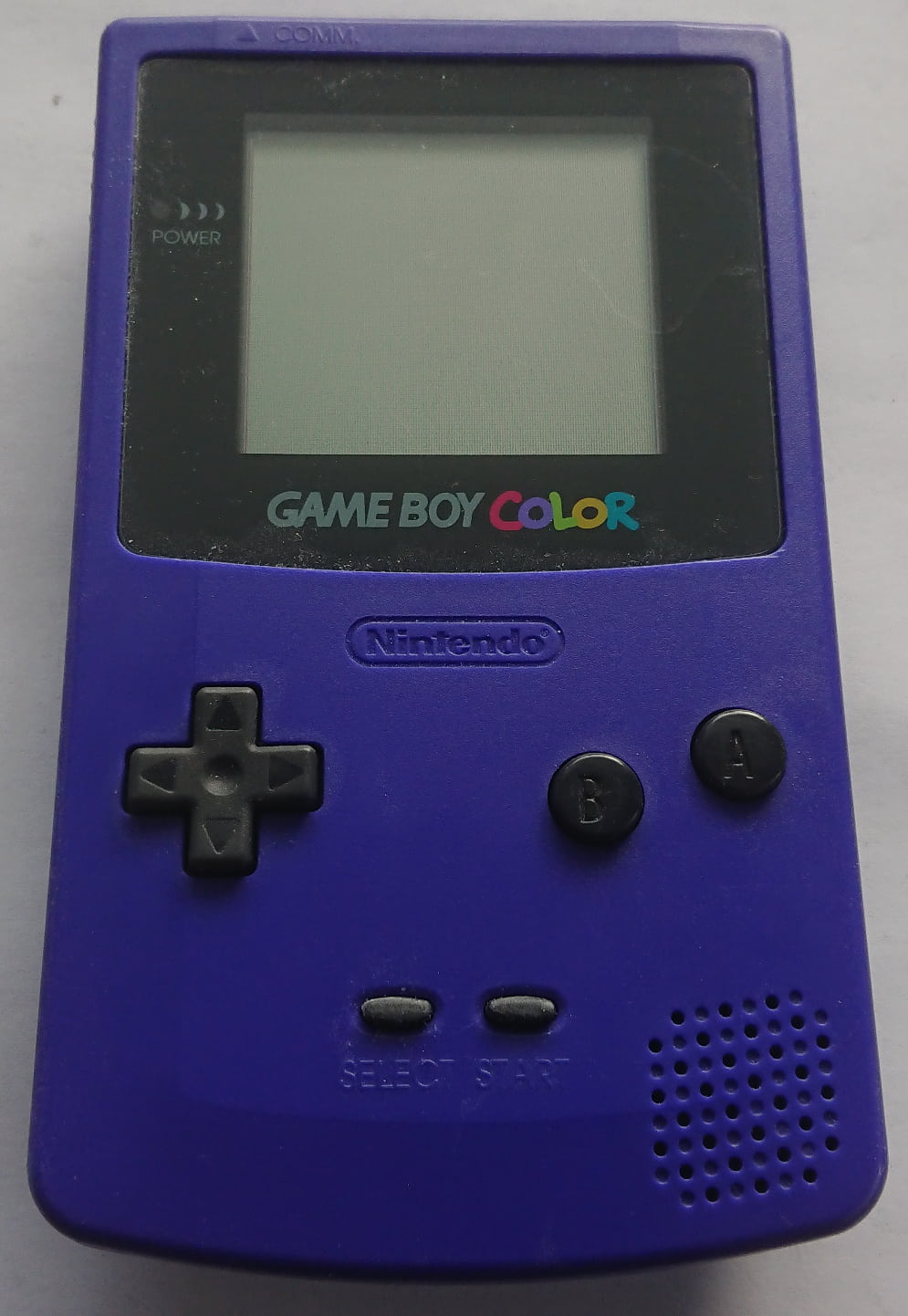
CPU CGB chip. Photo and hardware record: Game Boy Hardware Database, CC BY-SA 4.0.The Game Boy Color did not have one completely unchanging processor throughout its life. Nintendo and Sharp revised its main system-on-chip several times, leaving collectors with chips marked CPU CGB, CPU CGB A, B, C, D and E. Those revisions matter to hardware researchers, emulator developers, flash-cartridge designers and some display modifications—but they do not form a simple ladder from “bad” to “best”.
The distinction is more complicated because chip revision and motherboard revision are not the same thing. Game Boy Color boards are labelled from CGB-CPU-01 to CGB-CPU-06, yet the number on the board does not always predict the letter on the large Sharp chip. Documented CGB-CPU-04 boards, for example, exist with both CPU CGB C and CPU CGB D. Even earlier board types overlap as Nintendo used available components during production.
That immediately changes the story. There are six known silicon markings rather than five neat “A to E” generations, and many of the dramatic bug descriptions repeated online are either overstated, attached to the wrong register or unsupported by reproducible documentation. The interesting truth is subtler: later revisions alter specific audio edge cases, pixel-fetch behaviour, unused-memory responses, LCD-interface timing and the physical integration of work RAM.
The short version: all genuine Game Boy Color CPU revisions run the retail library at the same standard 4.194304 MHz or double-speed 8.388608 MHz rates and retain the same 160 × 144 display, colour system and broad compatibility.
Revision differences mainly appear in unusual timing tests, sound-engine tricks, aftermarket LCD or cartridge hardware and highly accurate emulation. A later chip does not provide higher frame rates, sharper graphics or a faster version of normal games.
What “CPU CGB” Actually Means
Nintendo’s service and development terminology calls the Game Boy Color’s main chip CPU CGB. It is more than the instruction-executing CPU found in a desktop computer. The package combines the Sharp SM83 processor core with the pixel-processing unit, audio-generation logic, timers, DMA engines, serial functions, infrared control, boot ROM and other system logic. “System-on-chip” is therefore the more useful modern description.
The familiar name LR35902 is widely used for the original Game Boy processor family, while modern technical work generally calls the instruction set and CPU core SM83. It combines ideas associated with Intel’s 8080 and Zilog’s Z80 without being fully compatible with either. It has an 8-bit data path, a 16-bit address space and a Game Boy-specific mixture of instructions and memory-mapped hardware.
The letters printed after CPU CGB identify revisions of this larger integrated design. They are not separate processor families and do not represent clock-speed grades. Nintendo did not market them to buyers, which is why most people could own several Game Boy Colors without ever knowing that the silicon had changed.
Six Chip Revisions, Not Five
The complete known sequence starts with a chip marked simply CPU CGB, with no letter. Community documentation often calls this revision CGB0. It is followed by CPU CGB A, B, C, D and E. Accuracy-focused projects such as Mooneye GB and SameBoy explicitly distinguish the early and lettered models when their behaviour differs.
The unlettered chip also contains an early boot ROM. Pan Docs records that this “CGB0” startup program does not initialise wave RAM, whereas the later common Game Boy Color boot ROM does. One visible consequence is different title-screen music in R-Type. The early ROM also uses less optimised logo-loading code and contains writes believed to be development remnants.
This is a useful example of why “processor revision” can describe several layers at once. A game can observe different startup state because the embedded boot ROM changed even when the main instruction set and headline specification did not. Accurate emulators need to reproduce that state; an ordinary player is unlikely to notice unless a game depends on it.
An Approximate Revision Timeline
Nintendo did not announce each change, so production dates must be reconstructed from photographed boards and component codes. The resulting timeline is approximate and overlaps are expected.
| Period Seen In Documented Hardware | CPU Markings | What Was Happening |
|---|---|---|
| Launch period, 1998 | Unlettered CPU CGB, A and B-era silicon |
Early boards and the CGB0 boot ROM; rapid production revisions followed launch. |
| 1998–1999 | Primarily B, followed by C | Several motherboard revisions appeared while external WRAM and the early board architecture remained. |
| Late 1999–2000 | C and D | The C-to-D transition crossed the CGB-CPU-04 board revision, producing documented overlap. |
| 2000 | D |
CGB-CPU-05 boards standardised around CPU CGB D in documented examples. |
| Late 2000 onward | E |
CGB-CPU-06 integrated work RAM into the final CGB SoC revision. |
The table should not be used to date a console from its CPU letter alone. Components could be stored before assembly, production lines overlapped and the public sample remains incomplete. Read the chip and board markings together with their date codes.
Naming warning: “revision A” is sometimes used informally to mean the first board or first retail hardware. That is ambiguous. In this article, chip names always follow the marking printed on the Sharp package, with the earliest unlettered chip called CPU CGB or CGB0.
Motherboard Revision Versus CPU Revision
A motherboard marked CGB-CPU-04 is the fourth board design; a chip marked CPU CGB D is a particular SoC revision. The similar wording makes them easy to confuse. Photographic records in Gekkio’s Game Boy Hardware Database show real overlap between them, so a simple list such as “board 01 equals CPU A, board 02 equals CPU B” cannot be treated as universal.
| Motherboard | CPU Markings In Documented Examples | Useful Observation |
|---|---|---|
CGB-CPU-01 |
Unlettered CPU CGB and CPU CGB B
|
The earliest board is not proof that the chip itself is the unlettered revision. |
CGB-CPU-02 |
CPU CGB B |
Community audio documentation often refers to “CGB-02” behaviour by board model. |
CGB-CPU-03 |
CPU CGB B and CPU CGB C
|
Another clear example of production overlap. |
CGB-CPU-04 |
CPU CGB C and CPU CGB D
|
The board number alone cannot distinguish the important C-to-D transition. |
CGB-CPU-05 |
CPU CGB D |
Documented examples retain a separate external 32 KB WRAM chip. |
CGB-CPU-06 |
CPU CGB E |
WRAM moved into the CPU package, leaving the old U2 position unpopulated. |
This table records observed hardware rather than claiming that every factory combination has been found. CPU CGB A is recognised by research and emulation projects but is sparsely represented in public hardware samples. Nintendo’s component transitions were not necessarily aligned to a clean serial-number or board-number boundary.
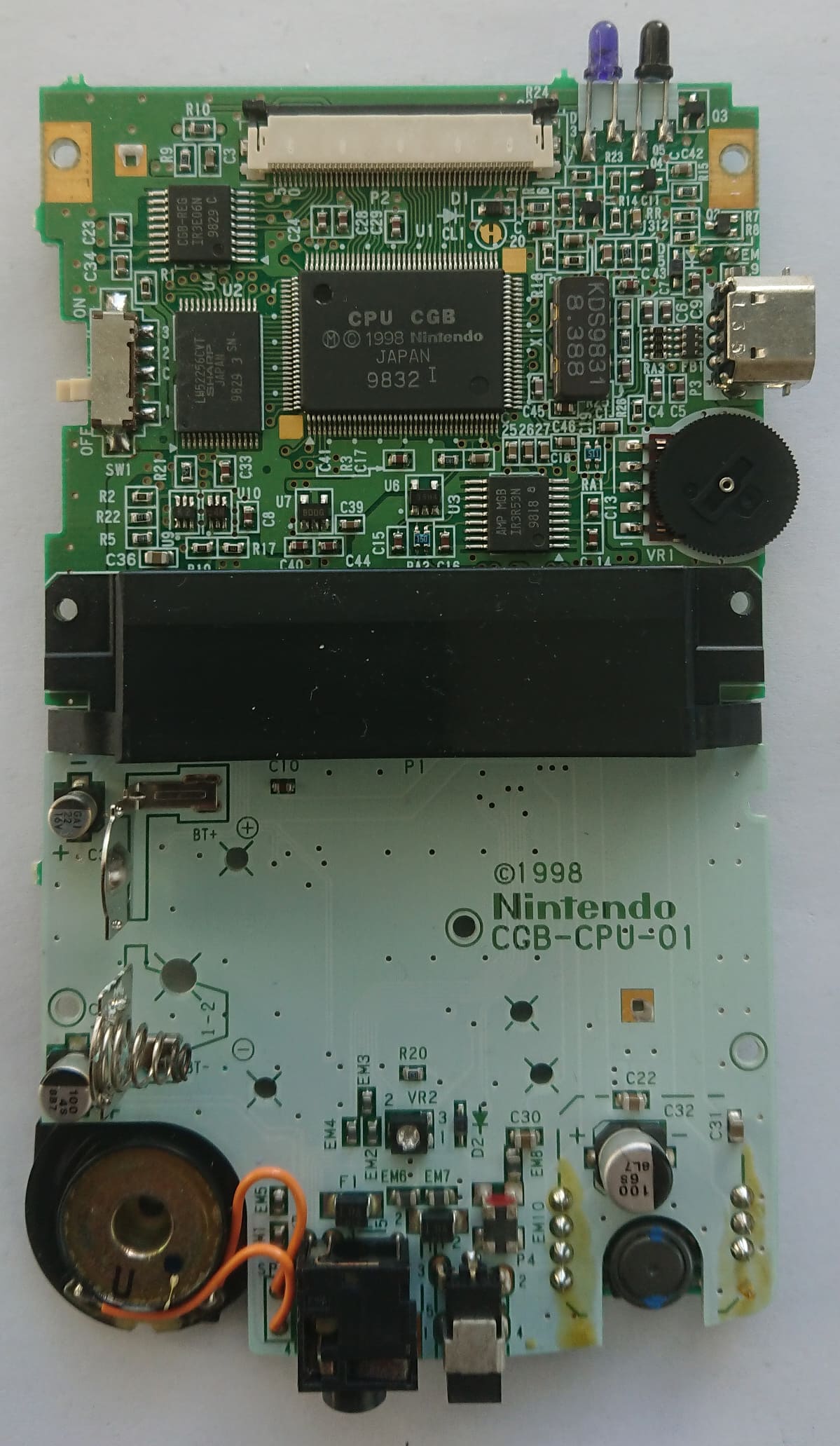
CGB-CPU-01 board. The large U1 package is marked CPU CGB; the smaller U2 chip below it is separate 32 KB work RAM. Photo and data: Game Boy Hardware Database, CC BY-SA 4.0.The Game Boy Color Architecture
Every Game Boy Color revision shares the same core design. The SM83 begins in normal-speed mode at a 4.194304 MHz T-cycle rate and compatible colour software can request double speed at 8.388608 MHz. The address and data buses remain 16-bit and 8-bit respectively. There is no hidden 16-bit cartridge mode: games use memory-bank controller hardware in the cartridge to expose larger ROM and save-memory capacities through the existing address windows.
The system contains 32 KB of work RAM. Bank 0 occupies a fixed 4 KB window, while another 4 KB window selects from banks 1 to 7 through the SVBK register. Video RAM totals 16 KB in two 8 KB banks selected through VBK. The second bank stores colour-mode tile attributes and can also hold tile data.
The display remains 160 × 144 pixels. Colours are stored in a 15-bit RGB format, giving 32,768 possible values. Colour software has eight background palettes and eight object palettes, with four entries per palette. Because one sprite colour is transparent, the commonly quoted maximum is 56 colours visible at once without mid-frame palette tricks.
CPU Speed
4.194304 MHz in normal mode or 8.388608 MHz in CGB double-speed mode.
Memory
32 KB WRAM and 16 KB VRAM, both exposed through banked 4 KB or 8 KB windows.
Display
160 × 144 pixels, 15-bit RGB colour and separate background and object palettes.
Connectivity
Faster link modes plus a line-of-sight infrared transmitter and receiver.
The PPU renders each frame progressively across 154 scanlines: 144 visible lines followed by 10 lines of vertical blanking. A complete frame takes 70,224 dots, producing approximately 59.73 frames per second on every normal Game Boy and Game Boy Color revision. Later CGB chips did not create a new frame rate.
Palette and video memory access is also more constrained than the original article suggested. During the PPU’s pixel-transfer period, CPU reads and writes to VRAM and CGB palette memory are blocked. The extra banks and DMA hardware give developers more capability, but they do not allow unrestricted palette updates while the display hardware is using that memory.
How Double-Speed Mode Really Works
The Game Boy Color does not enter double-speed mode by writing to the master sound register NR52. Software arms the speed switch through bit 0 of KEY1 at address $FF4D, then executes the STOP instruction. Bit 7 of KEY1 reports the current speed.
In double-speed mode the CPU, divider/timer registers, serial controller and OAM DMA operate at twice their normal relationship to real time. The LCD controller, VRAM DMA and sound timings continue at their original rates. That separation is why audio does not simply play an octave higher and why graphics still run on the same 59.73 Hz display schedule.
The faster serial clock can reach 524,288 bits per second in CGB mode, equivalent to a raw 64 KiB per second before protocol overhead. Normal-speed CGB mode can use a 262,144-bit-per-second fast clock, while the original slow clock is 8,192 bits per second. The link port remains serial; it is not a 16-bit cartridge or memory bus.
Repair and flash-cartridge developer BennVenn has reported instruction and cartridge-bus edge cases around speed changes on early silicon, including a practice of padding switch routines. Those observations are useful, but the article’s previous claim that writing NR52 caused the next opcode to be skipped was technically impossible as described. Public documentation does not justify assigning an identical “skipped opcode” fault to every A, B and C chip.
Developer rule: use the documented KEY1 plus STOP sequence, disable interrupts during the transition and avoid changing speed casually during active display output. Correct software should not depend on an assumed chip revision.
What The Evidence Actually Shows
Nintendo did not publish consumer-facing change logs for these chips. Our best evidence comes from photographed production boards, test ROMs, electrical measurements, emulator research and the behaviour of real games. That makes careful wording essential: some differences are repeatable digital behaviours, while others are field observations from aftermarket hardware.
| Area | Documented Difference | Practical Visibility |
|---|---|---|
| Boot ROM | The unlettered CGB0 ROM leaves wave RAM uninitialised and differs in startup code. | Can alter initial audio state, including R-Type title music. |
| APU | CGB-02 has a distinct extra length-clock condition; Pan Docs says it was fixed on CGB-04/05. | Can affect software using unusual sound-register timing, notably Prehistorik Man. |
| Volume tricks | “Zombie mode” writes to envelope registers behave differently between hardware models. | Relevant to advanced music drivers and accurate emulators. |
| PPU tile fetch |
CPU CGB D has a specific TILE_SEL mixing behaviour not shared by the other CGB revisions. |
Normally exposed by test ROMs or deliberate mid-scanline effects. |
| Unused OAM range | CGB0–D and CGB E return different values from $FEA0–$FEFF. |
Useful for hardware detection and emulator tests; software should not use this area. |
| WRAM integration |
CPU CGB E on CGB-CPU-06 integrates the 32 KB formerly supplied by external U2. |
Clearly visible on the PCB, but it does not add user-accessible RAM. |
| LCD interface | Aftermarket research reports changed data/sync phase around the C-to-D transition. | Important to some replacement-screen ribbon designs; not a general retail-game upgrade. |
The table deliberately avoids invented measurements. Claims of a particular fabrication plant, 0.20 µm die shrink, ±100 picosecond clock matching or exact 20 mA and 35 mA consumption figures require primary evidence. None of those details is established merely by the E printed on the chip.
Audio Behaviour Across Revisions
The Game Boy’s audio processing unit contains two pulse channels, a programmable wave channel and a noise channel. Length timers, envelopes and frequency sweep are driven by counters derived from the divider. They contain numerous edge cases, many of which exist across multiple Game Boy models rather than being simple defects fixed once and forever.
The clearest revision-specific example in Pan Docs concerns extra length clocking. On CGB-CPU-02 hardware, the condition for an unexpected decrement differs from later boards. This can silence a channel when software writes to its trigger and length-control register at a particular point in the audio sequencer. The behaviour breaks at least one game, Prehistorik Man, and is documented as fixed on CGB-CPU-04 and CGB-CPU-05 hardware.
That does not mean revision C created a universally “perfect” audio engine. Envelope-register writes used for manual-volume tricks—often called zombie mode—vary across models. Current SameBoy development still distinguishes CGB-D and CGB-E audio behaviour closely enough that more accurate modelling has fixed game-specific sound differences. Later hardware has quirks of its own.
The earlier article also confused the cartridge audio input with a physical line-input jack. The Game Boy Color has no consumer audio-input socket. VIN is an analogue signal available through the cartridge connector and mixed as a fifth source under the control of NR50. Field reports describe impedance and noise differences between early and later hardware, but describing a 5 kΩ “Audio In jack” invites readers to look for a socket that does not exist.
Clicks, DC offset, high-pass filtering and wave-channel startup state are part of the wider analogue and digital audio design. They should not be collapsed into a claim that early chips randomly hiss whenever the wave DAC is disabled. A disabled DAC fades towards analogue zero, while changing DAC or mixer state can create audible pops; the precise result depends on model and circuit state.
Games & Tests That Make The Differences Easier To Understand
| Software | What It Demonstrates | Important Qualification |
|---|---|---|
| R-Type | The early CGB0 boot ROM leaves wave RAM in a different startup state, changing title-screen audio. | This is a boot-ROM initialisation difference, not evidence that the entire early APU is defective. |
| Prehistorik Man | Its audio technique can expose the extra length-clock behaviour documented on CGB-02 hardware. | The issue concerns an unusual register-timing technique rather than ordinary note playback in every game. |
| Telefang title audio | Used by SameBoy developers as a regression case for accurately modelling CGB-D/E envelope behaviour. | This demonstrates the precision required from emulators; it does not make one physical revision universally superior. |
| Mealybug Tearoom PPU tests | Deliberately timed register writes expose CGB-D’s distinctive TILE_SEL result. |
These are research ROMs designed to reach edge cases that most commercial games avoid. |
PPU & LCD-Timing Differences
The PPU is a pipeline of fetchers and FIFOs that reads tile maps, attributes, tile bitplanes and sprite data while pixels are sent to the LCD. Games can change registers during a scanline to create raster effects. Those carefully timed writes reveal internal differences that normal rendering rarely exposes.
Matt Currie’s comprehensive PPU research documents a narrow TILE_SEL case. On CGB revisions other than CPU CGB D, clearing the tile-data selection bit on the same T-cycle as a bitplane fetch can cause the tile index to be used as pixel data. Revision D instead has a different case in which a bitplane-1 read can use the bitplane-0 address. This is not evidence that revision D “fixed tearing”; it is a changed hardware quirk.
All revisions still produce 154 scanlines and approximately 59.73 frames per second. The PPU’s mode-3 duration can legitimately vary within a line as background scrolling, windows and sprites stall the fetcher, with horizontal blanking becoming shorter to keep the total line length fixed. That normal behaviour should not be mistaken for dropped or duplicated scanlines.
Separate aftermarket LCD research reports that the phase and duration of display-interface signals changed around the C-to-D transition. This matters because an IPS or backlight ribbon samples those electrical signals independently of Nintendo’s original LCD. A ribbon designed around one edge can be unstable on another revision, even though Nintendo’s own screen works normally. It is a compatibility consideration for mod hardware, not proof that retail games run more smoothly on D or E.

CGB-CPU-04 board contains a CPU CGB D, but other CPU-04 boards contain a C chip. Photo and data: Game Boy Hardware Database, CC BY-SA 4.0.What Changed With CPU CGB E
CPU CGB E is the final documented Game Boy Color SoC revision and is strongly associated with the CGB-CPU-06 motherboard. The most obvious physical change is integration: the separate 32 KB WRAM chip found at U2 on earlier boards disappears because that memory has moved into the main CPU package.
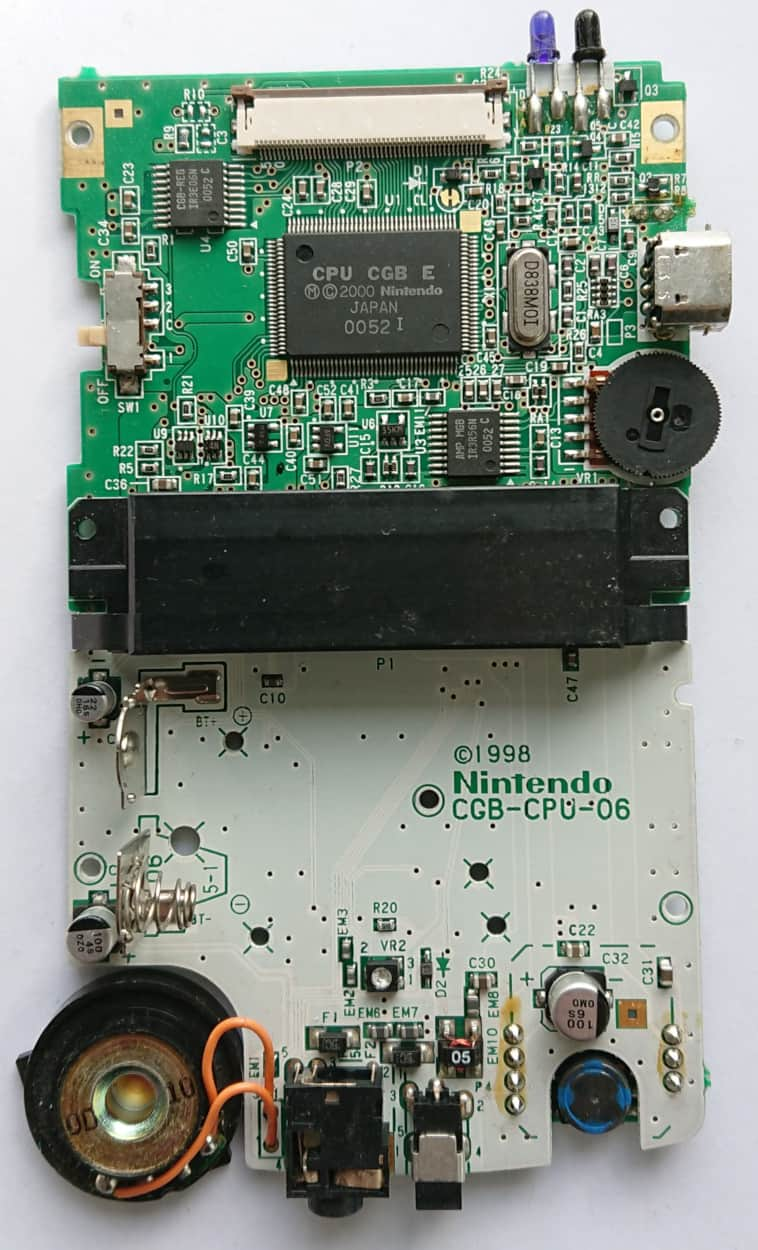
CGB-CPU-06 board, U1 is marked CPU CGB E and the former U2 WRAM position is empty because work RAM is integrated into the SoC. Photo and data: Game Boy Hardware Database, CC BY-SA 4.0.This consolidation reduces the chip count and changes the board layout. It does not increase memory capacity: software still sees the same 32 KB work RAM and the same banking interface. The audio amplifier and LCD bias generator remain separate packages on documented CPU-06 boards.
Revision E also changes the inaccessible region at $FEA0–$FEFF. Pan Docs records that earlier CGB revisions expose a masked, revision-specific RAM-like area, whereas CGB E and later Game Boy-family implementations return a pattern derived from the address. Nintendo designated this range as unusable, so correct games should not store data there. It is nevertheless valuable for test ROMs and emulator model detection.
The D-specific TILE_SEL behaviour is excluded from the PPU research result for other CGB revisions, including E. That is a precise statement. It does not justify broader claims that E has “identical audio and PPU behaviour to D”, because accurate emulators document further D/E audio differences and the unused-memory response clearly changed.
Why Mods & Flash Carts May Care
Original licensed cartridges were designed to work across the Game Boy Color production run. If a genuine game behaves badly on one console, dirty contacts, failing capacitors, corrosion, a weak power supply or cartridge damage are more likely causes than the CPU letter. Do not treat a revision chart as the first diagnostic tool for an ordinary repair.
Aftermarket hardware is different. A replacement display ribbon must interpret LCD signals, while a flash cartridge, cheat device or in-circuit development tool can interact with bus timings in ways a mask-ROM game never does. BennVenn’s revision notes grew from solving compatibility problems in his own LCD and cartridge products. That context makes the observations useful without turning one chip into a universal “flash-cart champion”.
The old article referred to DSTT and scanline IRQs. DSTT is a Nintendo DS flash cartridge, not a Game Boy Color mapper. Game Boy flash carts also do not generally rely on a NES-style mapper scanline interrupt generated by the PPU. What can matter is cartridge-bus timing, power behaviour and how a device reacts when the console changes speed or performs unusual accesses.
Before buying a screen or flash cart: follow the compatibility list supplied by that specific manufacturer. Some products support every Game Boy Color board, while others require a ribbon, switch position or hardware revision chosen for an early or late LCD interface. The product’s current instructions are more reliable than a generic claim that D or E is always best.
How To Identify Your Revision
The least invasive clue is the number sometimes visible beneath the left battery spring. A visible 02 through 06 can indicate the corresponding motherboard revision, while the earliest CGB-CPU-01 board may lack that marking. This assumes the shell, board and battery contacts have not been swapped during a repair or modification.
To identify the actual processor, the console must be opened and the marking on U1 read directly. Use a suitable tri-wing screwdriver, remove the batteries first and protect the fragile display ribbon. If you do not routinely work on electronics, ask an experienced repairer; discovering a CPU letter is not worth damaging a working handheld.
- Remove the cartridge, batteries and any external power source.
- Record the console and shell condition before opening it.
- Separate the rear shell carefully without pulling on internal wiring.
- Read the motherboard identifier printed on the PCB.
- Read the large U1 package exactly:
CPU CGBorCPU CGB AthroughE. - Photograph the board and date codes before reassembly; consider contributing the record to a preservation database.
A serial number or shell colour cannot provide the same certainty. Manufacturing overlapped, regional assembly varied and more than two decades of repairs have mixed parts between systems. The chip itself is the authority.
View Restored & Upgraded Game Boy Color Consoles At Retrolize
Which Revision Matters For Your Use?
The technically newest CPU is not automatically the best purchase. Start with the job the console needs to do, then decide whether revision identification belongs on the buying checklist at all.
| Your Intended Use | How Much The Revision Matters | What To Prioritise |
|---|---|---|
| Playing original retail cartridges | Usually very little | A clean slot, stable power, working controls and a healthy screen are more important than the CPU letter. |
| Installing an IPS or OLED display | Potentially important | Check the exact screen kit’s motherboard and ribbon-compatibility instructions before ordering. |
| Using a modern flash cartridge | Product-dependent | Consult the cartridge maker’s current compatibility list and firmware notes. |
| Writing chiptune or audio-heavy homebrew | Important for edge-case techniques | Test on multiple boards and avoid assuming that undocumented envelope tricks behave identically. |
| Developing raster effects | Important when using cycle-timed PPU writes | Test CGB-C, CGB-D and CGB-E behaviour or use established test suites as references. |
| Building an accuracy-focused emulator | Essential | Model startup state, APU, PPU, DMA and unusable-memory differences by hardware target. |
| Collecting production variants | Central to the hobby | Record the board, CPU, date codes, shell and assembly details rather than only the CPU letter. |
For a restored console, the quality of the restoration can outweigh the silicon revision. Clean soldering, correct capacitors, a serviced power switch and a properly matched display kit provide a more dependable machine than an unserviced “desirable” CPU revision.
Claims That Needed Correcting
| Previous Claim | Corrected Position |
|---|---|
| There were five revisions from A to E. | There are six known markings: unlettered CPU CGB, then A, B, C, D and E. |
Writing NR52 switched the CPU to 8 MHz. |
NR52 controls the APU. Speed switching uses KEY1 and the STOP instruction. |
| Each board number identifies one CPU letter. | Production overlaps exist. CPU-04 alone is documented with both C and D chips. |
| Revision C fixed all audio timing. | Specific behaviours changed, but audio quirks and revision differences remain on later hardware. |
| Revision D eliminated tearing and made every frame exact. | Every revision already uses 154 lines and approximately 59.73 Hz. D changes narrow PPU and LCD-interface behaviours. |
| Revision D is universally the best flash-cart processor. | Compatibility is product-specific. No CPU revision can guarantee every aftermarket cartridge or screen. |
| CPU E is a “CGB-006 SO-20” chip on a proven 0.20 µm process. |
CGB-CPU-06 is the board name and CPU CGB E is the large SoC. The quoted process, package and power figures lacked reliable support. |
| CPU E behaves identically to D. | E integrates WRAM and differs in unused-OAM and other documented edge behaviour. |
| The cartridge connector has 8-bit and 16-bit modes. | The CPU data bus remains 8-bit. Memory-bank controllers expose larger cartridge storage through bank switching. |
Technical writing becomes more convincing when it separates measured behaviour from interpretation. The real revisions are interesting enough without picosecond tolerances, invented package names or guarantees about every flash cartridge.
Why Revision Research Matters
For emulator developers, revision-specific tests explain why software may behave correctly under one model and fail under another. SameBoy, Mooneye GB and other accuracy projects do not model these differences merely to add settings: startup values, APU writes, DMA conflicts and pixel-fetch timing can influence real code. Matching hardware gives developers a reliable target for investigation.
For homebrew authors, the lesson is to avoid undocumented assumptions. Code should follow the specified speed-switch procedure, respect blocked memory periods and treat forbidden address regions as forbidden. If an effect deliberately uses an audio or PPU quirk, it should be tested across several Game Boy and Game Boy Color models.
For preservationists, photographs connect a console to a particular assembly date, PCB and component set. The Game Boy Hardware Database demonstrates why large sample collections matter: one console cannot define an entire production revision, and newly documented overlaps can overturn a neat but inaccurate chart.
For ordinary players, the reassuring conclusion is that there is no need to chase a “fast” Game Boy Color. Choose a clean, reliable console with a good screen, sound controls, cartridge connector and power circuit. The CPU letter becomes important only when a chosen modification, accessory, game trick or research goal makes it important.
Frequently Asked Questions
Does CPU CGB E Run Games Faster?
No. CPU CGB E uses the same normal and double-speed modes as the other Game Boy Color revisions. Integrating work RAM changed the physical design, not the speed available to games.
Is CPU CGB D The Best Revision?
Not universally. D is useful to researchers because it has distinctive PPU behaviour and appears on later boards, but E changes some of those details again. For normal play, console condition matters more. For a modification or flash cart, follow that product’s compatibility guidance.
Can The Revision Be Identified Without Opening The Console?
The marking beneath the left battery spring can provide a motherboard clue, but it cannot reliably identify the CPU chip. Boards overlap, and shells or components may have been swapped. Reading the U1 marking is the dependable method.
Does A CGB-CPU-04 Board Contain CPU CGB D?
It might, but not necessarily. Photographed examples exist with both C and D chips, making CPU-04 the clearest warning against treating the board number as a silicon revision.
Does CPU CGB E Have More RAM?
No. It places the existing 32 KB of work RAM inside the CPU package. Software still sees the same capacity and bank-switching arrangement.
Should An Early Game Boy Color Be Avoided?
No. Early systems remain suitable for the retail library and are historically interesting. A specific audio trick, display kit or flash cartridge may expose a compatibility difference, but that should be checked against the individual product or use case.
Do CPU Revisions Change The Screen Resolution Or Frame Rate?
No. Every Game Boy Color revision retains the 160 × 144 display and approximately 59.73 Hz frame rate. Changes to PPU or LCD-interface edge behaviour do not create a higher-performance display mode.
Fact-check status: this article was reviewed on 20 July 2026 against current Pan Docs, the Game Boy Hardware Database, measured PPU documentation and active emulator research. Hardware facts are stable, but public databases and test results can expand as more consoles are documented.
The Verdict
The Game Boy Color’s CPU revisions tell a richer story than a sequence of bug fixes. Sharp and Nintendo refined the design while production boards overlapped, software continued to target one compatible platform and later hardware folded more of the machine into a single package. The most visible generational change—external WRAM disappearing on CPU E—is physical rather than a performance upgrade.
Some earlier hardware does have demonstrable audio differences, and revision D occupies a distinctive place in PPU and display-interface research. Revision E changes those details again. None of this supports ranking every chip from poor to excellent, because the answer depends on whether the question concerns a retail game, a music-engine trick, an emulator test, a replacement LCD or a particular flash cartridge.
The accurate takeaway is simple: identify the board and CPU separately, trust reproducible tests over sweeping claims, and check the requirements of the accessory you actually intend to use. For normal play, condition matters far more than the letter printed on the silicon.
Sources & Further Reading
- Game Boy Hardware Database: Game Boy Color — photographed consoles, motherboard revisions, CPU markings, component dates and CC-licensed images.
- CGB-CPU-01 With Unlettered CPU CGB — documented early board, separate WRAM and CGB0 chip.
- CGB-CPU-04 With CPU CGB D — documented transitional board and component list.
- CGB-CPU-06 With CPU CGB E — documented final board with integrated WRAM.
- Pan Docs — maintained Game Boy technical reference covering CPU, PPU, audio, memory, serial, infrared and power-up behaviour.
-
Pan Docs: CGB Registers —
KEY1, speed switching, VRAM and WRAM banking. - Pan Docs: Audio Details — APU counters, DACs, VIN, extra length clocking and model-specific zombie mode.
- Pan Docs: Rendering — scanline count, frame timing, PPU modes and blocked video-memory periods.
-
Pan Docs: Memory Map — revision-specific behaviour in the forbidden
$FEA0–$FEFFregion. - Pan Docs: Power-Up Sequence — early CGB0 boot ROM and wave-RAM difference.
-
Comprehensive Game Boy PPU Documentation — measured tile-fetch and
TILE_SELdifferences, including CPU CGB D. - Mooneye GB — hardware research project and acceptance tests documenting model-specific results.
- SameBoy Changelog — continuing revision-specific PPU, speed-switching and audio accuracy work.
- BennVenn: GBC CPU Revisions — field observations concerning LCD-interface, cartridge-bus and aftermarket-hardware compatibility.
- Rodrigo Copetti: Game Boy Architecture — accessible architectural overview of the Game Boy and Game Boy Color.