

SummerCart64 is easy to misunderstand because it does several different jobs at once. To a player, it is a flash cartridge: choose compatible software from a microSD card and run it on a Nintendo 64. To a preservation enthusiast, it offers direct support for 64DD disk images without requiring an increasingly scarce mechanical drive. To a homebrew developer, it is a documented USB and debugging interface. Underneath all three roles is an open-source FPGA design that responds to the N64 cartridge bus.
That last point matters. SummerCart64 does not replace the N64’s CPU or graphics hardware, and its FPGA is not a miniature N64 console. The original machine still executes the game, renders the graphics, produces the sound and reads the controllers. The cartridge’s programmable logic recreates the behaviour expected from cartridge hardware, save devices, CIC security and selected 64DD interfaces while managing modern storage behind the scenes.
This makes the product both more interesting and less magical than some descriptions suggest. It can provide a remarkably convenient route into homebrew, personal backups and 64DD preservation, but it cannot improve a tired analogue video signal, turn a PAL console into an NTSC machine or guarantee that every menu release and hardware clone behaves identically. The best review is therefore one that separates the core hardware, the menu software and the claims made by individual sellers.
The short verdict: SummerCart64 is one of the most capable open-source flash cartridges available for an original Nintendo 64. Its automatic cartridge-save write-back, real-time clock, fast SD and USB interfaces, documented development features and 64DD device emulation give it unusual breadth.
It is “plug and play” only after a correctly prepared SD card and compatible firmware/menu combination are in place. Use homebrew and software you are legally entitled to copy; SummerCart64 itself does not grant rights to commercial ROMs or Nintendo’s 64DD IPL.
What SummerCart64 Actually Is
A conventional N64 cartridge presents fixed program data to the console and may add EEPROM, SRAM, FlashRAM or specialised hardware. SummerCart64 presents the same broad categories of resources, but loads their contents from removable storage and configures its hardware for the software being launched. The N64 sees a cartridge-shaped device on its Parallel Interface bus; the user sees folders, game information and launch options supplied by N64FlashcartMenu.
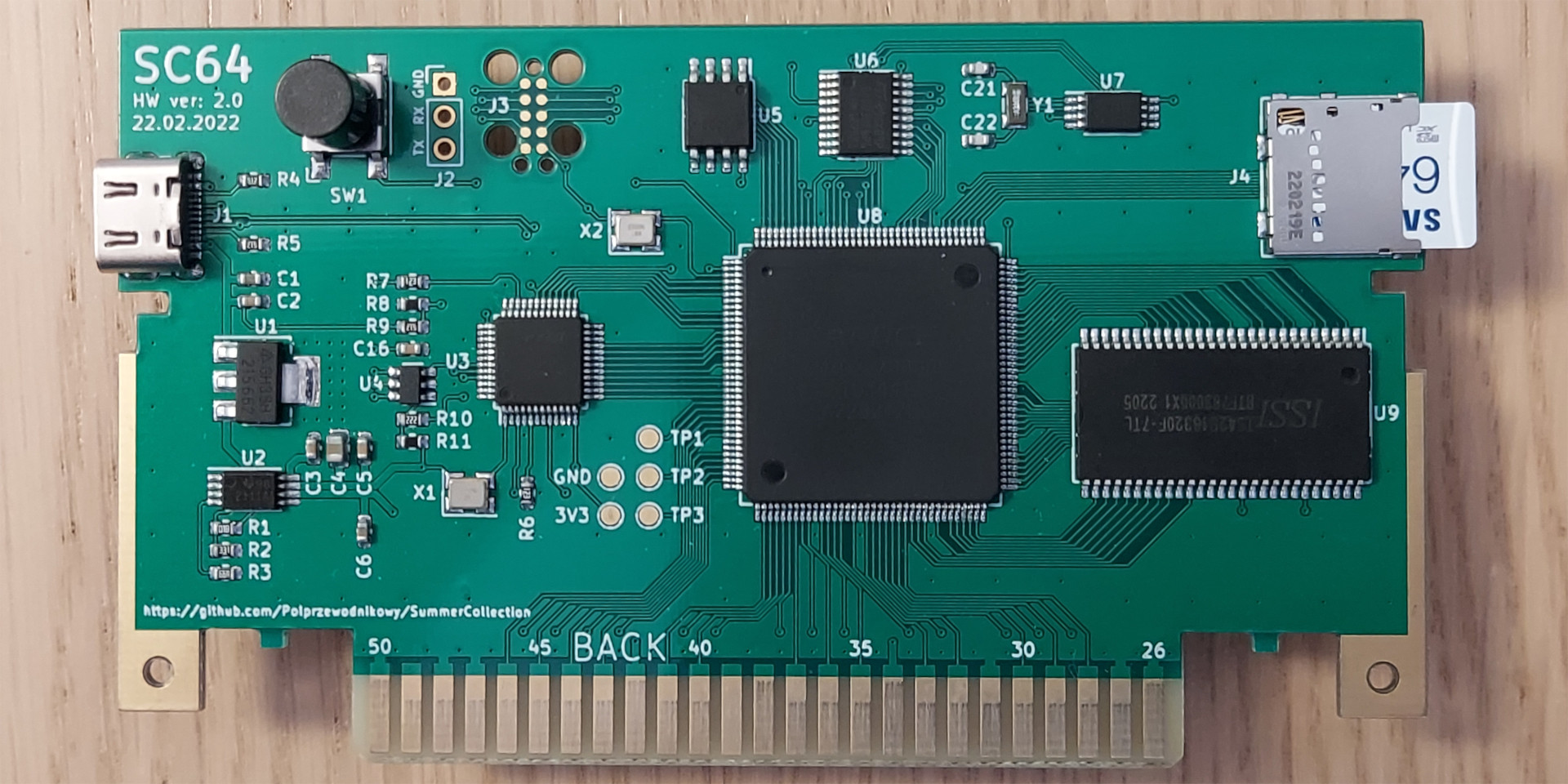
The project describes itself as the first feature-complete N64 flash cartridge that is also completely open source. Its public repository contains hardware design material, FPGA and firmware source, PC tools, documentation and a printable shell. N64FlashcartMenu is a related but separate open-source project. That separation is worth remembering whenever instructions say “update your SummerCart”: the cartridge firmware and the on-screen menu are not the same file.
Primary Memory
64 MiB of SDRAM holds game and save data—enough for every retail N64 cartridge image.
Extended Storage
16 MiB of flash stores the bootloader and extended game data, allowing images up to roughly 78 MiB.
Save Hardware
EEPROM, SRAM and FlashRAM cartridge-save types, with automatic write-back to the SD card.
Special Features
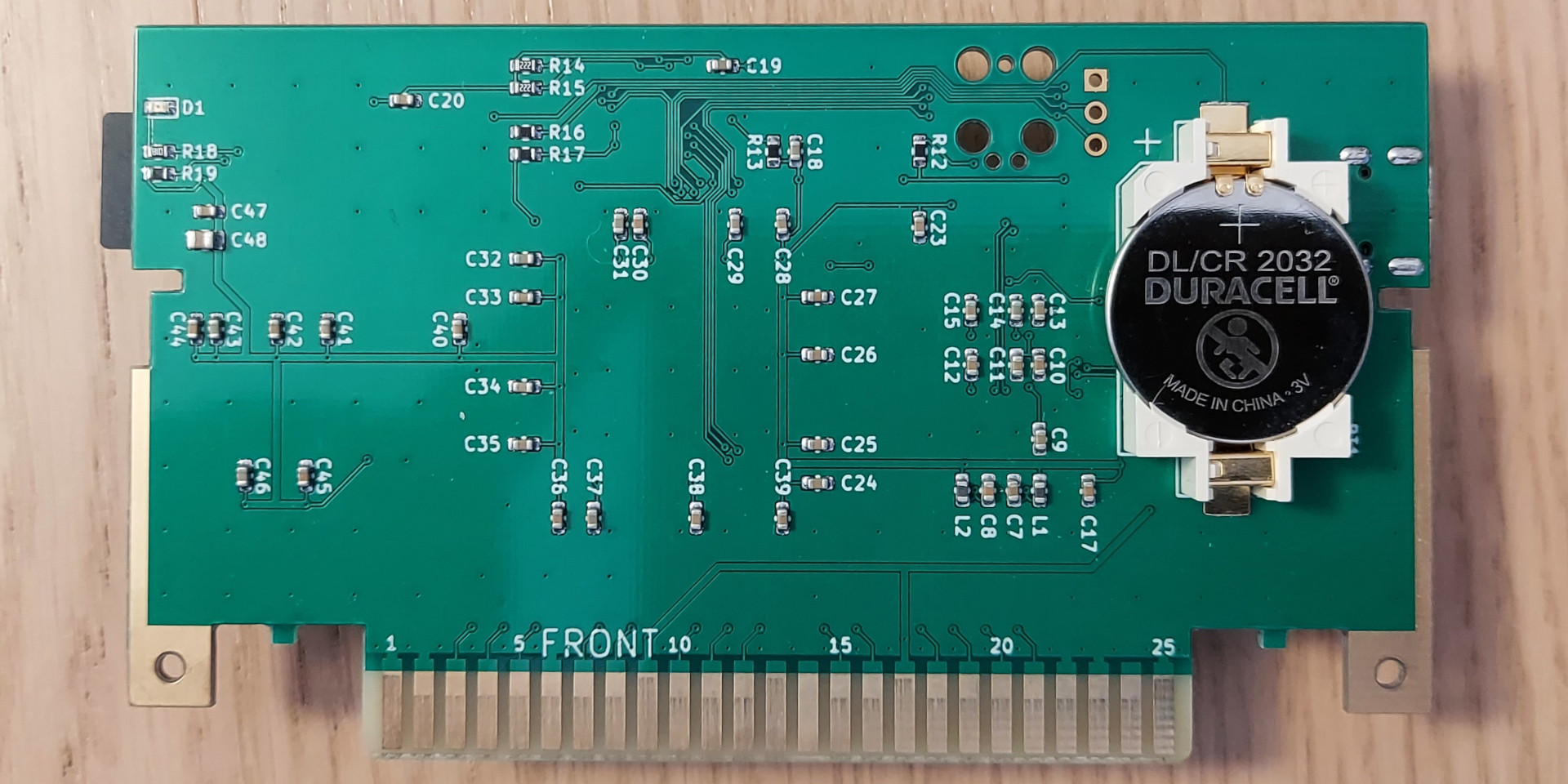
Battery-backed RTC, region-aware CIC emulation, 64DD interfaces, USB tools, status LED and button.
None of that means the cart contains commercial games. A responsible unit should arrive without unauthorised copyrighted software. Buyers who receive a suspiciously full SD card should not interpret that bundle as an official feature of the open-source project.
FPGA, Memory & I/O Architecture
The FPGA is the timing-sensitive centre of SummerCart64. It decodes the N64 bus, maps ROM and save regions, implements the cartridge-facing control registers and supplies the behaviour needed for CIC and 64DD functions. A compact SERV RISC-V soft core and supporting firmware handle control work around that datapath. Calling this “FPGA precision” is reasonable when it refers to the cartridge interface; calling it an FPGA recreation of the entire N64 is not.

The published specification lists a peak transfer rate of approximately 23.8 MiB/s for both the SD and USB interfaces. “Peak” is the important word: it is a capability of the interface and optimised DMA path, not a promise that every SD card or workload will sustain the same figure. Actual launch time includes filesystem access, image transfer, save preparation and menu overhead.
The 64 MiB SDRAM capacity covers the largest official retail N64 cartridge images. Part of the additional 16 MiB flash is reserved for the bootloader, leaving enough addressable extended storage for images of roughly 78 MiB. That extra headroom is useful for unusually large homebrew and development builds; it should not be presented as evidence that retail games need more than the main 64 MiB.
How Plug-And-Play Is It?
A properly assembled retail unit can be simple to use, but the phrase “two-minute setup” assumes that its firmware is current and its SD card has already been prepared correctly. The normal user-facing menu is loaded from the SD card. The current N64FlashcartMenu instructions tell SummerCart64 owners to place sc64menu.n64 in the root of the card.
- Check the seller’s instructions and back up any supplied SD card before changing it.
- Use a reliable, compatibly formatted microSD card and place the current SummerCart menu file in its root.
- Add legal homebrew, development builds or personal dumps in an organised folder structure.
- Insert the cart with the N64 switched off, then start the console and verify the firmware and menu versions from their information screens.
- For 64DD software, fit an Expansion Pak and provide the required IPL obtained lawfully from your own hardware.
Menu updates and firmware updates follow different routes. Updating the menu normally means replacing the SD-card menu file. Updating the FPGA/firmware requires a USB connection and the project’s sc64deployer tool; current 64DD.org instructions explicitly note that firmware updating from the SD card is not supported. That makes the everyday experience friendly, but initial maintenance is not entirely console-only.
Version check: this article was checked against SummerCart64 firmware v2.20.2 and N64FlashcartMenu v0.3.2. The menu release is dated 23 May 2026 and includes its own known-issues list. New units can ship with older files, so the number printed in a listing is less useful than the versions actually reported by the cart and menu.
Running N64 Software On Original Hardware
Once a game image is selected, the cart loads it into fast local memory, chooses the appropriate save configuration and supplies the boot information expected by the console. UltraCIC-based handling can automatically select suitable seed and checksum values, reducing the regional security friction found with original cartridges.
Region handling is not the same as a hardware region conversion. The menu and CIC can help software boot, and configuration can influence the TV-type value presented during startup, but a PAL N64 remains a PAL console with its own video and clock characteristics. An imported title may still produce incorrect speed, colour or display behaviour depending on the game, console, television and video chain. “Region smart” is more accurate than “every region works perfectly everywhere”.
The game still runs on the original N64 CPU, Reality Coprocessor and memory. This preserves the console’s real performance characteristics, including frame-rate drops and software quirks. It also preserves the limitations of the surrounding hardware: worn controller sticks, marginal power supplies, dirty cartridge connectors and poor analogue video do not disappear because the program arrived from an SD card.

Save Types, RTC & Controller Paks
SummerCart64 supports the common forms of save memory built into N64 cartridges: 4-kibit and 16-kibit EEPROM, 256-kibit, 768-kibit and 1-Mibit SRAM configurations, and 1-Mibit FlashRAM. Its menu database normally selects the expected type, while advanced configuration can override it for homebrew or unusual software.
Automatic write-back removes the older flash-cart ritual of pressing RESET solely to copy cartridge-save memory to the SD card. That is a meaningful convenience, but “automatic” should not be translated into “impossible to lose”. Keep periodic backups, use a reputable SD card and avoid cutting power during obvious save or loading activity. Homebrew and modified software may also declare or use a different save type from the original database entry.
The battery-backed real-time clock supports software designed to query RTC hardware, most famously the Japanese N64 release of Dōbutsu no Mori. It does not add time-based events to games that never contained them. The clock can be adjusted through the menu or synchronised from a computer with the deployment tool.
Controller Pak saves are separate. They live in the accessory connected to the controller, not in the game cartridge, so cartridge-save emulation does not replace a Controller Pak. The current menu describes Controller Pak backup and restoration—including individual notes—as experimental. Treat it as a useful management feature, not a reason to stop backing up valuable Pak data.
| Save Method | Where It Lives | SummerCart64’s Role |
|---|---|---|
| EEPROM / SRAM / FlashRAM | Normally inside a game cartridge | Emulated by the cart and written back automatically to SD. |
| Real-Time Clock | Special cartridge hardware | Provided by a battery-backed RTC and configurable through menu or USB. |
| Controller Pak | Inside the controller accessory | Still used by the game; current menu backup/restore tools are experimental. |
| 64DD Writable Area | On the original magnetic disk | Represented within the disk image; back up the image before experimentation. |
What Its 64DD Emulation Really Does
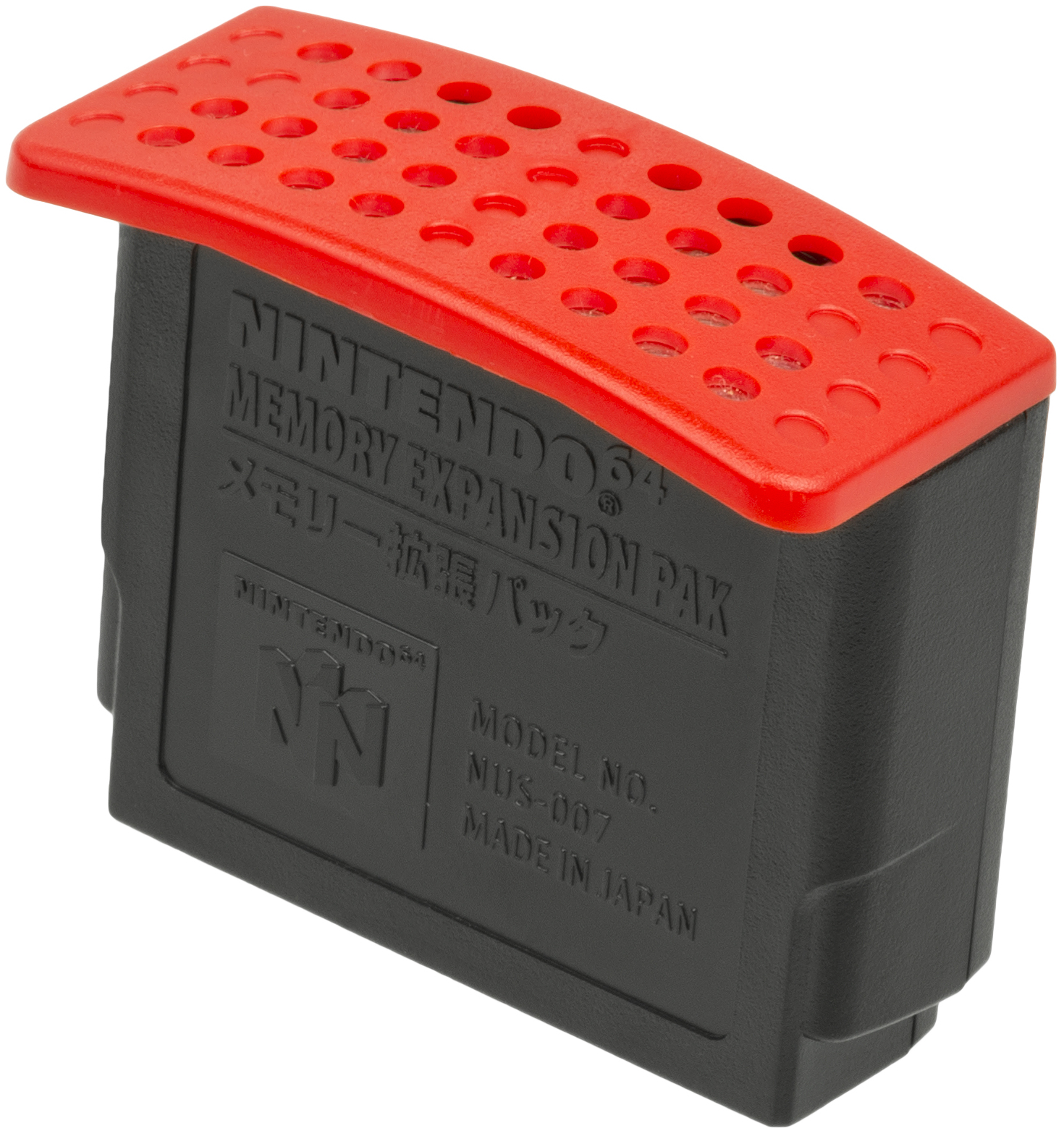
Nintendo’s 64DD was a magnetic-disk drive that connected beneath the N64 through the EXT port. Its 64.45 MB disks could divide their capacity between read-only and writable areas, while the system also supplied a real-time clock and ROM libraries. The Expansion Pak doubled the console’s main memory from 4 MB to 8 MB and was part of the standard 64DD environment.

SummerCart64 takes a different physical route. Its programmable logic exposes the registers and IPL access that 64DD software expects, while block read/write requests are served from a disk image on the SD card or through USB. This allows supported unmodified disk dumps to run without first being rebuilt as cartridge conversions. It also enables cartridge-plus-disk combinations such as F-Zero X with its Expansion Kit.
That is genuine hardware-level device emulation, but it is not a mechanical recreation. There is no magnetic medium, moving head, motor or physical disk swapping. Storage latency and failure modes are different, and current menu notes say disk swapping remains work in progress. The most defensible use of “authentic” is that original software can communicate with a compatible 64DD-style interface on a real N64—not that every physical property of Nintendo’s drive has been reproduced.

Booting disk software also requires a 64DD IPL. That code belongs to Nintendo and is not made legal merely because a flash cartridge can load it. Preservation-minded owners should obtain the necessary data from hardware they own and follow the law that applies where they live. Likewise, make a backup of a writable disk image before opening it: a program can modify it just as it could modify original writable media.
Earlier-System Emulation: Useful, But Not FPGA Cores
N64FlashcartMenu can hand supported files to software emulators for systems including Game Boy, Game Boy Color, NES, SNES, Master System and Game Gear. Those emulators run on the Nintendo 64’s processor. SummerCart64 supplies storage and launching; its FPGA does not transform itself into each earlier console.
That distinction sets expectations. Compatibility, sound, mapper support, enhancement chips and performance depend on the individual emulator and the N64’s available processing power. Simple games can work well, while demanding SNES titles or unusual hardware may expose limitations. Menu release notes also show that emulator save handling continues to receive fixes—the v0.3.2 release, for example, corrected Neon64 1-Mibit SRAM behaviour.
This is an enjoyable bonus for a television setup centred on one original console. It is not the main reason to buy SummerCart64, and it should not be compared with a modern multi-system FPGA platform or a powerful software-emulation device without acknowledging the different goals.
USB & Homebrew Development
The development story is where SummerCart64’s open design becomes more than an ideological benefit. Its documented USB protocol and deployment application can upload and download game or save data, expose a debug terminal, access the SD card, change configuration and install cartridge firmware. The project integrates with libdragon/libcart workflows and supports UNFLoader.
IS-Viewer 64 compatibility provides a fixed 64 KiB debugging buffer with a configurable base address, useful for logging on real hardware. Direct boot modes can bypass the normal embedded bootloader for specialised IPL3 and low-level experiments. These features do not matter to every player, but they make the cart valuable for testing code against the behaviour of an actual N64 rather than an emulator alone.
The documented rate is a peak figure and USB performance can depend on operating system, driver and interface choices. Official release notes explain that Windows users may need an optional WinUSB/libftdi configuration to achieve the fastest transfers, whereas Linux and macOS can use libftdi without the same driver replacement. A normal player does not need to optimise this path simply to launch games from SD.
Hardware Variants & Open-Source Builds
Open hardware creates choice, but it also removes the assumption that every cartridge bearing the same name came from one factory. Different sellers can assemble the design, choose components, revise a shell, install a particular FPGA speed grade and bundle their own SD card. The source project publishes a reference design; it does not automatically certify every commercial build.
Retrolize has listed 4TG and 6TG variants. A faster FPGA speed grade can provide more timing margin for an implementation, but claims that one retail variant universally loads games faster or has higher software compatibility require controlled evidence. The SD interface, firmware, card and menu all affect the observed experience. Buyers should prioritise build quality, tested firmware, support and warranty over a simplified “bigger number equals more games” message.
The official repository also warns that ordering a bare PCB assembly is an advanced route: manufacturer options must be chosen correctly and a new board requires initial programming. That is very different from buying a tested, programmed cartridge in a shell. “Open source” means the design can be inspected and built; it does not mean every build is automatically plug and play.
Analogue 3D note: SummerCart64 is designed and documented around an original N64. Current N64FlashcartMenu notes say the latest menu can work on Analogue 3D with current firmware, but Analogue’s official compatible-media guide does not guarantee third-party flash cartridges. Treat that combination as firmware-dependent rather than a promised feature of either product.
SummerCart64 Versus Original Hardware
| Capability | Original Cartridge / 64DD | SummerCart64 |
|---|---|---|
| Game execution | Runs on the original N64. | Also runs on the original N64; the FPGA supplies cartridge and selected drive interfaces. |
| Media | Fixed-mask ROM cartridges or writable magnetic disks. | Files loaded from microSD or USB into electronic memory. |
| Cartridge saves | Stored in the individual cartridge’s EEPROM, SRAM or FlashRAM. | Emulated and written back to files on SD automatically. |
| 64DD behaviour | Physical drive, disk mechanics, original IPL and media. | Register/IPL interface and block storage emulated without mechanical hardware. |
| Development | Retail media offers little direct debugging support. | Documented USB deployment, terminal, IS-Viewer and low-level configuration. |
| Preservation risk | Ageing contacts, batteries and magnetic media. | Dependent on SD integrity, backups, firmware and build quality. |
SummerCart64 is not a replacement for the historical experience of handling original media. It is a practical way to reduce wear, consolidate lawful backups, run homebrew and study software on the console for which it was written. For 64DD material in particular, eliminating a rare mechanical drive can make access far more realistic while necessarily changing the physical storage layer.
Limitations & Known Issues
- No video improvement: the cart does not add HDMI, scaling, RGB or de-blur. Video quality depends on the console, modification or external scaler.
- No complete region conversion: CIC and boot handling cannot rewrite the physical timing of a PAL or NTSC console.
- No mechanical 64DD recreation: physical disk handling, drive noises, original latency and hardware failure behaviour are absent.
- Expansion Pak required for 64DD software: the flash cart does not add the missing 4 MB of console RDRAM.
- Firmware updates need USB: replacing the menu on SD does not update the cartridge firmware.
- Menu regressions can happen: the current v0.3.2 notes mention incomplete disk swapping, a blank screen after one fast reboot from a 64DD disk, reported Zelda: Ocarina of Time anti-piracy crashes and a background-related demo issue.
- Earlier-system support varies: those systems are handled by N64 software emulators, not dedicated FPGA cores.
- Open-source clones vary: component quality, programming, shell fit, SD card and after-sales support depend on the assembler.
Known issues are not an argument against the project; publishing them is evidence of active, transparent development. They are an argument against absolute phrases such as “full game compatibility” or “effortless for everyone”. Attach compatibility claims to a specific hardware, firmware, menu and software combination.
What To Check Before Buying
- Confirm the exact variant. Ask which hardware revision and FPGA option the listing contains, rather than relying only on a generic SummerCart64 title.
- Check what has been tested. A reputable seller should be able to state that the cart, SD slot, USB connection, RTC and save write-back have been verified.
- Look for support and a warranty. The open-source maintainer is not responsible for faults introduced by an unrelated assembler.
- Plan for a good SD card. Back up bundled files, then use reliable storage. A large collection rarely needs an enormous card.
- Budget for an Expansion Pak. It is required for the 64DD environment and for N64 games that already required it.
- Avoid illicit software bundles. A card advertised with thousands of commercial ROMs adds legal and quality concerns, not value.
- Check current software before troubleshooting. Record both the cartridge firmware and menu version because their numbers are unrelated.
- Keep the original N64 healthy. A stable power supply, clean slot, working controller and suitable video solution remain part of the system.
View SummerCart64 At Retrolize
The Verdict
SummerCart64 earns its reputation through breadth rather than a single headline feature. It combines the everyday advantages people expect from a premium flash cartridge—fast loading, flexible save support, RTC and automatic write-back—with development tools that are unusually well documented. Its open design allows the community to inspect, repair and extend the work instead of waiting for a closed vendor.
The 64DD implementation is the defining extra. Serving disk reads and writes through an emulated drive interface allows original disk software and cartridge expansions to run on real N64 processing hardware without relying on a rare magnetic drive. That is a serious preservation achievement. It is still device emulation, not a literal 64DD, and the current menu’s unfinished disk-swapping behaviour deserves to be stated plainly.
For someone who owns an original Nintendo 64, wants to run legal homebrew or personal backups and is willing to maintain an SD card, SummerCart64 is easy to recommend. It becomes less automatic if the buyer expects bundled games, perfect cross-region behaviour, a built-in upscaler or guaranteed operation on an unofficial clone or Analogue 3D. Describe it accurately and the product remains impressive without needing the mythology.
Sources & Further Reading
- SummerCart64 Official Website — project overview and purchasing/build information.
- SummerCart64 Source Repository — hardware specification, save support, I/O rates, RTC, 64DD, USB and development features.
- SummerCart64 Firmware Releases — current v2.20.2 status and firmware change history.
- SummerCart64 Configuration Documentation — save types, boot modes, CIC, TV type and 64DD interface settings.
- N64FlashcartMenu Repository — current menu capabilities and emulator support.
- N64FlashcartMenu Releases — v0.3.2 changes and current known issues.
- 64DD.org SummerCart64 Tutorial — firmware checks, menu setup, RTC and cartridge-plus-disk launching. Obtain copyrighted IPL data lawfully.
- Nintendo 64DD Programming Manual — contemporary technical description of the drive, Expansion Pak, RTC and memory.
- Nintendo 64DD Disk Specifications — original disk capacity, types and writable-area documentation.
- Analogue 3D Compatible Media Guide — official scope of guaranteed cartridge and accessory support.