Skip to product information
1 of 7

RetroScaler GBS-Control Pro (GBSC PRO) Upscaler/Converter - HDMI Output

RetroScaler GBS-Control Pro (GBSC PRO) Upscaler/Converter - HDMI Output

📺 Upscales Retro Consoles To HDMI Up To 1080p 📺

🔌 RGB SCART, Component, VGA, Composite & S-Video Inputs 🔌

⚡ Low-Latency Scaling & Motion-Adaptive Deinterlacing ⚡

🔄 Seamless 240p/480i & 288p/576i Switching 🔄

🎞️ Adjustable Scanlines, Smoothing & Image Controls 🎞️

🎛️ OLED Display, Control Knob & IR Remote 🎛️

📡 Wi-Fi Web Control & Saveable Profiles 📡

🎮 Wide PAL, NTSC & SECAM Video Support 🎮

📦 UK Power Supply & Remote Control Included 📦

🛡️ 12-Month Retrolize Warranty 🛡️

Regular price £98.99
Regular price Sale price £98.99
Sale Sold out
UK VAT included
UK Stock
12-Month Warranty
Tracked UK Delivery
Real UK Customer Support

Description

Connect a wide range of original retro gaming consoles, computers and compatible arcade hardware to a modern HDMI television, monitor or capture device with the RetroScaler GBSC Pro.

The GBSC Pro is a flexible low-latency retro gaming upscaler designed to convert RGB SCART, RGBS, RGBHV, RGsB, YPbPr component, VGA, composite and S-Video signals into digital HDMI output at up to 1080p. Its broad input support makes it particularly useful for mixed retro console collections where different systems require different analogue video connections.

Unlike basic plug-and-play HDMI adapters built for a single console, the RetroScaler GBSC Pro provides extensive control over scaling, deinterlacing, picture positioning and image presentation. Selectable HDMI output modes include 720p, 960p, 1024-line and 1080p presets, allowing the output to be matched more closely to the connected source and display.

The built-in motion-adaptive deinterlacer makes the GBSC Pro particularly useful for systems and games that rely heavily on 480i or 576i video. Interlaced signals are converted into a cleaner progressive HDMI output while retaining responsive controls and reducing the visible flicker associated with basic bob deinterlacing.

Classic 240p and 288p systems also benefit from low-latency scaling, adjustable scanlines, sharpening, filtering and image-position controls. The scaler is designed to maintain a stable HDMI output when a game switches between progressive gameplay and interlaced menus, helping to reduce the long signal interruptions that can occur with some modern televisions.

Composite and S-Video inputs allow many original consoles to connect without an RGB modification. For the strongest picture quality, RGB SCART and YPbPr component remain the preferred connections wherever the console provides a compatible signal.

Pair compatible systems with one of our Premium On-Sync RGB SCART Cables for a clean, correctly wired RGB connection. Component, composite, S-Video and VGA systems require the appropriate console-specific cable.

Settings can be controlled using the included infrared remote, the built-in OLED display and rotary control knob, or the Wi-Fi web interface. Saveable profiles allow different settings to be stored for individual consoles, video standards and display preferences, reducing the need to configure the scaler each time the connected system changes.

Picture controls include scaling, positioning, borders, brightness, contrast, saturation, sharpening and filtering. Advanced controls provide additional options for ADC calibration, frame-time locking, scanline presentation and signal compatibility.

With support for composite, S-Video, RGB SCART, component and VGA in a single unit, the RetroScaler GBSC Pro provides a practical centrepiece for a multi-console retro gaming setup.

Specifications

Product Type: Retro gaming video scaler, deinterlacer & analogue-to-HDMI converter
Brand: RetroScaler
Model: GBSC Pro
Underlying Platform: GBS-Control-based video processing
Maximum HDMI Output: 1920 × 1080
Output Connection: HDMI
Separate Audio Output: 3.5mm stereo

RGBS Input: Three RCA connections
RGB SCART Input: 21-pin EuroSCART
SCART Signal Support: RGBS
Component Input: Three RCA YPbPr connections
VGA Input: 15-pin D-Sub
VGA Signal Support: RGBHV and compatible RGB signals
VGA Horizontal Frequencies: 15.7kHz, 31.5kHz and 37.9kHz
Composite Input: RCA CVBS
S-Video Input: 4-pin Mini-DIN
Audio Input: Stereo RCA

Composite & S-Video Standards: PAL, PAL-M, PAL-N, PAL-60, NTSC, NTSC 4.43, SECAM and SECAM 525
RGB Sync Detection: RGBS, RGsB and RGBHV
Input Selection: Manual through the on-screen display

HDMI Output Presets: 1280 × 720, 1280 × 960, 1280 × 1024 and 1920 × 1080
NTSC Matched Preset: 1280 × 960
PAL Matched Preset: 1280 × 1024

Deinterlacing Modes: Motion-adaptive and bob
Composite/S-Video Processing: 1x and 2x modes
Scanline Support: Compatible 240p and 288p sources
Smoothing: Composite and S-Video sources in 2x mode
Image Controls: Position, scale, borders, brightness, contrast and saturation
Additional Controls: ADC calibration, frame-time lock, sharpening and filtering
Profile Support: Saveable user presets
50Hz To 60Hz Conversion: Selectable

Local Controls: OLED display and rotary control knob
Remote Control: Infrared remote included
Wireless Control: Wi-Fi web interface
Firmware Connections: Two USB-C service ports
USB-C Power Support: No

External Power Required: Yes
Power Input: 5V DC
Minimum Current: 4A
Power Connector: 2.1 × 5.5mm centre-positive barrel connector
UK Power Supply Included: Yes

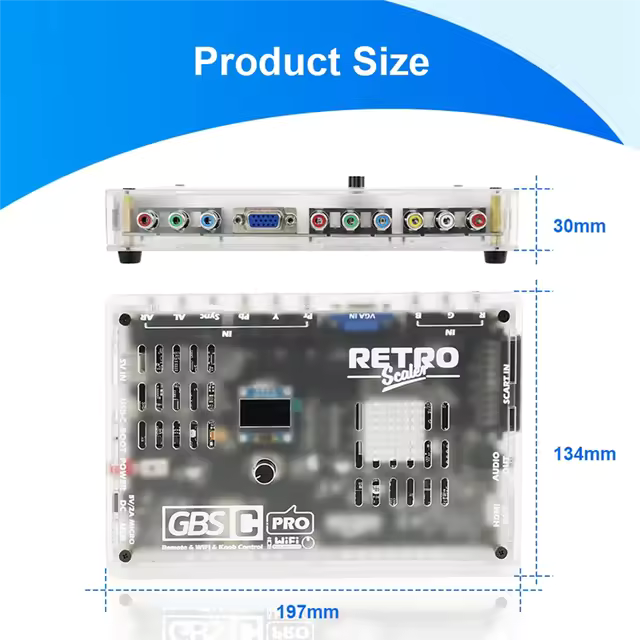
Dimensions: Approximately 116 × 79 × 41mm
Housing: Ventilated transparent enclosure

Supported Systems

Compatibility depends on the console model, region, selected video output and cable used.

Nintendo

Nintendo Entertainment System / NES: Composite video on compatible NTSC consoles. The manufacturer’s firmware compatibility list does not confirm PAL NES support.

Original Famicom: The original RF-only Famicom requires an AV-output modification before it can be connected.

AV Famicom: Composite video.

Super Nintendo / Super Famicom: Composite, S-Video or RGB SCART depending on the console model and region.

SNES Mini / Super Famicom Jr: Composite video. An RGB restoration modification is required for RGB SCART.

Nintendo 64: Composite video on PAL and NTSC consoles. S-Video is available from compatible console models and regions. RGB requires a console modification.

Nintendo GameCube DOL-001: Composite, regional S-Video or RGB SCART, plus component video through a compatible Digital AV solution.

Nintendo GameCube DOL-101: Composite, regional S-Video or PAL RGB SCART. Component video is not available without modification.

Nintendo Wii RVL-001: Connect using a YPbPr component cable. Composite video is not supported with this model.

Nintendo Wii Family Edition RVL-101: Connect using a YPbPr component cable. Composite video is not supported with this model.

Nintendo Wii Mini RVL-201: Not supported because the Wii Mini does not provide component video output.

Sega

Master System Model 1: Composite video or RGB SCART.

Master System Model 2: Compatibility depends on the console region and available AV output. RF-only models require modification.

Mega Drive / Genesis Model 1: Composite video or RGB SCART.

Mega Drive / Genesis Model 2: Composite video or RGB SCART.

Mega-CD / Sega CD: Video is supplied through the connected Mega Drive or Genesis console.

Sega 32X: Composite video or RGB SCART from the 32X AV output. Enable Compatibility Mode and restart the GBSC Pro.

Sega Saturn: Composite, S-Video or RGB SCART.

Sega Dreamcast: Composite, S-Video, RGB SCART or VGA. VGA operation may require Compatibility Mode followed by a restart.

Sony

PlayStation / PS1: Composite, S-Video or RGB SCART.

PS One: Composite, S-Video or RGB SCART.

PlayStation 2: Composite, S-Video, RGB SCART or YPbPr component. The console’s video-output setting must match the cable being used.

PlayStation 3: YPbPr component at a compatible output resolution such as 480p, 720p or 1080i.

PSP-2000 / PSP-3000: Composite or component television output using a compatible model-specific cable.

PSP Go: Composite or component output using a compatible television cable or cradle.

PSP-1000: Not supported because it does not provide television output.

PSP Street E1000: Not supported because it does not provide television output.

Microsoft

Original Xbox: Composite, S-Video, RGB SCART or YPbPr component.

Original Xbox PAL: Progressive and high-definition component modes generally require a compatible modified or NTSC-configured console.

Xbox 360 With Analogue AV Output: Component YPbPr or VGA at a compatible output resolution.

SNK

Neo Geo AES: Composite video or RGB SCART. Enable Compatibility Mode and restart the GBSC Pro.

Neo Geo CD / CDZ: Composite, S-Video or RGB SCART.

Neo Geo MVS: Compatible through a properly configured Supergun that provides safe consumer-level RGBS and audio.

NEC

PC Engine / CoreGrafx Family: Composite video on consoles or accessories that provide AV output. RGB requires a compatible modification or expansion accessory.

PC Engine Duo Family: Composite video. RGB requires modification.

TurboGrafx-16: Requires a compatible AV-output accessory or modification.

SuperGrafx: Composite through a compatible AV accessory or RGB through an appropriate modification or expansion device.

Other Consoles & Equipment

3DO Interactive Multiplayer: Composite or S-Video on compatible systems.

Philips CD-i: Composite, S-Video or RGB SCART depending on the player model.

Atari Jaguar: Composite, S-Video or RGB SCART.

Compatible Retro Computers: RGBS, RGBHV, component or VGA through an appropriate model-specific cable.

Compatible Arcade Boards: RGBS through a properly configured Supergun or attenuated video interface. Do not connect raw JAMMA video directly.

Not Supported

Atari 2600: Not supported by the manufacturer’s current compatibility guidance.

Atari 800: Not supported by the manufacturer’s current compatibility guidance.

Commodore 64: Not supported by the manufacturer’s current compatibility guidance.

Critical Info

This Is The GBSC Pro: This listing is for the RetroScaler GBSC Pro with composite, S-Video, RGB SCART, component, VGA and HDMI support. It is not the older GBS-Control model with analogue video outputs.

HDMI Video Output Only: Video is output through HDMI at up to 1920 × 1080. The unit also provides a separate 3.5mm stereo audio output but does not provide VGA, RGBS or component video output.

Available HDMI Resolutions: Selectable output modes include 1280 × 720, 1280 × 960, 1280 × 1024 and 1920 × 1080.

NTSC & PAL Matched Presets: The 1280 × 960 preset is designed for NTSC-format sources, while 1280 × 1024 is intended for PAL-format sources. With matched presets enabled, the GBSC Pro can select the appropriate output for the detected signal.

RGB SCART & Component Recommended: Composite and S-Video are supported, but RGB SCART and YPbPr component generally provide a cleaner source signal with stronger colour separation and greater image detail.

Scanlines Require A 240p Or 288p Source: The scanline option is intended for low-resolution progressive signals. It is not designed for 480i, 576i or higher-resolution sources.

Smoothing Has Limited Availability: The smoothing option is intended primarily for composite and S-Video sources operating in the 2x processing mode.

Composite & S-Video Processing Modes: The AV and S-Video module can operate in 1x or 2x modes. DoubleLine mode converts compatible interlaced composite or S-Video signals into progressive output.

Motion-Adaptive Deinterlacing: Motion-adaptive processing is recommended for 480i and 576i material because it reduces flicker while retaining more detail than basic bob deinterlacing. Some artefacts may still be visible around moving objects.

Bob Deinterlacing: Bob mode provides a faster alternative with very low processing delay but can create visible vertical movement around text, menus and fine horizontal details.

Seamless Resolution Switching: The GBSC Pro is designed to maintain its HDMI output when the source changes between modes such as 240p and 480i, reducing the long blank-screen interruptions experienced with some scalers and displays.

SCART Cable Wiring: Use correctly wired EuroSCART cables. Japanese JP21 cables use the same physical connector with a different pinout and must not be connected directly.

Premium RGB Cables Available: Browse our Premium On-Sync RGB SCART Cables for compatible Sega, Nintendo, Sony and other retro console connections.

Manual Input Selection: Inputs are selected through the on-screen display. Connecting several sources does not create an automatic input-switching system.

50Hz To 60Hz Conversion: An optional conversion mode is available for displays that cannot accept 50Hz video. Frame-rate conversion can introduce motion judder and should only be enabled when required.

External Power Required: The GBSC Pro requires a regulated 5V DC power supply capable of providing at least 4A. A compatible UK power supply is included.

Use The Correct Power Supply: Replacement supplies must provide 5V DC through a 2.1 × 5.5mm centre-positive connector. Incorrect voltage, polarity or insufficient current may cause unstable operation or permanent damage.

USB-C Ports Are For Firmware Updates: The two USB-C service connections are used to update the Wi-Fi controller and AV/S-Video module. They are not used to power the GBSC Pro.

Firmware Updates Are Optional: Only install firmware specifically intended for the RetroScaler GBSC Pro and follow the correct update procedure for the relevant module.

Remote Batteries Not Included: The infrared remote control requires two AAA batteries.

HDMI Cable Not Included: A standard HDMI cable is required to connect the GBSC Pro to a television, monitor, AV receiver or capture device.

Package Includes

1 × RetroScaler GBSC Pro Video Converter
1 × Infrared Remote Control
1 × UK 5V Power Supply
1 × Instruction Manual

Warranty Information

This RetroScaler GBSC Pro is covered by a 12-month limited Retrolize warranty against manufacturing defects and hardware faults arising during normal use.

The warranty does not cover accidental damage, liquid damage, damaged connectors, incorrect power supplies, reversed polarity, insufficient power delivery, unauthorised hardware modification or damage caused by unsuitable cables or connected equipment.

Failed or interrupted firmware updates, installation of firmware intended for a different model and damage caused during firmware servicing are not covered.

Differences caused by source video quality, composite or S-Video limitations, display compatibility, image settings, deinterlacing behaviour, frame-rate conversion or third-party cables are not considered hardware faults.

Warranty claims remain subject to the full Retrolize warranty terms.

View full details