
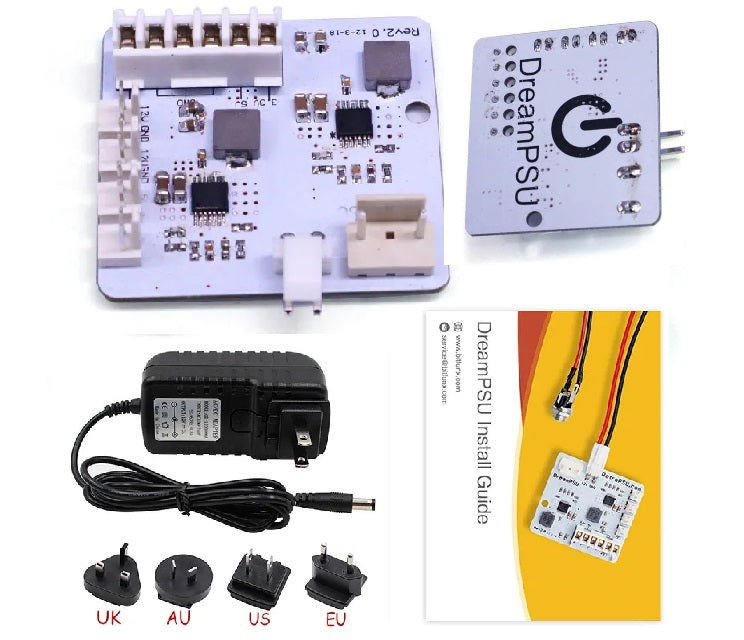
BitFunx DreamPSU Rev2.0 Sega Dreamcast Power Supply Replacement Kit
⚡ Replacement Internal Power Supply For Sega Dreamcast ⚡
🔌 Includes 12V 3A Adapter & UK, EU, US & AU Plugs 🌍
🔧 No Soldering Or Shell Cutting Required 🔧
🎮 Supports Original GD-ROM, GDEMU & USB-GDROM Setups 🎮
🔘 Retains The Original Dreamcast Power Button 🔘
🌡️ Moves AC-To-DC Power Conversion Outside The Console 🌡️
🧩 Compact Board Frees Internal Space For Modifications 🧩
🔗 Dedicated DC Barrel Connection Without USB-C Negotiation 🔗
🛡️ 12-Month Retrolize Warranty 🛡️
Couldn't load pickup availability
Description
Description
The BitFunx DreamPSU Rev2.0 Sega Dreamcast Power Supply Replacement Kit replaces the console’s original internal mains power supply with a compact board powered by an external adapter. It provides an alternative power arrangement for Dreamcast restoration, repair and modification projects while retaining the console’s original power button.
This package includes the DreamPSU Rev2.0 board, external 12V 3A adapter, UK/EU/US/AU plug heads and installation accessories. The supplied adapter provides the DC input required by the replacement board, so the user does not need to source a separate power brick to complete the standard installation. The board then supplies the console through its existing motherboard power connection.
The original Dreamcast PSU performs mains-to-low-voltage conversion inside the casing. With DreamPSU, the external adapter handles AC-to-DC conversion outside the console, changing where that part of the power system generates heat. The smaller internal board also leaves more room around the former PSU area. Actual operating temperatures still depend on the console, airflow, ambient conditions and any other installed hardware, so a particular temperature reduction is not guaranteed.
The dedicated DC barrel connection provides a straightforward power-only connection between the adapter and console. It operates at the required fixed voltage without USB Power Delivery negotiation or charger-profile selection. Its cylindrical plug and socket suit a permanent console setup, although the cable should still be routed to avoid pulling or sideways strain. The practical benefit is a supplied, matched power arrangement rather than a need to choose a suitable USB-C charger and cable.
DreamPSU retains the original Dreamcast power switch, allowing the console to be switched on and off using its familiar button after installation. The DC socket fits at the rear power-inlet opening using the supplied mounting arrangement. Standard installation requires no soldering or shell cutting, but the console must be opened and the original PSU removed carefully.
The kit supports Dreamcast systems retaining the original GD-ROM disc drive, making it suitable for restoration projects where the original disc-based setup is being preserved. It can also be used with compatible GDEMU and USB-GDROM installations. Power-supply compatibility does not override the hardware requirements of those devices, so the user must still choose an optical drive emulator appropriate for the console revision.
For imported consoles, replacing the original regional PSU allows the fitted external adapter to determine the mains input requirements. The included plug heads support several common socket formats, making the kit useful for an imported Dreamcast used in the UK or a console moved between supported mains regions. This changes the power arrangement only; it does not unlock games from other regions or alter PAL and NTSC video behaviour.
A replacement PSU can form part of a repair where the original supply has been diagnosed as faulty. It should not be treated as a guaranteed cure for every startup problem, reset or video fault, since worn connectors, drive problems and other board faults can produce similar symptoms. Careful inspection and testing remain important when working on an ageing console.
The cooling fan remains part of the Dreamcast’s normal cooling system after the conversion. For users also addressing fan noise, our Noctua NF-A4x10 5V Dreamcast Cooling Fan Mod Kit is a separate upgrade with its own revision and fan-housing requirements.
Supplied by Retrolize with a 12-month warranty, this DreamPSU kit is available with fast UK delivery and support from our UK team. Explore our Sega Dreamcast Parts & Mods collection for complementary repair components and console upgrades.
Specifications
Specifications
Brand: BitFunx
Product: DreamPSU Sega Dreamcast Power Supply Replacement Kit
Hardware Revision: Rev2.0
Product Type: Power Supplies
Compatible Console: Sega Dreamcast
Console Revisions: VA0, VA1 and VA2-series standard retail hardware
Console Regions: PAL, NTSC-U and NTSC-J
Power Arrangement: External AC/DC adapter with internal replacement PSU board
External Adapter AC Input: 110–240V AC, 50/60Hz
External Adapter DC Output: 12V DC, 3A
DreamPSU Board Input: 12V DC
External Power Connection: DC barrel plug and socket
Motherboard Connection: Existing Dreamcast power-pin connector
Power Control: Retains the original console power button
Drive Support: Original GD-ROM drive and compatible GDEMU or USB-GDROM installations
Installation: Internal replacement; no soldering or shell cutting required for standard fitment
Included Plug Heads: UK, EU, US and AU
Warranty: 12 months from delivery
SKU: DREAMPSU-KIT
Supported Systems
Supported Systems
Sega Dreamcast VA0: Standard retail consoles using the original Dreamcast motherboard power connection and PSU mounting arrangement. The Noctua fan kit’s metal-housing restriction does not determine compatibility with this power-supply kit.
Sega Dreamcast VA1: Standard retail consoles retaining the original GD-ROM drive or using a compatible optical drive emulator. Existing motherboard power pins and mounting points must be intact.
Sega Dreamcast VA2 / VA2.1: Standard retail consoles using the original Dreamcast power connection. PSU compatibility does not imply that GDEMU or another optical drive emulator supports this revision.
PAL / NTSC-U / NTSC-J: UK, European, North American and Japanese retail consoles are supported. The external adapter must be suitable for the mains supply where the console is being used.
Original GD-ROM Drive: Supported when the drive and console are otherwise functional.
GDEMU / USB-GDROM: Supported in console revisions compatible with the installed device, with suitable mounting and clearance.
Critical Info
Critical Info
Power Supply Kit Only: This listing includes the DreamPSU replacement board, external power adapter and installation accessories. A Sega Dreamcast console, optical drive emulator and other console modifications are not included.
Internal Installation Required: DreamPSU replaces the original internal power supply. The console must be opened, the original PSU removed and the supplied DC input socket fitted. It is not an external adapter that connects directly to an unmodified Dreamcast.
Compatible Consoles: Designed for standard retail Sega Dreamcast consoles across PAL, NTSC-U and NTSC-J regions, including VA0, VA1 and VA2-series hardware. Check the existing power connection and mounting points if the console has previously been modified or repaired.
Power Requirements: Use the supplied regulated 12V DC, 3A adapter. The internal DreamPSU board accepts low-voltage DC through the fitted barrel socket; it must never be connected directly to mains electricity.
Replacement Adapters: A replacement must match the required voltage, connector dimensions and polarity, with adequate current capacity. A barrel plug fitting into the socket does not confirm electrical compatibility. Contact Retrolize before substituting the supplied adapter if uncertain.
Mains Compatibility: The supplied adapter is listed for 110–240V AC, 50/60Hz. Use the appropriate plug head and check the adapter’s label against the local mains supply before connection. Change plug heads only while the adapter is unplugged.
Imported Consoles: Once the original PSU has been replaced, the external adapter determines mains compatibility. This does not change the console’s game-region restrictions, video output or software compatibility.
Original Drive And Optical Drive Emulators: Suitable for consoles retaining their original GD-ROM drive and compatible GDEMU or USB-GDROM installations. Each optical drive emulator retains its own console-revision requirements. Installing DreamPSU does not make an otherwise incompatible emulator compatible.
Installation Safety: Disconnect the console from mains power and all other cables before opening it. The original PSU can retain a dangerous charge after disconnection. Do not touch its exposed circuitry or capacitor terminals. Installation should be carried out by someone competent to work safely inside the console.
Cooling And Other Modifications: The original cooling fan remains necessary. Keep ventilation clear and check cable routing and clearance around other installed modifications. A compact replacement PSU does not guarantee compatibility with every combination of additional hardware.
Installation Overview
- Switch off the Dreamcast, remove any disc and disconnect the mains lead and all other cables.
- Remove the modem or network adapter as required to access the casing screws, then carefully remove the upper shell.
- Identify the original PSU, its mounting screws, the motherboard power pins and the original power-switch connection.
- Disconnect the switch lead, remove the PSU mounting screws and carefully lift the original board from the power pins. Avoid touching the PSU circuitry.
- Inspect the motherboard power pins for damage or corrosion. Resolve any connector damage before fitting the replacement.
- Fit the DreamPSU onto the motherboard power pins, checking alignment before pressing it into place. Secure it using the appropriate mounting point and supplied instructions.
- Fit the DC barrel socket and mounting plate at the rear power-inlet opening. Connect the input lead and reconnect the original power-switch lead to the correct board connections.
- Check that all connectors are seated, the board is secure and no wires are trapped or positioned against the fan or other moving parts.
- Refit the casing. Connect the supplied 12V adapter using the appropriate mains plug head, then switch on the console.
- Check startup, fan operation and the installed disc drive or optical drive emulator. If anything behaves abnormally, switch off and unplug the adapter before investigating.
Connection & Control Troubleshooting
No Power: Check the mains socket, adapter plug head and DC barrel connection. With all power disconnected, check that the DreamPSU is correctly seated on the motherboard pins and that the original power-switch lead is connected.
Intermittent Power Or Unexpected Resets: Stop using the console and check for a loose DC plug, poor board seating, damaged power pins or trapped wiring. Use the supplied adapter while troubleshooting. Repeated resets are not proof that the PSU is the only possible cause.
Console Powers On But Does Not Boot: Check connections disturbed during installation, including the fan and disc-drive or optical-drive-emulator connections. Confirm that any fitted emulator supports the console revision.
Picture Interference After Installation: Check the power and AV connections and keep the adapter and its cable away from the video cable where practical. Use the supplied adapter and contact Retrolize if interference persists rather than substituting an unverified power supply.
Original Disc Drive Does Not Work: With power disconnected, check that the drive assembly and its connections are correctly seated. The PSU replacement does not repair an existing laser or drive-mechanism fault.
Excessive Heat, Smell Or Abnormal Noise: Switch off and unplug the adapter immediately. Do not continue testing until the installation and hardware have been checked.
Package Includes
Package Includes
1 × DreamPSU Rev2.0 replacement power supply board
1 × External 12V 3A AC/DC adapter
4 × Interchangeable mains plug heads — UK, EU, US and AU
1 × DC input socket and connection lead
1 × Installation accessories set
1 × Instruction manual
1 × Retail box
Warranty Information
This BitFunx DreamPSU Rev2.0 Sega Dreamcast Power Supply Replacement Kit is covered by a 12-month Retrolize warranty against manufacturing defects and hardware faults arising during normal use from the date of delivery.
The warranty does not cover accidental damage, liquid damage, misuse, damaged connectors, forced insertion, unauthorised modification or damage caused by incorrect installation or an incompatible power adapter.
Faults in the console’s existing hardware or connected accessories are not considered product faults.
Warranty claims remain subject to the full Retrolize warranty terms and are additional to the user’s statutory rights.
Additional Information
Does This Kit Include The External Power Adapter?
Yes. The kit includes a 12V DC, 3A adapter and UK, EU, US and AU plug heads, alongside the DreamPSU board and installation components.
Do I Need To Solder Or Cut The Console Shell?
Standard installation does not require soldering or shell cutting. It does require opening the console, removing the original PSU, fitting the replacement board and installing the DC input socket.
Does The Original Power Button Still Work?
Yes. The original Dreamcast power-switch connection is retained during installation, allowing the console’s existing button to control power.
Can I Keep The Original GD-ROM Drive?
Yes. DreamPSU supports the original Dreamcast disc drive. Removing the drive or fitting an optical drive emulator is not required.
Do I Need DreamPSU To Use GDEMU?
Not necessarily. Installing GDEMU does not automatically mean that every console needs a replacement PSU. DreamPSU is an alternative power arrangement; the appropriate approach depends on the existing supply’s condition and the console’s configuration.
Will It Make A Japanese Or American Dreamcast Work On UK Mains?
Once correctly installed in place of the original PSU, the console is powered through the supplied external adapter. Its listed 110–240V AC input range covers UK mains, so a separate step-down transformer is not needed for that adapter when used with the UK plug head.
Never connect an unmodified imported console’s original regional PSU directly to unsuitable mains power.
Does Multi-Region Mean Region-Free Games?
No. Multi-region power support concerns the external adapter and plug options. The kit does not change game-region restrictions, video standards or the console’s BIOS.
Why Does This Kit Use A Barrel Connector Instead Of USB-C?
The barrel connection supplies fixed-voltage DC power from the included adapter. It does not require USB Power Delivery negotiation, a particular charger profile or selection of a compatible USB-C cable. Use the supplied adapter and avoid placing strain on the connector.
Can I Use Any 12V Power Adapter?
No. Voltage alone is not enough. The connector dimensions, polarity, current capacity and power-supply suitability must also match. Use the included adapter or contact Retrolize before choosing a replacement.
Will It Fix Random Resets Or Overheating?
It may address problems caused by a faulty original PSU, but these symptoms can have other causes. Damaged power connectors, cooling faults, disc-drive problems and other hardware issues require separate diagnosis.
Can I Use It With The Noctua Fan Upgrade?
Both upgrades can be used in a console that meets their individual installation requirements. The Noctua kit has additional restrictions relating to the original fan housing, so check its compatibility information separately.
Is International Delivery Available?
Yes, international delivery is available to supported destinations. Available services and charges are shown at checkout. Check that the supplied adapter’s input rating is suitable for the destination’s mains supply.
Share
