Retro-Bit SEGA Saturn Pro 2.4G Wireless Controller - White
🎮 Officially Licensed SEGA Saturn Pro Controller 🎮
📡 Low-Latency 2.4GHz Wireless With Up To 10m Range 📡
🎯 Dual Hall Effect Analogue Sticks & 3D Control Support 🎯
🕹️ Classic Six-Button Saturn Layout With Modern Controls 🕹️
🔌 SEGA Saturn & USB Wireless Receivers Included 🔌
🌍 Supports Saturn, Switch, Switch 2, PC, Mac, Android & PS3 🌍
📳 Dual Rumble On Compatible USB Systems 📳
🔋 500mAh Rechargeable Battery With USB-C Charging 🔋
🛠️ Plug & Play With No Console Modification Required 🛠️
🛡️ 12-Month Retrolize Warranty 🛡️
Couldn't load pickup availability
Description
Description
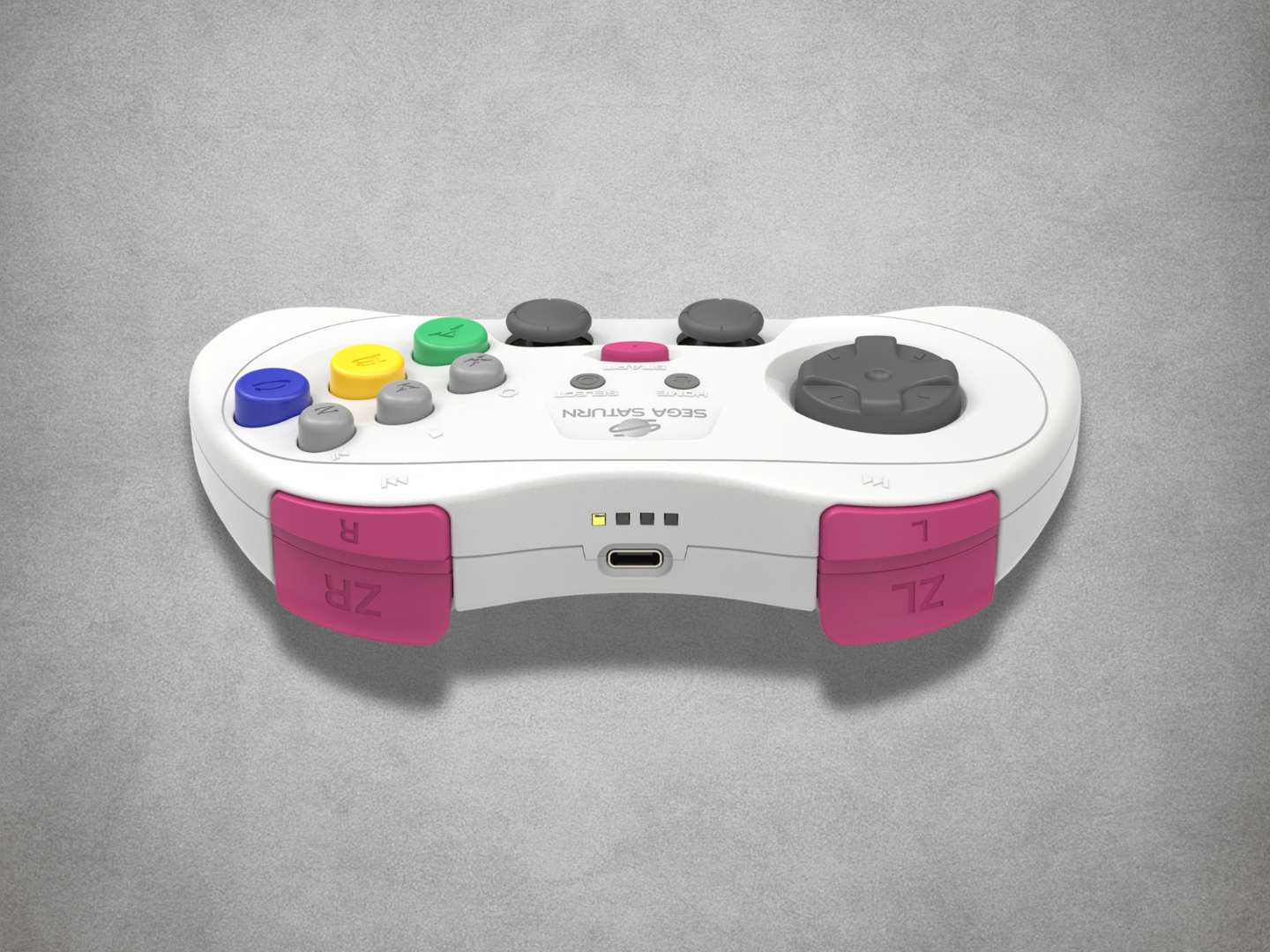
The Retro-Bit SEGA Saturn Pro 2.4G Wireless Controller provides cable-free control on an original SEGA Saturn using the included console receiver.
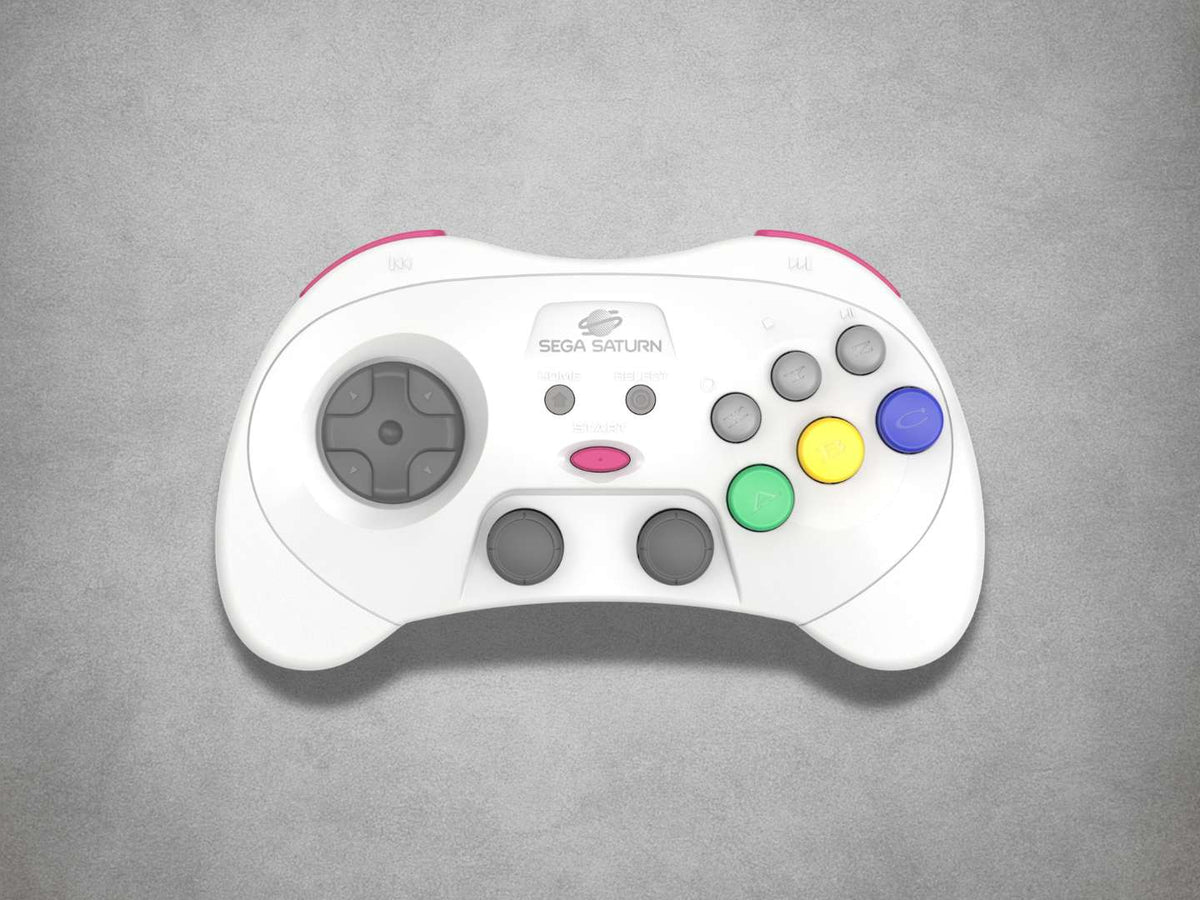
Its officially licensed design retains the distinctive circular directional pad and six-button layout of the classic SEGA Saturn controller while adding dual Hall Effect analogue sticks, four shoulder buttons and controls suited to compatible modern systems.
The controller includes A, B, C, X, Y and Z face buttons, Start, Select and Home controls, L, R, ZL and ZR shoulder buttons, clickable Hall Effect analogue sticks and dual analogue rumble motors.
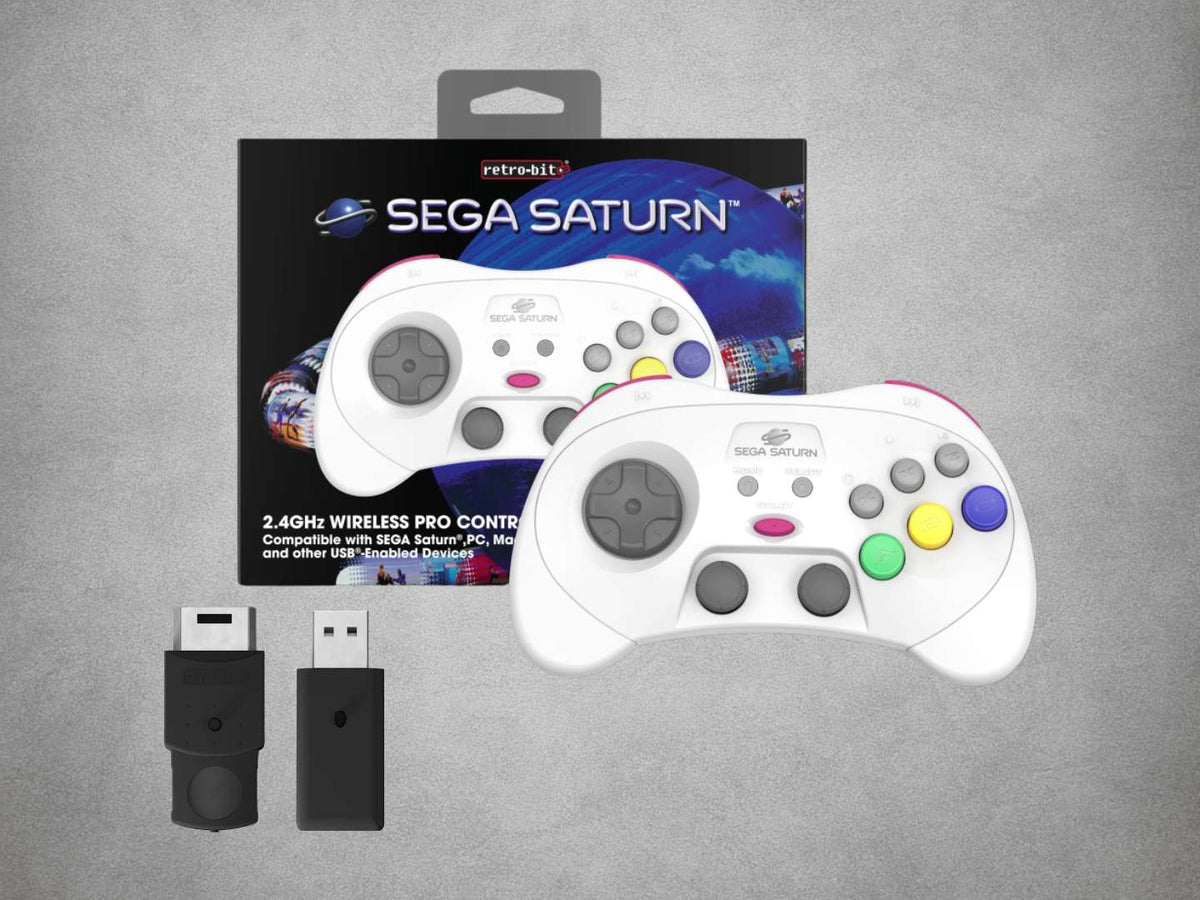
Both SEGA Saturn and USB wireless receivers are included. The Saturn receiver connects directly to an original console controller port, while the USB receiver supports Nintendo Switch, Nintendo Switch 2 with the required receiver firmware, Windows PC, Mac, PlayStation 3, compatible Android devices and SEGA Mega Drive Mini or Genesis Mini systems.
Standard digital mode supports conventional Saturn games. Holding Start and B enables compatible 3D Control mode, allowing the left Hall Effect stick to provide analogue movement in games designed for the original SEGA Saturn 3D Control Pad.
The right analogue stick and dual rumble motors are intended for compatible USB systems and software. Rumble is not available through the original Saturn controller port.
The dedicated 2.4GHz connection avoids Bluetooth pairing and provides a manufacturer-rated wireless range of up to approximately 10 metres. D-Input, X-Input and selectable Nintendo Switch control layouts help the controller adapt to compatible games, emulators and modern systems.
Its built-in 500mAh rechargeable lithium-ion battery charges through USB-C. Retro-Bit does not publish a confirmed battery-life or charging-time figure for the Saturn Pro model.
Official firmware is available separately for the controller, Saturn receiver and USB receiver. Available updates include optional wired controller operation and Nintendo Switch 2 support.
This listing is specifically for the White Saturn Pro controller supplied with V2 Saturn and USB receivers. V1 receivers and firmware are not compatible.
Finished in White, the controller is dispatched from UK stock with fast delivery, international tracked delivery to supported destinations and a 12-month Retrolize warranty.
Browse our complete range of wireless controllers for retro and modern systems.
Specifications
Specifications
Brand: Retro-Bit
Official Licence: SEGA
Product Name: SEGA Saturn 2.4GHz Wireless Pro Controller
Product Type: 2.4GHz Wireless SEGA Saturn Controller & Receivers
Model: SEGA Saturn Pro
Manufacturer Product Code: RB-SGA-028
Primary Platform: Original SEGA Saturn
Wireless Technology: Dedicated 2.4GHz RF Connection
Wireless Range: Up To Approximately 10m / 30ft
Receiver Generation: V2
SEGA Saturn Receiver: Included
SEGA Saturn Receiver Connection: Original SEGA Saturn Controller Port
USB Receiver: Included
USB Receiver Connection: USB-A
Controllers Per Receiver: 1
Bluetooth: Not Supported
Console Modification Required: No
USB Receiver Compatibility: Nintendo Switch, Nintendo Switch 2, Windows PC, Mac, PlayStation 3, Compatible Android Devices & SEGA Mega Drive / Genesis Mini
Nintendo Switch 2 Requirement: Official Saturn Pro USB Receiver Firmware 1.1 Or Later
Controller Layout: SEGA Saturn Six-Button Pro Layout
Directional Control: SEGA-Style Digital D-Pad
Face Buttons: A, B, C, X, Y & Z
Analogue Sticks: Dual Hall Effect Analogue Sticks With L3 & R3 Inputs
Shoulder Controls: L, R, ZL & ZR
Additional Controls: Start, Select & Home
Saturn Control Modes: Standard Digital & Compatible 3D Control Modes
Saturn Analogue Input: Left Hall Effect Stick In Compatible 3D Control Titles
Right Analogue Stick On Saturn: No Original Saturn Input Mapping
Built-In Rumble: Dual Analogue Motors
Rumble Through Saturn Receiver: Not Supported
Rumble Through USB Receiver: Supported With Compatible Systems, Games & Software
USB Input Modes: D-Input, X-Input, Nintendo Switch & PlayStation 3
Selectable Switch Controls: Standard D-Pad, Left Analogue, Right Analogue & Exchanged A/B And X/Y Layouts
Battery: Built-In Rechargeable Lithium-Ion Battery
Battery Capacity: 500mAh
Published Battery Life: Not Specified By Retro-Bit
Published Charging Time: Not Specified By Retro-Bit
Controller Charging Connection: USB-C
Included Cable: 1m USB-A To USB-C Charging Cable
Controller Firmware Connection: Data-Capable USB-C Cable Required
Receiver Firmware Connection: Micro-USB Data Cable Required
Receiver Firmware Cable Included: No
Firmware Updating: Official Saturn Pro Firmware Only
Optional Wired Mode: Supported With Official Controller Firmware 1.1
Optional Original Mega Drive / Genesis Compatibility: Requires A Separately Purchased Compatible Retro-Bit V2 Receiver
Colour: White
SKU: RB-SGA-028
Supported Systems
Supported Systems
Original SEGA Saturn Compatibility
PAL SEGA Saturn Consoles: Supported
NTSC-U SEGA Saturn Consoles: Supported
NTSC-J SEGA Saturn Consoles: Supported
Standard Digital Controller Mode: Supported
3D Control Pad Mode: Supported With Compatible Saturn Games
Left Hall Effect Stick Analogue Input: Supported In Compatible 3D Control Titles
Right Analogue Stick: No Original Saturn Input Mapping
Rumble On Original Saturn Hardware: Not Supported
Included USB Receiver Compatibility
Nintendo Switch: Supported
Nintendo Switch 2: Supported With Official Saturn Pro USB Receiver Firmware 1.1 Or Later
Windows PC: Supported
Mac: Supported
PlayStation 3: Supported
Compatible Android Devices: Supported With Suitable USB Or USB OTG Connectivity
SEGA Mega Drive Mini I & II: Supported
SEGA Genesis Mini I & II: Supported
Other USB Devices: Compatibility Varies By Hardware, Operating System & Software
Controller Functions & Modes
Dedicated 2.4GHz Wireless Connection: Supported
Standard Saturn Digital Mode: Supported
Compatible Saturn 3D Control Mode: Supported
Dual Hall Effect Analogue Sticks: Supported
Dual Analogue Rumble: Supported Through Compatible USB Systems & Software
D-Input: Supported Through The USB Receiver
X-Input: Supported Through The USB Receiver
Nintendo Switch Input Mode: Supported
Standard D-Pad Mode: Supported
D-Pad As Left Analogue Stick: Supported
D-Pad As Right Analogue Stick: Supported
Selectable A/B & X/Y Assignments: Supported
Optional Wired Controller Mode: Supported With Official Controller Firmware 1.1
Optional Receiver Compatibility
Compatible Retro-Bit V2 Mega Drive / Genesis Receiver: Supported & Sold Separately
Original PAL SEGA Mega Drive Consoles: Supported With A Compatible V2 Receiver
Original NTSC-U SEGA Genesis Consoles: Supported With A Compatible V2 Receiver
Original NTSC-J SEGA Mega Drive Consoles: Supported With A Compatible V2 Receiver
Three-Button Mega Drive / Genesis Mode: Supported
Six-Button Mega Drive / Genesis Mode: Supported
Retro-Bit V1 Receivers: Not Supported
Connection Requirements
Controllers Per Receiver: One
Receivers Required For Multiplayer: One Matching Receiver For Each Controller
SEGA Saturn Connection: Included V2 Saturn Receiver
Modern-System Connection: Included V2 USB-A Receiver
Controller Charging Connection: USB-C
Controller Firmware & Wired Connection: Data-Capable USB-C Cable Required
Receiver Firmware Connection: Separate Micro-USB Data Cable Required
Bluetooth Connection: Not Supported
BlueRetro Adapters: Not Supported
Console Modification: Not Required
External Saturn Receiver Power Supply: Not Required
Hot Plugging: Not Supported
Critical Info
Critical Info
Dedicated 2.4GHz Controller: This is not a Bluetooth controller. It connects through the included SEGA Saturn and USB wireless receivers and cannot connect directly to Bluetooth devices or BlueRetro adapters.
One Controller Per Receiver: Each receiver supports one Saturn Pro controller. Additional wireless players require their own controllers and receivers.
V2 Receivers Required: This controller uses Retro-Bit V2 receivers. V1 and V2 receivers are not interchangeable.
Standard & 3D Control Modes: Standard digital mode is intended for conventional Saturn games. Analogue 3D Control mode works only with games that support the original SEGA Saturn 3D Control Pad.
Saturn Analogue Mapping: The left Hall Effect stick provides the analogue input used by compatible Saturn 3D Control titles. The right analogue stick does not have an equivalent input on the original Saturn controller interface.
Rumble On Saturn Not Supported: The controller’s dual rumble motors operate through the USB receiver with compatible systems, games and software. Rumble is not transmitted through the original SEGA Saturn controller port.
Nintendo Switch 2 Support: Nintendo Switch 2 compatibility requires official Saturn Pro USB Receiver Firmware 1.1 or later.
Optional Wired Mode: Official Saturn Pro Controller Firmware 1.1 adds wired USB controller operation. Compatibility can vary between connected systems and software.
Separate Firmware Files: The controller, Saturn receiver and USB receiver use different firmware. Only install the official firmware intended for the exact component being updated.
V1 & V2 Firmware Must Not Be Interchanged: Installing firmware intended for a different receiver generation or product may render the controller or receiver inoperable.
Firmware Data Cables: The supplied USB-C cable is described as a charging cable. Controller firmware updates and optional wired operation require a data-capable USB-C cable. Receiver firmware updates require a separate Micro-USB data cable.
Nintendo Switch Setup: Pro Controller Wired Communication may need to be enabled within the Nintendo Switch system settings before the USB receiver is recognised.
Optional Mega Drive / Genesis Receiver Not Included: Original Mega Drive and Genesis compatibility requires a separately purchased compatible Retro-Bit V2 receiver.
Hot Plugging: Always switch an original SEGA Saturn off before inserting, removing or changing the Saturn receiver.
Console Or Device Not Included: The controller, receivers and listed accessories are supplied. Any console, computer or mobile device shown in the product images is for demonstration only.
First-Time SEGA Saturn Connection
- Switch the SEGA Saturn off.
- Connect the included Saturn receiver to an available controller port.
- Switch the console on. The receiver indicator should begin flashing.
- Press Start on the Saturn Pro controller to switch it on.
- Press and hold the Sync button on the receiver.
- Release the Sync button once the controller and receiver indicators remain steadily illuminated.
- Confirm that the controller is in standard digital mode unless the selected game supports the original 3D Control Pad.
- Test the directional pad and buttons before starting the game.
- Always switch the console off before removing or changing the receiver.
Using Standard & 3D Control Modes
Standard Digital Mode: The controller indicator is red. Use this mode for conventional SEGA Saturn games.
3D Control Mode: Hold Start and B until the controller indicator changes to blue. The left Hall Effect stick then provides analogue input in compatible 3D Control Pad games.
Hold Start and B again to return to standard digital mode.
Only certain Saturn games support 3D Control Pad input. The right analogue stick is not mapped as a separate analogue control through the original Saturn receiver.
First-Time USB Receiver Connection
- Connect the included USB receiver to a supported console, computer or compatible USB device.
- When using Nintendo Switch, open System Settings > Controllers And Sensors and enable Pro Controller Wired Communication.
- Switch the connected system on. The USB receiver indicator should begin flashing.
- Press Start on the controller to switch it on.
- Press and hold the Sync button on the receiver.
- Release the Sync button once the controller and receiver indicators remain steadily illuminated.
- Select the required input mode where applicable.
- Configure the controls within the connected system, game, emulator or software where necessary.
USB Input & Layout Modes
Switch Between D-Input & X-Input On PC Or Android: Hold Start and B until the controller indicator changes colour.
D-Input Mode: Indicated by a red controller light.
X-Input Mode: Indicated by a blue controller light.
Set D-Pad To Left Analogue Mode On Switch: Hold Left and Start for approximately three seconds.
Set D-Pad To Right Analogue Mode On Switch: Hold Right and Start for approximately three seconds.
Restore Standard D-Pad Mode On Switch: Hold Up and Start for approximately three seconds.
Exchange A/B & X/Y Assignments On Switch: Hold Down and Start for approximately three seconds. Repeat the command to restore the previous assignments.
Charging
Connect the supplied USB-C charging cable between the controller and a suitable powered USB source.
The charging indicator remains illuminated when the controller is fully charged.
Retro-Bit specifies a built-in 500mAh rechargeable lithium-ion battery but does not publish a confirmed play-time or charging-time figure for the Saturn Pro model.
Clearing Stored Pairings
Hold Start, Select and R together for approximately four seconds to clear the controller’s stored receiver pairings.
Clearing stored pairings can also help prevent unnecessary battery drain when the controller is being stored without its paired receiver.
Factory Reset
If the controller stops responding, carefully insert a thin, firm object into the recessed reset opening on the rear of the controller.
Firmware Updating
Official firmware is available through Retro-Bit Support.
Confirm whether the file is intended for the Saturn Pro controller, Saturn receiver or USB receiver before installing it. These components use separate firmware files.
The controller requires a data-capable USB-C cable for firmware updates. The Saturn and USB receivers require a separate Micro-USB data cable.
Nintendo Switch 2 support requires official USB Receiver Firmware 1.1 or later. Optional wired controller operation requires official Controller Firmware 1.1 or later.
Maintain a stable connection throughout the update and do not disconnect the controller or receiver until the process has finished.
Package Includes
Package Includes
1 × Retro-Bit SEGA Saturn Pro 2.4G Wireless Controller In White
1 × V2 SEGA Saturn 2.4GHz Wireless Receiver
1 × V2 USB-A 2.4GHz Wireless Receiver
1 × 1m USB-A To USB-C Charging Cable
1 × Instruction Manual
1 × Retail Box
Warranty Information
This Retro-Bit SEGA Saturn Pro 2.4G Wireless Controller is covered by a 12-month Retrolize warranty against manufacturing defects and hardware faults arising during normal use from the date of delivery.
The warranty does not cover accidental damage, liquid damage, misuse, damaged charging or receiver connections, damaged analogue sticks or buttons, unauthorised modification, unsuitable charging equipment, normal cosmetic wear or the expected reduction in rechargeable battery capacity through normal use and ageing.
Damage, loss of function or bricking caused by installing incorrect, incompatible or unofficial firmware, using V1 firmware with V2 hardware, applying firmware to the wrong component, interrupting an update or carrying out an update incorrectly is not covered by the warranty.
Damage caused by connecting a powered firmware cable to a receiver while it remains connected to the console, or by using an incompatible receiver, cable, charger or power source, is not covered.
Compatibility differences involving unsupported consoles, third-party receivers, USB equipment, emulator configuration, individual software or unlisted operating systems are not considered product faults.
Warranty claims remain subject to the full Retrolize warranty terms and are additional to the customer’s statutory rights.
Additional Information
Does It Work With An Original SEGA Saturn?
Yes. Original PAL, NTSC-U and NTSC-J SEGA Saturn consoles are supported using the included Saturn receiver.
Does The Saturn Pro Use Bluetooth?
No. It uses a dedicated 2.4GHz wireless connection with the included Saturn and USB receivers.
Which Receivers Are Included?
The package includes one V2 receiver for original SEGA Saturn controller ports and one V2 USB-A receiver for compatible modern systems and USB devices.
Does It Support Saturn 3D Control Pad Games?
Yes. Hold Start and B to enable 3D Control mode. The left Hall Effect stick provides the compatible analogue input used by supported Saturn games.
Do Both Analogue Sticks Work On An Original Saturn?
No. The left stick provides the supported 3D Control Pad analogue input. The right stick does not have an equivalent input on the original Saturn controller interface.
Does Rumble Work On An Original Saturn?
No. The controller’s dual rumble motors work through the USB receiver with compatible systems, games and software. Rumble is not transmitted through the original Saturn controller port.
Does It Work With Nintendo Switch?
Yes. Connect the included USB receiver and enable Pro Controller Wired Communication within the Nintendo Switch system settings.
Does It Work With Nintendo Switch 2?
Yes, after installing official Saturn Pro USB Receiver Firmware 1.1 or later.
Can It Be Used With PC, Mac, PS3 Or Android?
Yes. These systems are supported through the included USB receiver. Button mapping or software configuration may be required on some devices, games and emulators.
Does It Support D-Input & X-Input?
Yes. When using a compatible PC or Android device, hold Start and B to change between D-Input and X-Input.
Can The Nintendo Switch Button Layout Be Changed?
Yes. The directional pad can operate as a standard D-pad or emulate the left or right analogue stick. The A/B and X/Y assignments can also be exchanged.
Can It Be Used As A Wired Controller?
Optional wired controller operation is available after installing official Saturn Pro Controller Firmware 1.1. A data-capable USB-C cable is required, and compatibility can vary between connected systems and software.
Does It Work With An Original Mega Drive Or Genesis?
Yes, but a separately purchased compatible Retro-Bit V2 Mega Drive or Genesis receiver is required. This optional receiver is not included.
How Long Does The Battery Last?
Retro-Bit confirms that the controller contains a 500mAh rechargeable battery but does not publish a confirmed battery-life figure for the Saturn Pro model.
What Is The Wireless Range?
The dedicated 2.4GHz connection provides a manufacturer-rated range of up to approximately 10 metres or 30 feet.
Can Multiple Wireless Controllers Be Used?
Yes. Each player requires one Saturn Pro controller, one matching Saturn receiver and one available console controller port.
Is International Delivery Available?
Yes. International tracked delivery is available to supported destinations, with delivery options calculated at checkout.
Share