Skip to product information
1 of 3

BitFunx 1080p HDMI Adapter & Upscaler For Sega Saturn

BitFunx 1080p HDMI Adapter & Upscaler For Sega Saturn

📺 Connect Sega Saturn To Modern HDMI Displays 📺

🖥️ 1080p HDMI Output For Compatible TVs & Monitors 🖥️

🎨 Converts The Saturn’s S-Video Signal To HDMI 🎨

↔️ Switchable 4:3 & 16:9 Aspect Ratios ↔️

🌍 Supports PAL, NTSC-U & NTSC-J Saturn Consoles 🌍

🧩 Compatible With Sega Saturn Model 1 & Model 2 🧩

🔊 Video & Stereo Audio Through One HDMI Connection 🔊

🔌 5V Micro-USB Power With Power Cable Included 🔌

🛠️ Plug And Play With No Console Modification Required 🛠️

🛡️ 12-Month Limited Retrolize Warranty 🛡️

Regular price ÂŁ26.99
Regular price Sale price ÂŁ26.99
Sale Sold out
UK VAT included
UK Stock
12-Month Warranty
Tracked UK Delivery
Real UK Customer Support

Description

Connect your original Sega Saturn to a modern HDMI television with the BitFunx 1080p HDMI Adapter & Upscaler. It connects to the console’s rear AV output and converts its analogue picture and stereo audio into an HDMI signal for a compatible television, monitor or projector, providing a practical way to keep using original Saturn hardware when your display lacks a suitable legacy connection.

This version processes the Saturn’s S-Video output. S-Video carries brightness and colour information separately, and the adapter converts that analogue signal into digital HDMI alongside the console’s audio. The console connection is built into the adapter, so you do not need a separate Saturn S-Video cable or an RGB SCART cable for this setup.

The adapter offers wide compatibility with original Sega Saturn Model 1 and Model 2 consoles, including PAL, North American NTSC-U and Japanese NTSC-J versions. This makes it suitable for connecting supported regional Saturn hardware to a compatible HDMI display without opening or modifying the console. The console’s existing game-region restrictions remain unchanged.

Its built-in upscaler produces a 1080p HDMI output from the incoming console picture. This provides a modern display connection while preserving the games running on your original hardware. Upscaling changes how the picture is presented to the display; it does not redraw sprites, improve textures or turn the Saturn’s original graphics into native Full HD artwork.

A physical aspect-ratio switch lets you choose between 4:3 and 16:9. For most Saturn games, 4:3 retains the familiar proportions of the original picture, keeping characters, vehicles and scenery from being stretched across a widescreen display. Select 16:9 if you prefer a wider presentation, with the understanding that this setting stretches the existing picture rather than generating additional game content.

Stereo audio is carried through HDMI alongside the video, allowing your connected television or compatible audio equipment to receive both through the same connection. There is no need to run separate audio leads to the television for normal use.

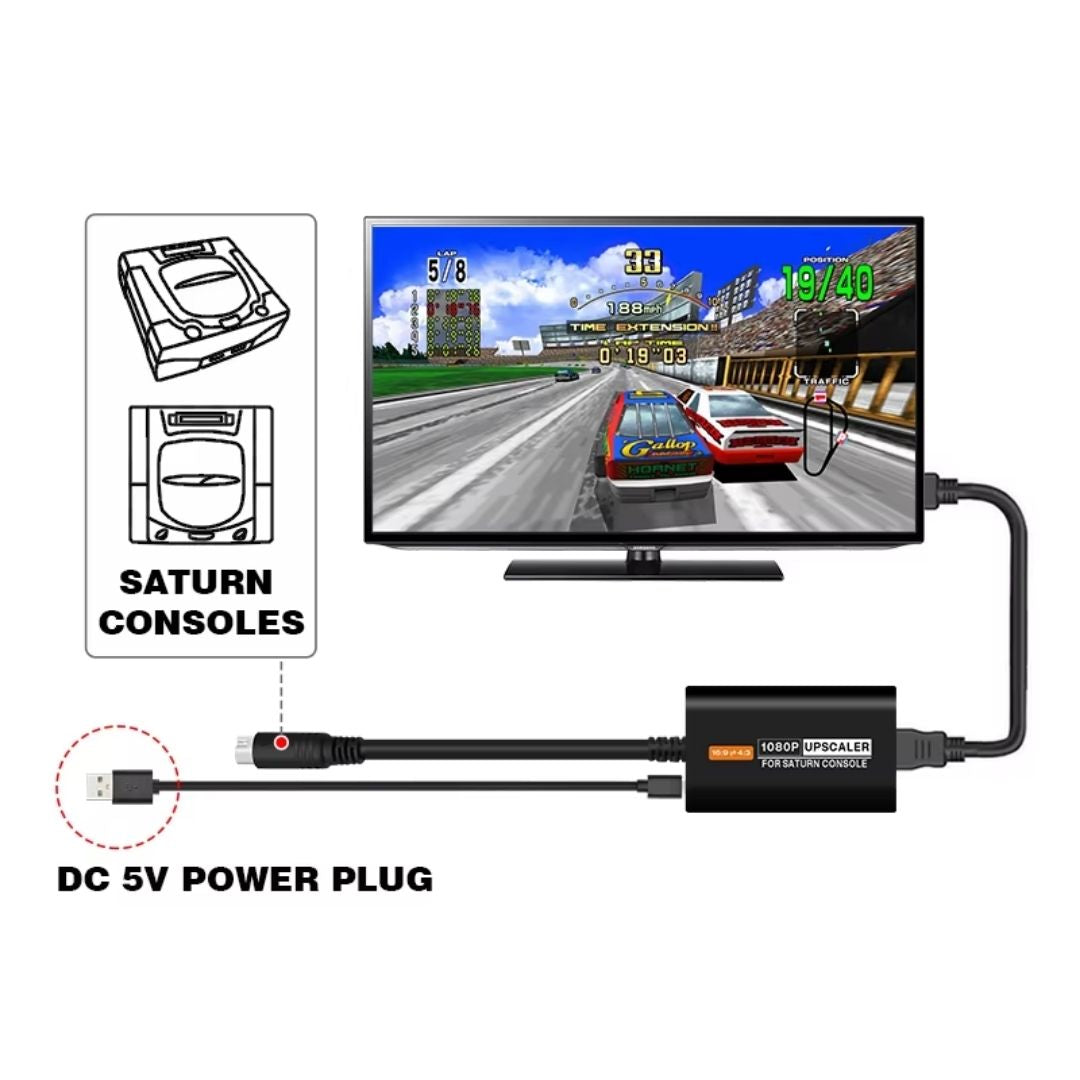
The compact external design keeps installation straightforward. Connect the console lead, attach HDMI and supply 5V power through Micro-USB. The included USB power cable provides the power connection, while a suitable USB power source is required separately. The main display setting is selected using the adapter’s aspect-ratio switch.

This is a fixed-output, console-specific adapter for customers who want a straightforward Saturn-to-HDMI connection. Final picture presentation depends on the console, game, adapter and connected display. Enable your television’s Game Mode where available to reduce additional processing performed by the television.

Plug and play with no console modification required. Supplied with a 12-month limited Retrolize warranty and expert support, with fast UK delivery and delivery to supported international destinations.

Explore our retro gaming upscalers and HDMI adapters for more console-specific connections and multi-system video processors.

Specifications

Brand: BitFunx
Product Name: BitFunx 1080p HDMI Adapter & Upscaler For Sega Saturn
Product Type: HDMI Adapter & Video Upscaler
Console Connection: Sega Saturn AV Output
Video Input: Analogue S-Video From The Console AV Port
Video Output: 1080p HDMI
Audio: Stereo Audio Carried Through HDMI
Aspect Ratio Settings: 4:3 & 16:9
Console Compatibility: Original Sega Saturn Model 1 & Model 2
Regional Compatibility: PAL, NTSC-U & NTSC-J
Power Connection: Micro-USB
Power Requirement: DC 5V
USB Power Cable: Included
Colour: Black
Console Modification Required: No
SKU: BF-HDMI-SAT-1080P

Supported Systems

Compatible Consoles

Sega Saturn Model 1: Supported
Sega Saturn Model 2: Supported
European / UK PAL Sega Saturn: Supported
North American NTSC-U Sega Saturn: Supported
Japanese NTSC-J Sega Saturn: Supported

Connection Requirements

Console: Original Sega Saturn With A Working AV Output
Display: HDMI Input Accepting The Adapter’s 1080p Output
Power: Separate DC 5V USB Power Source
HDMI Cable: Required For Connection To The Display; Not Listed As Included
Other Sega Consoles: Compatibility not established for this model

Critical Info

Sega Saturn Only: This model is designed for original Sega Saturn consoles. Compatibility with other Sega consoles is not established for this adapter.

S-Video Conversion: This adapter processes the Saturn’s S-Video signal from its AV output. It is not an RGB-to-HDMI adapter.

USB Power Required: Supply 5V power through the Micro-USB connection using the included power cable. A USB mains power adapter is not included.

HDMI Cable: A separate HDMI cable is not listed in the supplied package contents. Have a suitable HDMI cable available for connection to your display.

Display Compatibility: Your television or monitor must accept the adapter’s 1080p HDMI output. Compatibility with HDMI switches, AV receivers and capture equipment depends on the connected equipment.

Aspect Ratio: Choose 4:3 for the original proportions of most Saturn games. The 16:9 setting stretches the picture and does not add widescreen support to the game.

Upscaling: The adapter scales the original console picture for HDMI output. It does not increase the game’s internal rendering resolution or add new graphical detail.

Console Region: PAL and NTSC console support concerns video compatibility. The adapter does not change the Saturn’s game-region restrictions.

Initial Setup

  1. Switch off the Sega Saturn before connecting the adapter.
  2. Connect the adapter’s console lead to the Saturn’s rear AV output.
  3. Connect the adapter’s HDMI output to your television or monitor using a suitable HDMI cable.
  4. Connect the included Micro-USB power cable to the adapter and a suitable 5V USB power source.
  5. Select 4:3 or 16:9 using the aspect-ratio switch.
  6. Switch on the console and select the correct HDMI input on your display.
  7. Check the picture and audio. Enable your display’s Game Mode where available.

Aspect-Ratio Switch

4:3: Displays the picture in the original proportions of most Saturn games
16:9: Stretches the picture to widescreen proportions

Package Includes

1 Ă— BitFunx 1080p HDMI Adapter & Upscaler For Sega Saturn
1 Ă— Micro-USB Power Cable

Warranty Information

This BitFunx 1080p HDMI Adapter & Upscaler For Sega Saturn is covered by a 12-month limited Retrolize warranty against manufacturing defects and hardware faults arising during normal use.

The warranty does not cover accidental damage, liquid damage, misuse, damaged connectors, excessive strain placed on the adapter, unauthorised modification or faults caused by an incompatible console, HDMI cable or display.

Display compatibility, television scaling, aspect-ratio behaviour and differences between supported video modes are not considered product faults. Warranty claims remain subject to the full Retrolize warranty terms.

Additional Information

How Do I Connect A Sega Saturn To A Modern HDMI TV?

Connect the adapter to the Saturn’s rear AV output, connect its HDMI output to your television and supply 5V power through the included Micro-USB cable. Select the correct HDMI input on your television and choose your preferred aspect ratio.

Does It Work With Model 1 And Model 2 Saturn Consoles?

Yes. The linked product supports original Sega Saturn Model 1 and Model 2 consoles.

Can I Use It With A Japanese Or North American Saturn?

Yes. PAL, NTSC-U and NTSC-J Saturn consoles are supported. The adapter provides video conversion; it does not change which region of game discs your console can run.

Does This Adapter Use RGB?

No. This version processes S-Video from the Saturn’s AV output. Other Saturn HDMI adapters may use RGB or offer different processing features, so their specifications should not be applied to this model.

Do I Need A Separate S-Video Or SCART Cable?

No. The adapter’s console lead connects directly to the Saturn’s AV output. A suitable HDMI connection and separate USB power source are required.

Does It Carry Stereo Sound Through HDMI?

Yes. The Saturn’s stereo audio is carried alongside the picture through HDMI.

Should I Use 4:3 Or 16:9?

For most Saturn games, select 4:3 to retain the original picture proportions. The 16:9 setting stretches the picture across a widescreen display.

Will My Games Become Native 1080p?

No. The adapter scales the original picture into a 1080p HDMI output. The game’s internal resolution, textures and graphical detail remain unchanged.

Is This The BitFunx 2x Line Doubler?

No. This listing is for the S-Video-based 1080p HDMI adapter. Features, output modes and firmware instructions belonging to the separate BitFunx 2x line doubler do not apply to this model.

What Is Included For Power And HDMI?

The package includes a Micro-USB power cable. A suitable 5V USB power source is required separately. A separate HDMI cable is not listed in this package.

Is International Delivery Available?

Delivery to supported international destinations is available. Available services and applicable checkout charges are shown before you complete your order.

View full details