Skip to product information
1 of 3

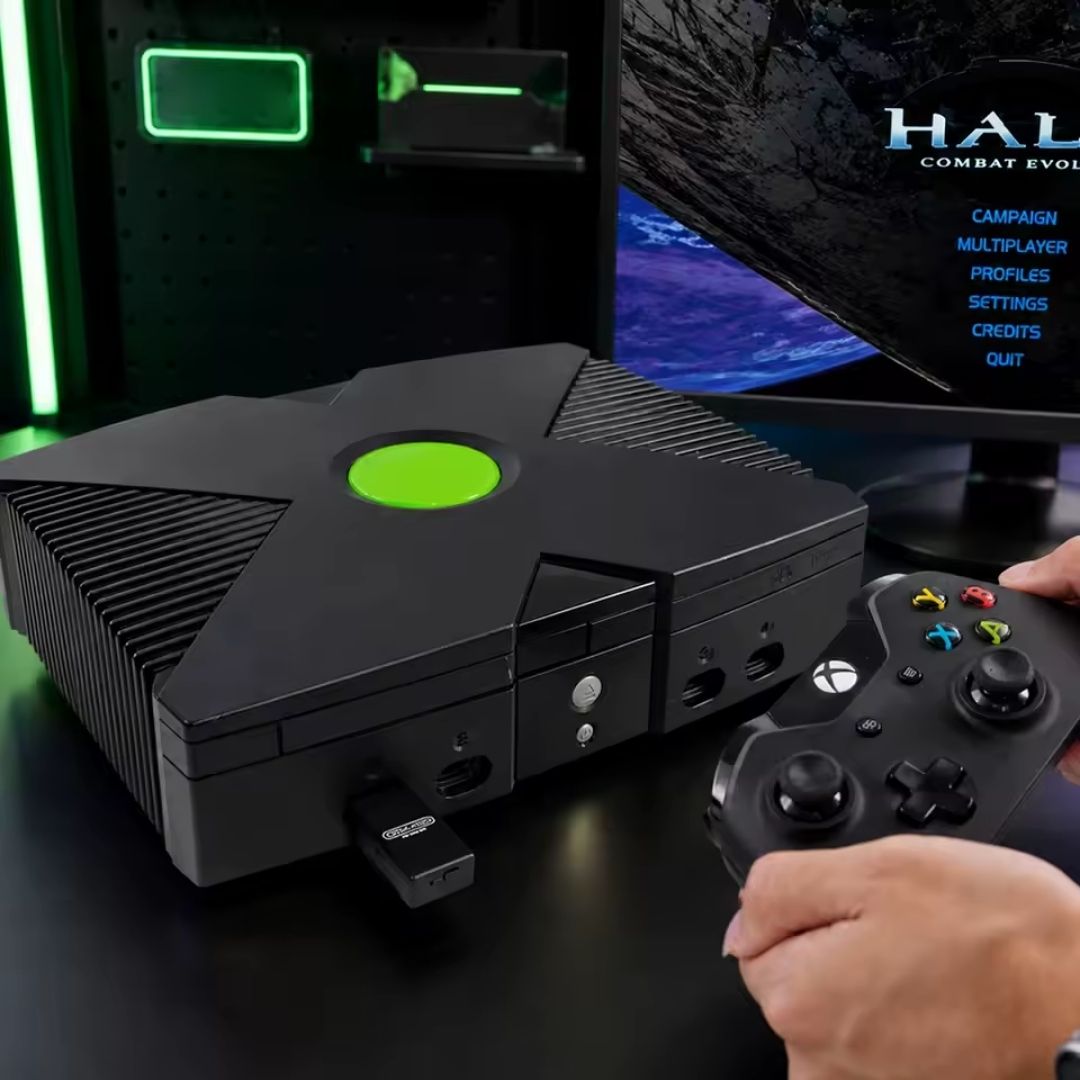
OGX Mini Original Xbox Wireless Bluetooth Controller Adapter

OGX Mini Original Xbox Wireless Bluetooth Controller Adapter

🕹️ Wireless Bluetooth Control For Original Xbox Consoles 🕹️

🎮 Supports Bluetooth Xbox, PS4, PS5, Switch Pro & Selected 8BitDo Controllers 🎮

⚡ Low Latency Wireless Gameplay ⚡

⚙️ Remappable Buttons Via OGX Mini Web Config ⚙️

🎚️ Adjustable Analogue Stick Deadzones & Response 🎚️

🎯 Configurable Turbo & Autofire Settings 🎯

🔄 Automatic Reconnection With Previously Paired Controllers 🔄

🧩 Original Xbox V1.0–V1.4, V1.6 & V1.6b Compatibility 🧩

🔌 Plug And Play With No Console Modification Or External Power 🔌

🛡️ 12-Month Retrolize Warranty 🛡️

Regular price ÂŁ32.99
Regular price Sale price ÂŁ32.99
Sale Sold out
UK VAT included
UK Stock
12-Month Warranty
Tracked UK Delivery
Real UK Customer Support

Description

The SOFUNRETRO OGX Mini is an original Xbox Bluetooth controller adapter for selected modern wireless controllers. It plugs directly into the console’s controller port, letting you enjoy your original Xbox games with a compatible Xbox Series, PlayStation or Nintendo controller without modifying the console.

Built around the open-source OGX-Mini and BlueRetro projects, the adapter receives Bluetooth controller inputs and translates them into commands the original Xbox understands. Its integrated wireless receiver keeps the connection compact, with no separate Bluetooth USB dongle or external power supply needed for normal gameplay.

It offers wide compatibility with Bluetooth-enabled Xbox One controllers, Xbox Series X|S controllers, Xbox Elite Series 2, Sony DualShock 3, DualShock 4 and DualSense controllers, Nintendo Switch Pro and Wii U Pro controllers, and selected 8BitDo and Retro-Bit Bluetooth models. Controller revision, firmware and operating mode can affect compatibility; PS3 controllers need additional first-time pairing setup.

The browser-based OGX-MINI-1P Web Config lets you remap buttons and adjust analogue settings to suit your controller and preferred layout. Deadzone, response scaling and turbo settings are available through the configuration interface, giving you more control over how the pad behaves in your games.

Designed for low latency wireless play, the OGX Mini provides a practical way to keep using original Xbox hardware with a comfortable modern controller. Wireless response varies with the controller, firmware and local Bluetooth conditions.

The adapter supports original Xbox hardware revisions V1.0, V1.1, V1.2, V1.3, V1.4, V1.6 and V1.6b. Available in Black, with a 12-month Retrolize warranty included.

Browse our Bluetooth controller adapters for retro consoles, or explore our wireless controllers. Choose a supported Bluetooth model for use with this adapter.

Specifications

Brand: SOFUNRETRO
Product Name: OGX Mini Original Xbox Wireless Bluetooth Controller Adapter
Model: OGX-MINI
Product Type: Bluetooth Controller Adapter & Wireless Receiver
Platform: OGX-Mini & BlueRetro Open-Source Projects
Console Connection: Original Xbox Controller Port
Receiver Power: Console Controller Port
Wireless Technology: Bluetooth
Wireless Receiver: Integrated
Players Per Adapter: One
Console Compatibility: Original Xbox V1.0, V1.1, V1.2, V1.3, V1.4, V1.6 & V1.6b
Button Mapping: Configurable
Analogue Settings: Configurable Deadzones & Response Scaling
Turbo & Autofire: Configurable Through Web Config
Configuration Tool: SOFUNRETRO OGX-MINI-1P Web Config
Configuration Connection: Bluetooth Via A Compatible Web Browser
Firmware Updating: Supported With Hardware-Compatible Firmware
Console Modification Required: No
Separate Bluetooth Receiver Required: No
External Power Required For Gameplay: No
Colour Options: Black
SKU – Black: OGX-XBOX-BLK

Supported Systems

Compatible Consoles

Original Microsoft Xbox: Supported
Supported Hardware Revisions: V1.0, V1.1, V1.2, V1.3, V1.4, V1.6 & V1.6b
Xbox 360, Xbox One & Xbox Series Consoles: Not supported by this original Xbox adapter

Compatible Bluetooth Controllers

Xbox One S / Bluetooth-Enabled Xbox One Controllers: Supported
Xbox Series X|S Controllers: Supported
Xbox Elite Wireless Controller Series 2: Supported
Sony PS4 DualShock 4: Supported
Sony PS5 DualSense: Supported
Sony PS3 DualShock 3: Supported with additional first-time pairing setup
Nintendo Switch Pro Controller: Supported
Nintendo Wii U Pro Controller: Supported
Nintendo Wii Remote: Supported; usable controls depend on the extension and mapping
Valve Steam Controller: Supported with Bluetooth firmware and a suitable mapping
8BitDo Bluetooth Controllers: Selected models and operating modes supported
Retro-Bit Bluetooth Controllers: Selected models and operating modes supported

Connection Requirements & Limitations

Controller Required: A compatible Bluetooth controller
Wireless Multiplayer: One adapter and one available Xbox controller port per player
Xbox 360 Controllers: Cannot connect directly through Bluetooth
Xbox One Controllers Without Bluetooth: Cannot connect through Bluetooth
Controllers Using Only Proprietary 2.4GHz Receivers: Cannot connect through Bluetooth
Third-Party Controllers: Compatibility depends on the model, firmware and operating mode

Critical Info

Original Xbox Only: This model is designed for the original Microsoft Xbox. Support for Xbox One and Xbox Series controllers describes the input controller, not compatibility with those consoles.

Compatible Bluetooth Controller Required: The console and controller are not included. A controller that works only through a proprietary 2.4GHz receiver cannot pair directly with this Bluetooth adapter.

One Adapter Per Player: Each wireless player needs a separate OGX Mini adapter connected to an available controller port.

Controller Layouts: Buttons are translated into the original Xbox layout. Check the mapping before playing, particularly when using a controller with different button labels or fewer controls. Remapping cannot add physical buttons that your controller does not have.

PS3 Controllers: An official Sony DualShock 3 requires its Bluetooth host address to be assigned during initial USB setup on a computer. Use the BlueRetro PS3 pairing guide, obtaining this adapter’s Bluetooth address through the OGX-MINI-1P System Manager.

Steam Controller: Bluetooth firmware is required. The original Steam Controller’s proprietary USB receiver connection is different from Bluetooth pairing.

First-Time Pairing

  1. Switch the Xbox off and connect the OGX Mini to an available controller port.
  2. Switch the console on. With the adapter in pairing mode, place the compatible controller into its Bluetooth pairing mode. Refer to the included booklet if pairing mode does not start automatically.
  3. Wait for the connection to complete, then check the controls in the dashboard or a game.
  4. Keep the sticks centred and triggers released while connecting. With an Xbox controller, press A a few times after connection to initialise the neutral positions.
  5. Once paired, turn the controller on to reconnect during future use. Repeat pairing if the controller has been paired with another device.

Common Controller Pairing Controls

Xbox One S / Xbox Series / Elite Series 2: Turn on, then hold the Pair button until the Xbox light flashes
PS4 DualShock 4: Hold SHARE + PS until the light bar flashes
PS5 DualSense: Hold Create + PS until the lights flash
Nintendo Switch Pro: Hold the SYNC button until the player lights cycle
Nintendo Wii / Wii U Pro: Use the red SYNC button
8BitDo & Retro-Bit: Use the supported Bluetooth operating mode and the controller’s documented pairing control
PS3 DualShock 3: Complete the additional computer setup before attempting wireless connection

Using OGX Mini Web Config

  1. Leave the adapter connected to the powered Xbox and switch off or disconnect all controllers paired to it.
  2. Open SOFUNRETRO OGX-MINI-1P Web Config on a Bluetooth-equipped computer or Android device using a compatible Chrome-based browser with Web Bluetooth support.
  3. Open OGX-MINI-1P Advance config, select Connect BlueRetro and choose the adapter in the Bluetooth device list.
  4. Select the relevant Bluetooth input and adjust the button mapping, deadzones, response scaling or turbo settings. Save each section you change.
  5. Disconnect the browser configuration session, reconnect the controller and test the changes. Keep the system and output settings appropriate for the original Xbox.

Firmware Updating

The adapter supports firmware updates, and the manufacturer’s configuration site includes an OTA update page. Firmware must match this exact SOFUNRETRO adapter and its hardware revision. An OGX-Mini or BlueRetro project name alone does not establish compatibility with a firmware file.

Use the update procedure and files confirmed for this model. Keep power and the configuration connection stable throughout the update. If you are unsure which file to use, contact Retrolize before updating.

Package Includes

1 Ă— SOFUNRETRO OGX Mini Bluetooth Controller Adapter in Black
1 Ă— Instruction Booklet
1 Ă— Retail Box

Warranty Information

This adapter includes a 12-month Retrolize warranty from the date of delivery, covering defects in manufacture and hardware faults that develop during normal use.

The warranty excludes accidental or liquid damage, forced insertion, unauthorised modifications, incorrect external power, and damage caused by incompatible, interrupted or incorrectly performed firmware updates.

An adapter made unresponsive or unusable, commonly described as “bricked”, by an incompatible, interrupted or incorrectly performed firmware update is not covered by the Retrolize warranty.

Differences in compatibility involving unsupported controllers, third-party controller firmware, individual games or unsupported operating modes are not treated as hardware faults.

The full Retrolize warranty terms apply. This warranty is additional to your statutory rights.

Additional Information

Can I Use An Xbox Series Controller On My Original Xbox?

Yes. A supported Xbox Series X|S controller can connect wirelessly through the OGX Mini. The adapter translates its inputs for the original Xbox, allowing you to use the modern controller without modifying the console.

Can I Use A PS4 Or PS5 Controller On An Original Xbox?

Yes. Official Sony DualShock 4 and DualSense controllers are supported. Their controls are mapped to the original Xbox layout, and you can adjust the button assignments through the manufacturer’s Web Config.

Does It Need A Separate USB Bluetooth Receiver?

No. This version includes its own Bluetooth receiver. A supported Bluetooth controller pairs directly with the adapter.

Will My 8BitDo 2.4GHz Controller Work?

Only if that specific controller also offers a supported Bluetooth mode. A model that communicates exclusively through its proprietary 2.4GHz receiver cannot pair directly with the OGX Mini over Bluetooth.

Can I Use More Than One Wireless Controller?

Yes, with a separate adapter for each player. Connect each adapter to its own original Xbox controller port and pair a compatible controller with it. The number of players supported still depends on the game.

Can I Remap Buttons With OGX Mini Web Config?

Yes. OGX-MINI-1P Web Config provides button mapping, analogue deadzone and response scaling settings. Turbo settings are also available, although their effect depends on the game and polling behaviour.

Does It Work On An Xbox One Or Xbox Series Console?

No. This adapter connects to the original Xbox controller port. Xbox One and Xbox Series references in the compatibility list describe controllers you can use with the original Xbox.

Is International Delivery Available?

Yes. Delivery to supported international destinations is available, with the available services and any applicable checkout charges shown before you complete your order.

View full details