Skip to product information
1 of 1

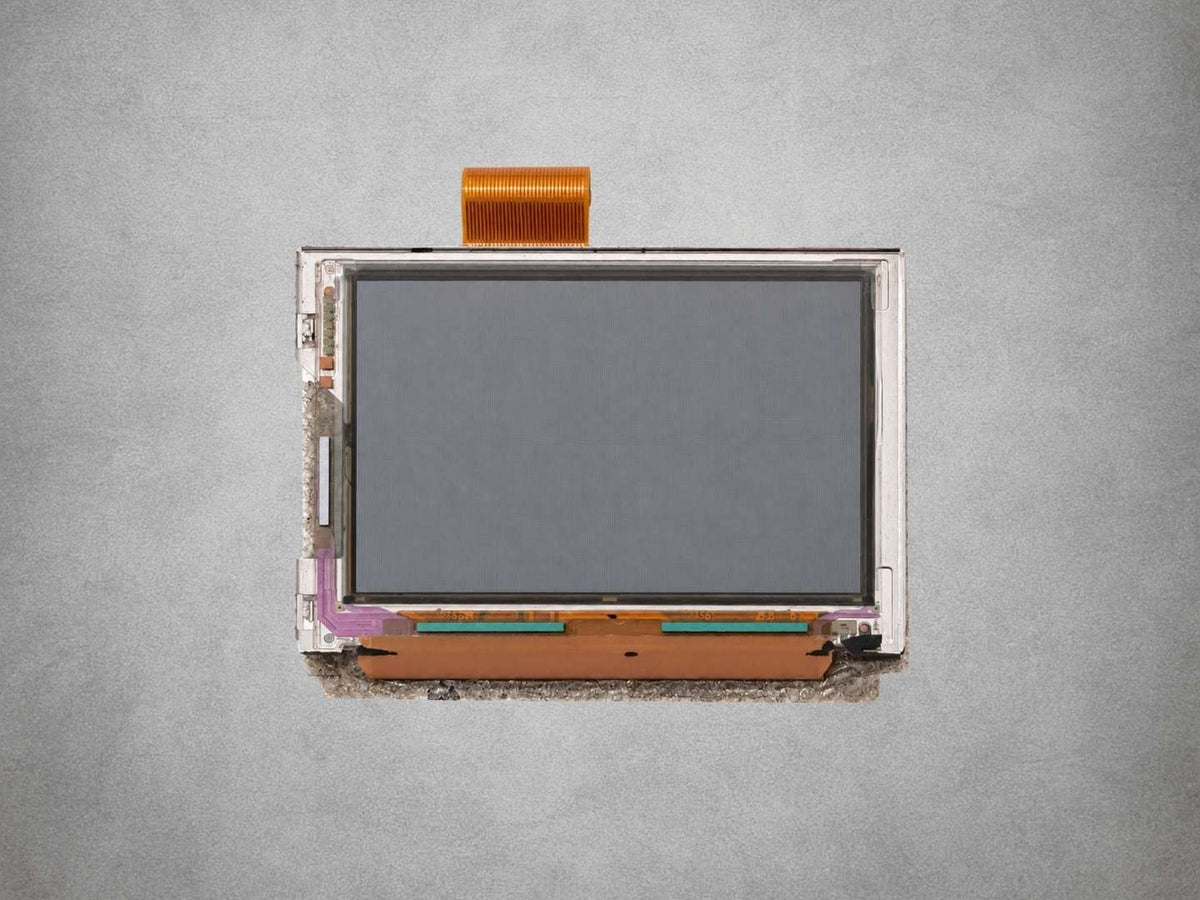
Nintendo Game Boy Advance OEM LCD Screen – 32-Pin / 40-Pin – Mint

Nintendo Game Boy Advance OEM LCD Screen – 32-Pin / 40-Pin – Mint

🎮 Genuine Nintendo OEM Screen For Original Game Boy Advance 🎮

🔌 Choose The Matching 32-Pin Or 40-Pin Connection 🔌

🖥️ Original 2.9-Inch Reflective LCD With 240 × 160 Resolution 🖥️

✨ Mint Condition With No Scratches, Cracks Or Discolouration ✨

🔧 No Soldering Required For A Standard Screen Replacement 🔧

🛠️ For Original-Specification GBA Repairs & Restoration 🛠️

🛡️ 12-Month Limited Retrolize Warranty 🛡️

Connector Type
Regular price £9.99
Regular price Sale price £9.99
Sale Sold out
UK VAT included
UK Stock
12-Month Warranty
Tracked UK Delivery
Real UK Customer Support

Description

Restore the original display in your Nintendo Game Boy Advance AGB-001 with a genuine OEM LCD screen in Mint condition. Choose the 32-Pin or 40-Pin version to match your motherboard, with one screen supplied per selection. These original panels are suitable for repairing an unmodified console or rebuilding a GBA around its original screen specification.

The Original Game Boy Advance Display

The 2.9-inch reflective TFT LCD retains the GBA’s native 240 × 160 resolution and original display size. It uses surrounding light to make the image visible, preserving the appearance and operation of the original hardware.

This is a replacement for the standard AGB-001 screen. It does not introduce an illuminated display, touch controls, colour modes or an on-screen settings menu. Choose it when your project calls for an original screen rather than a modern display conversion.

Two Connections, One Clear Choice

Both variants serve the same restoration purpose, but their ribbon connections suit different motherboard revisions. The pin count is a compatibility requirement, not a selectable brightness or quality setting. Matching it before ordering avoids purchasing a panel that cannot connect directly to your board.

The LCD’s own ribbon connects to the appropriate motherboard socket, so a standard replacement does not require soldering or an additional display adapter. You will still need to open the console and handle the connector, panel and mounting materials carefully.

Mint Condition For Careful Restorations

Retrolize’s Mint grade describes a screen with no scratches, cracks or discolouration. These are original OEM replacement parts; the condition grade does not mean they are newly manufactured or factory-sealed stock.

The LCD panel and the console’s outer screen lens are separate components. Replacing this LCD will not remove scratches from the outer lens, and a replacement lens is not included. Check the condition of your existing lens and mounting materials while planning the repair.

For a console previously converted to another display type, also check that the shell and mounting arrangement still accept the original screen. A replacement LCD will not repair a damaged motherboard connector or another fault elsewhere in the display circuit.

Supplied with a 12-month limited Retrolize warranty and fast UK delivery. Explore our Game Boy Advance parts, mods and upgrades, or see our laminated IPS screen kit if your project requires a modern illuminated display.

Specifications

Original Brand: Nintendo
Product Type: OEM replacement LCD screen
Designed For: Game Boy Advance
Console Model: AGB-001
Condition: Used original OEM component — Mint grade
Mint Grade: No scratches, cracks or discolouration
Variant Options: 32-Pin or 40-Pin
Display Technology: Reflective TFT LCD
Screen Size: 2.9 inches diagonally
Native Resolution: 240 × 160 pixels
Aspect Ratio: 3:2
Display Area: 61.2mm wide × 40.8mm high
Backlight / Frontlight: Neither included
Connection: Integral ribbon cable matching the selected pin count
Soldering Required: No, for a standard compatible replacement
Mounting Requirement: Shell and mounting arrangement suitable for the original AGB-001 LCD
Outer Screen Lens Included: No
Quantity Supplied: One LCD screen per selected variant
32-Pin SKU: NIN-GBA-LCD-32-OEM
40-Pin SKU: NIN-GBA-LCD-40-OEM

Supported Systems

Game Boy Advance AGB-001 With 32-Pin LCD Connector: Select the 32-Pin variant
Game Boy Advance AGB-001 With 40-Pin LCD Connector: Select the 40-Pin variant
Aftermarket AGB-001 Shells: Must retain a mounting arrangement suitable for the original LCD
Previously Modified AGB-001 Consoles: Confirm the original connector, shell, lens and mounting compatibility before purchase
Game Boy Advance SP AGS-001 / AGS-101: Not supported as a direct replacement
Game Boy, Game Boy Color, Game Boy Pocket And Game Boy Micro: Not supported

Critical Info

Choose The Correct Connection: Original Game Boy Advance AGB-001 motherboards use either a 32-pin or 40-pin LCD connection. Select the screen that matches your motherboard. These are separate screen variants, not one screen supplied with two interchangeable adapter ribbons. One screen is supplied per selected variant.

Original Non-Backlit Display: This is the original reflective LCD type. It relies on external light and does not include a backlight, frontlight or IPS upgrade. It is intended for restoring the original display specification.

Check The Shell And Mounting: The screen is intended for the original AGB-001 mounting arrangement. An aftermarket shell must support the original LCD. Shells cut or moulded specifically for laminated IPS displays may require different mounting parts and are not automatically suitable.

Test Before Installation: Inspect the LCD and ribbon, then connect the screen for a temporary test before securing it in the shell, applying adhesive or completing reassembly. Keep the screen and motherboard supported on a clean, non-conductive surface. If there is damage or an image fault, stop and contact Retrolize before proceeding.

Handle With Care: Hold the screen by its frame. Do not press the display surface, crease the ribbon or force the connector lock. Disconnect all power before connecting or disconnecting the LCD. Professional fitting is recommended if you are unfamiliar with handheld console disassembly.

How To Identify Your Screen Connection

On an original motherboard, the board number can normally be seen through the small opening near the battery-cover retaining tab:

Number Begins With 1: 32-pin motherboard — select 32-Pin.
Number Begins With 0: 40-pin motherboard — select 40-Pin.

This is the marking on the motherboard, not the serial-number sticker on the shell. With the console open, check for the 32 or 40 marking beside the LCD connector. If the marking is unclear or the console has been modified, confirm the actual connector before ordering; shell colour and an IPS kit’s adapter cable are not reliable substitutes.

Installation And Pre-Installation Testing

  1. Switch off the console, remove the batteries and disconnect any rechargeable battery modification or external power source.
  2. Open the AGB-001 using suitable tools. Confirm the motherboard’s LCD connection and record the original ribbon orientation and mounting arrangement.
  3. Release both sides of the LCD connector lock evenly and slide the old ribbon out gently. Do not pull it through a locked connector.
  4. With the replacement LCD still outside its final mounting position, insert its ribbon squarely into the matching connector and secure the lock. Keep the screen’s metal frame clear of exposed circuitry.
  5. Support the assembly safely, restore power for testing and check the image in good ambient light. Inspect for missing lines, discolouration or other display faults. Stop if anything is wrong.
  6. Switch off and disconnect power again. Only after a successful test, fit the LCD using appropriate mounting and insulating materials. Avoid pressure on the panel or a trapped ribbon, then reassemble and retest the console.

Package Includes

1 × original Nintendo Game Boy Advance 32-pin or 40-pin LCD screen with integral ribbon cable
One screen is supplied according to your selected variant.
Console, motherboard, outer screen lens, shell, tools, adapter cables and replacement mounting materials are not included.

Warranty Information

The selected Game Boy Advance OEM LCD screen includes a 12-month limited Retrolize warranty from the date of delivery against faults in the supplied screen under normal use.

Condition And Coverage: These are used original OEM screens supplied in Mint condition. The condition grade describes their cosmetic condition; it does not make them newly manufactured products. The warranty covers the supplied LCD and does not cover unrelated faults in the console, motherboard connector or other components.

Inspection And Testing Before Installation: Inspect the screen, ribbon cable and contacts when it arrives. Perform a temporary functional test before securing the screen in the shell, applying adhesive or completing reassembly. If it arrives damaged or displays a fault during this test, stop and contact Retrolize with your order number and clear photographs or video. Do not continue installing a screen with a suspected fault.

Installation And Handling Damage: The warranty does not cover damage caused during fitting, removal or handling. This includes a cracked panel, pressure marks, damaged display layers, torn or sharply creased ribbon cables, damaged contacts, incorrect insertion, electrostatic discharge, short circuits or damage caused by trapped parts or excessive screw pressure.

Compatibility And Receiving Hardware: The selected pin count must match the original AGB-001 motherboard. Damage caused by an incompatible connection, unsuitable adapter, altered power supply or defective receiving hardware is not covered. A screen is not considered faulty solely because an unresolved console fault prevents it from displaying correctly.

Returns After Installation: We do not accept discretionary returns once installation has been attempted. Complete the temporary pre-installation test before mounting the screen or applying adhesive. This does not restrict your statutory cancellation rights or rights concerning faulty goods.

Fault Reporting: If you suspect a screen fault, stop further work and contact Retrolize with your order number, selected pin count, photographs of the ribbon and motherboard connection, a description of the issue and details of any console modifications. Include the result of your pre-installation test where available.

Warranty claims remain subject to the full Retrolize warranty terms. This warranty is additional to your statutory rights, which remain unaffected.

Additional Information

How Do I Choose Between 32-Pin And 40-Pin?

Match the original motherboard’s LCD connector. The board number visible through the battery-compartment opening normally begins with 1 for 32-pin or 0 for 40-pin. You can also check the 32 or 40 marking beside the connector inside the console. See Critical Info above before ordering.

Are Both Screen Types Included?

No. You receive one LCD screen in the selected connection type. Add one of each variant to your basket only if you need screens for two different motherboard types.

Is This A Backlit Or IPS Screen?

No. This is the original reflective AGB-001 LCD, which needs suitable ambient light. It does not include a backlight or IPS conversion hardware.

Are These Brand-New Screens?

These are used original OEM components supplied in Mint condition. Mint describes their condition, not new manufacture or unopened retail packaging.

Does Installation Require Soldering?

A standard replacement in a compatible AGB-001 does not require soldering. The LCD connects through its ribbon cable, but careful console disassembly and handling are still required.

Can I Use The 40-Pin Version In A Game Boy Advance SP?

No. This listing covers original AGB-001 screens. A matching pin count alone does not establish compatibility with an AGS-001 or AGS-101 SP display connection.

Does The Screen Include The Outer Lens?

No. The outer glass or plastic lens is a separate part. If the picture is working correctly and only the outer lens is scratched, replacing the lens may be all your console needs.

Can I Return A Previously Modified GBA To Its Original Screen?

Potentially, provided the original motherboard connection is intact and the shell, lens and mounting arrangement are suitable. Check for shell trimming or replacement parts intended specifically for a different display before ordering.

Should I Test The Screen Before Fitting It?

Yes. Connect it temporarily and check the picture before mounting it, applying adhesive or closing the shell. Disconnect power before making or changing connections. Report any fault before proceeding with installation.

Will A Replacement Screen Fix Every Display Fault?

No. A damaged LCD connector, poor connection or motherboard fault can also cause missing or incorrect images. Diagnose the fault before replacing parts.

Is International Delivery Available?

Tracked international delivery is available to supported destinations. Available services, delivery estimates and applicable duties and taxes are shown at checkout.

View full details