
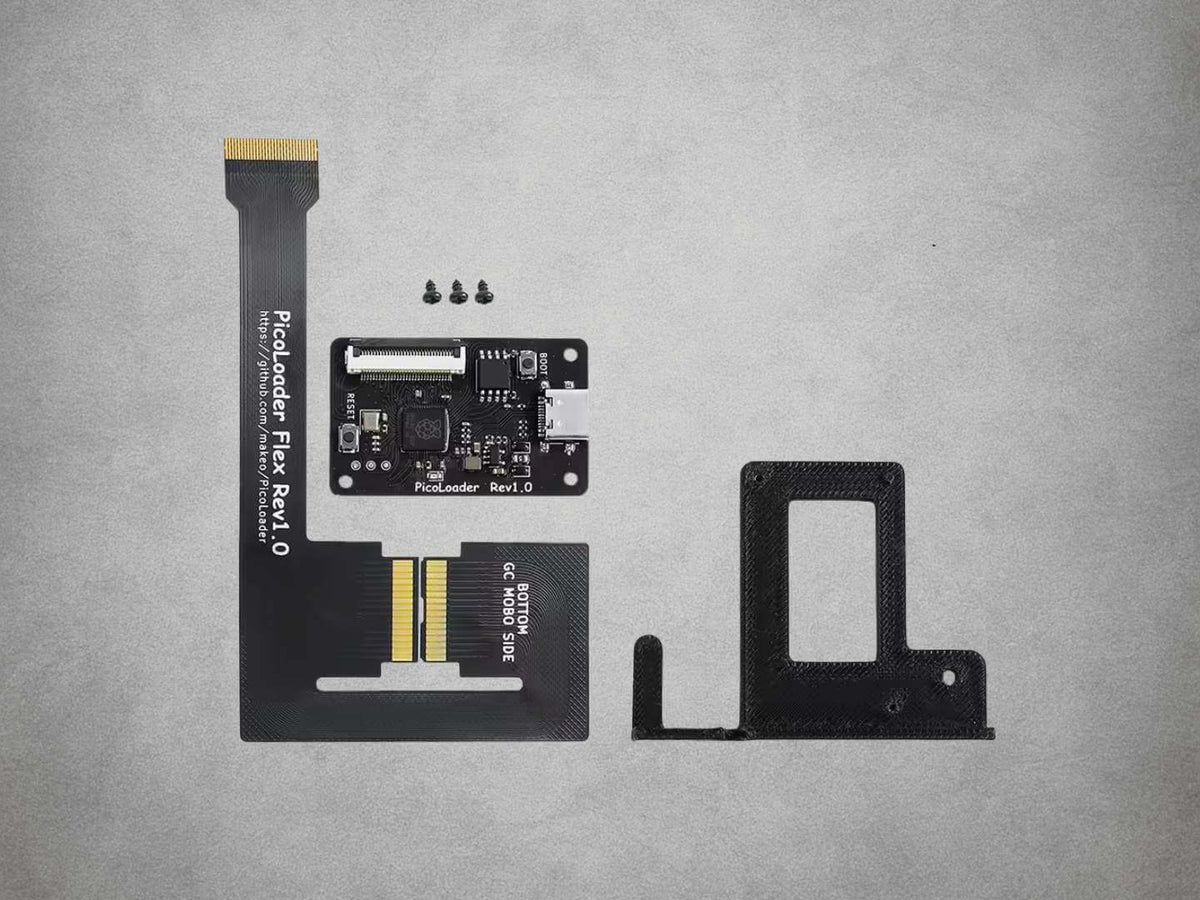
PicoLoader v1.0 Solderless GameCube Modchip Kit – 2 Flex Cables
PicoLoader v1.0 Solderless GameCube Modchip Kit – 2 Flex Cables
Couldn't load pickup availability
🎮 Solderless Swiss & Homebrew Boot For GameCube 🎮
💿 Retains The Original GameCube Disc Drive 💿
🧩 Compatible With DOL-001 & DOL-101 Consoles 🧩
🔌 Separate Module With Replaceable Installation Flex 🔌
📦 Two Flex Cables Included With The Kit 📦
💾 Works With Compatible SD2SP2, GC2SD & SDGecko Adapters 💾
🛠️ Mounting Bracket & Fixings Included 🛠️
♻️ Removable Installation Without Motherboard Soldering ♻️
🛡️ 12-Month Retrolize Warranty 🛡️
Description
Description
The PicoLoader v1.0 Solderless GameCube Modchip Kit provides access to Swiss and compatible homebrew while retaining the console’s original optical drive. Designed for Nintendo GameCube DOL-001 and DOL-101 models, it uses a flexible installation PCB within the drive connection, avoiding the need to solder wires directly to the motherboard.
PicoLoader works by temporarily emulating the optical drive during startup to launch a homebrew application. The original drive is then re-enabled, allowing physical GameCube discs to remain part of the setup. This makes it suitable for owners who want homebrew access alongside their existing disc collection.
The supplied v1.0 design uses a separate module and replaceable flex cable. The module can be mounted independently of the delicate installation flex, and a compatible replacement cable can be fitted without replacing the main board. Two flex cables are included with the kit, providing a spare from the outset.
Swiss can access compatible software stored on an SD card using a separate storage adapter. PicoLoader provides the boot method; an SD2SP2, GC2SD, SDGecko or other compatible adapter provides access to the card’s contents. The appropriate storage hardware depends on the console’s available connections.
DOL-001 consoles fitted with Serial Port 2 can use an SD2SP2 beneath the console. A compatible GC2SD or SDGecko adapter can instead use a memory-card slot. This is also the straightforward option for DOL-101 consoles, which do not provide the external Serial Port 2 connection required by a standard SD2SP2.
Installation requires opening the GameCube and temporarily removing its optical-drive assembly. No motherboard soldering is required, but the flex must be shaped, aligned and seated carefully. The supplied mounting bracket and fixings help position the separate module inside the console.
The installation can be removed without desoldering connections from the motherboard. Care is still needed during removal, particularly around the flex, connector and drive assembly. Original disc playback depends on the condition of the retained optical drive, while homebrew and SD-loading compatibility depend on the supporting software and storage setup.
Supplied by Retrolize with a 12-month warranty, the kit is supported by our UK team, with tracked delivery options for the UK and supported international destinations. Explore our Nintendo GameCube Parts & Mods collection for compatible storage adapters and complementary upgrades.
Specifications
Specifications
Product: PicoLoader v1.0
Product Type: Modchips
Compatible Console: Nintendo GameCube
Supported Models: DOL-001 & DOL-101
Regional Compatibility: PAL, NTSC-U/C & NTSC-J
Primary Function: Booting Swiss & compatible homebrew
Installation Interface: Optical-drive connection
Installation Type: Solderless flex PCB
Module Design: Separate module & replaceable flex
Installation Flex Cables Included: 2
Mounting Bracket & Fixings: Included
Original Optical Drive: Retained
Physical Disc Playback: Retained with a working original drive
Bulk SD Storage: Separate compatible adapter & card required
SD2SP2 Compatibility: Requires a physical Serial Port 2 connection
GC2SD / SDGecko Compatibility: Supported through a GameCube memory-card slot
Console Disassembly Required: Yes
Motherboard Soldering Required: No
Removal: Does not require motherboard desoldering
Retrolize Warranty: 12 months from delivery
SKU: GC-PICOLOADER-V10
Supported Systems
Supported Systems
Compatible Console Models
Nintendo GameCube DOL-001: Supported with internal installation
Nintendo GameCube DOL-101: Supported with internal installation
Regional Versions
UK & European PAL Consoles: Supported in the listed models
North American NTSC-U/C Consoles: Supported in the listed models
Japanese NTSC-J Consoles: Supported in the listed models
Compatible SD Storage Adapters
SD2SP2: Supported on consoles fitted with a physical Serial Port 2 socket
GC2SD: Supported through a GameCube memory-card slot
SDGecko: Supported through a GameCube memory-card slot
DOL-101 SD Storage: Use a compatible memory-card-slot adapter
SD Card & Storage Adapter: Required separately for SD-based file access
Supported Functions
Swiss & Compatible Homebrew: Supported
Original Optical Drive: Retained
Physical GameCube Discs: Supported with a working original drive
Full Optical-Drive Replacement: Not provided by this kit
Installation Requirements
Console Disassembly: Required
Motherboard Soldering: Not required for a standard installation
Installation Flex: Must match the supplied module & connector layout
Existing Internal Modifications: Check module clearance & flex routing before fitting
Critical Info
Critical Info
Homebrew Boot Modchip: PicoLoader provides a method of launching Swiss and compatible homebrew. It retains the original optical drive and does not provide bulk SD storage itself.
SD Storage Required Separately: Accessing files on an SD card requires a compatible adapter such as SD2SP2, GC2SD or SDGecko, alongside a suitably prepared card. These storage items are not included.
Check For Serial Port 2: An SD2SP2 adapter requires a console with the physical Serial Port 2 connection. Some DOL-001 consoles lack this port, and DOL-101 consoles do not provide it. Compatible GC2SD or SDGecko adapters use a memory-card slot instead.
Installation Requirements: Installation is solderless but requires console disassembly, temporary removal of the optical-drive assembly and careful placement of the flex PCB within the drive connection.
Flex Cable Handling: Follow the instructions for the exact flex supplied. Avoid sharp creases, repeated bending, twisting, pulling on the contacts or trapping the cable beneath the drive or housing.
Two Flex Cables Supplied: The kit includes two compatible installation flex cables. The separate-module design allows a damaged flex to be replaced without replacing the main module, provided the correct replacement flex is used.
Replacement Flex Compatibility: Flex cables from other PicoLoader variants are not automatically interchangeable. Confirm the connector, layout and compatibility with this specific module before fitting a replacement.
Original Disc Playback: Physical discs can continue to be used with a working original drive. PicoLoader does not repair existing laser, motor or other optical-drive faults.
Power & Handling: Switch off the GameCube, remove any disc and disconnect all cables before opening it. Do not insert or remove internal connections while power is applied.
Installation Overview
- Test the console and its original disc drive before starting, then disconnect all power and accessories.
- Open the GameCube using suitable Gamebit and Phillips screwdrivers, keeping the original screws organised.
- Carefully remove the optical-drive assembly following the installation instructions.
- Prepare and position the supplied flex using the instructions matching its printed layout and orientation.
- Refit the optical drive, checking that the flex remains correctly seated and is not pinched or scraped by the shielding.
- Secure the drive assembly and mount the separate PicoLoader module using the supplied mounting components.
- Connect and secure the flex to the module without forcing the connector or locking mechanism.
- Check clearances and reassemble the console as directed by the guide, keeping the disc lid open when refitting the outer housing.
- Test homebrew booting, access to your configured SD storage and original disc playback.
Connection & Boot Troubleshooting
Console Does Not Start Normally: Switch off and disconnect power. Check the flex orientation, seating, connector alignment and drive assembly. Stop if any connection requires excessive force.
Swiss Starts But Cannot Find SD Storage: Check the selected adapter, card preparation and software configuration. Confirm that an SD2SP2 is connected to an actual Serial Port 2 socket.
Original Discs No Longer Read: Check the drive and flex connections against the installation instructions. PicoLoader does not correct pre-existing faults in the optical mechanism.
Flex Appears Damaged: Do not continue bending or forcing it. Inspect the connection and replace a damaged cable with a confirmed compatible flex.
Installation Reference
Consult the PicoLoader installation documentation and follow the instructions appropriate to the supplied module and flex design.
Package Includes
Package Includes
1 × PicoLoader v1.0 module
2 × Compatible PicoLoader v1.0 installation flex cables
1 × Mounting bracket with fixings
SD card, SD storage adapter and installation tools are not included.
Warranty Information
Warranty Information
This PicoLoader v1.0 kit includes a 12-month Retrolize warranty from the date of delivery, covering manufacturing defects and hardware faults arising during normal use.
Coverage applies to the supplied module, flex cables and mounting components. Customer-caused damage is excluded, including accidental impact, liquid exposure, electrostatic damage, damaged connectors, excessive force, incorrect installation and unauthorised hardware modification.
Damage caused by incorrect flex shaping, sharp creasing, repeated bending, twisting, tearing, trapping or forced insertion is installation damage and is not covered. Two flex cables are supplied, but physical damage to either cable during fitting is not considered a manufacturing defect.
A device made unusable by an incompatible, interrupted or incorrectly performed firmware update is excluded from warranty coverage.
Software configuration problems, incompatible homebrew, corrupted data, unsuitable SD cards or adapters, and faults caused by third-party software are not PicoLoader hardware faults.
Existing faults in the GameCube, optical drive or separately supplied storage equipment are separate from faults with this kit.
Contact Retrolize with your order details and a description of the issue so we can assess it. Full warranty terms and our Returns Policy apply. Your statutory rights are unaffected.
Additional Information
Additional Information
Does PicoLoader Fit DOL-001 & DOL-101 Consoles?
Yes. Compatible Nintendo GameCube DOL-001 and DOL-101 consoles are supported, including PAL, North American and Japanese versions.
Can I Still Play My Original GameCube Discs?
Yes. PicoLoader retains the original optical drive and re-enables it after the homebrew boot stage. Disc playback still requires a working drive and compatible discs.
Do I Need To Solder Anything?
No motherboard soldering is required for installation of this kit. The console must still be dismantled, and the flex PCB must be fitted carefully within the drive connection.
Why Does The Kit Include Two Flex Cables?
The installation flex is delicate and can be damaged by incorrect handling or fitting. Two compatible cables are supplied so you have a spare available. Physical installation damage is separate from a manufacturing defect.
Can The Flex Be Replaced Separately?
Yes. This v1.0 kit uses a separate module and installation flex. A damaged cable can be replaced without replacing the module, using a flex confirmed as compatible with this particular design.
Does The Kit Include An SD Card Or SD Adapter?
An SD card, SD2SP2, GC2SD or SDGecko adapter is not included. Select a compatible storage adapter for your console and prepare the card for the software you intend to use.
Which Storage Adapter Should I Choose?
An SD2SP2 can be used when the console has a physical Serial Port 2 socket. Some DOL-001 consoles lack this connection, so check the actual hardware.
Compatible GC2SD and SDGecko adapters connect through a GameCube memory-card slot and can be used with both listed console models, including DOL-101.
Is PicoLoader The Same As A Full Optical Drive Replacement?
PicoLoader supplies a homebrew boot method while retaining the original drive. It uses a separate adapter for SD storage.
If you want to remove the original optical drive and load software from an ODE’s own SD card, see our CUBEODE GameCube Optical Drive Emulator.
Will It Repair A Faulty Disc Drive?
PicoLoader does not repair faults in the laser, motors or other original drive components. Retained physical-disc playback depends on the condition of that drive.
Can I Use Any PicoLoader Replacement Flex?
Use a replacement specifically confirmed for this module and connector layout. Different manufacturers and hardware variants can use different flex designs, even where their revision labels look similar.
Can I Update The Firmware Or Boot Software?
Use files and instructions confirmed for the exact module, hardware revision and flash configuration. Follow the relevant project documentation and do not assume that files intended for another PicoLoader implementation are interchangeable.
How Quickly Will My UK Order Be Dispatched?
In-stock orders placed before 2pm UK time on working days are normally dispatched the same day. Royal Mail Tracked 24 aims for next-working-day delivery after dispatch. Available services and delivery estimates are shown at checkout.
Is International Delivery Available?
Yes, tracked international delivery is available to supported destinations. Available Royal Mail services, delivery charges and estimated transit times are shown at checkout.
Share
Product reviews
Honest feedback to help you choose.
Customers receive a personal review invitation after purchase.