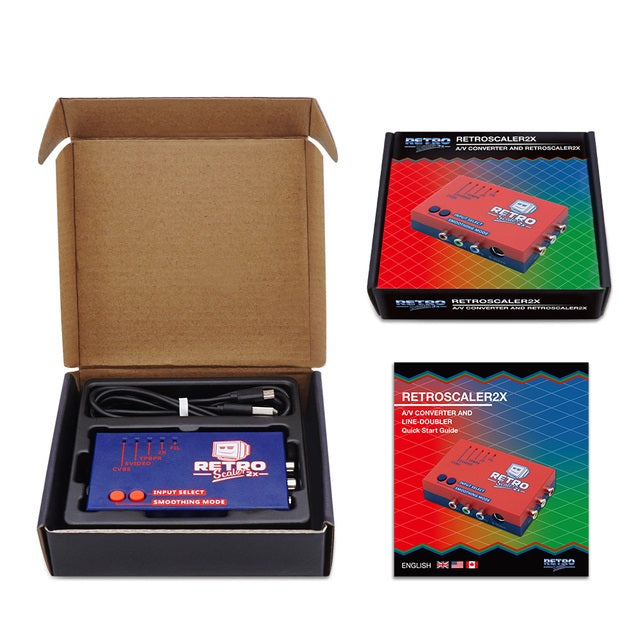
RetroScaler2x AV To HDMI Converter & Line Doubler
📺 Line-Doubles 240p To 480p & 288p To 576p 📺
⚡ Zero-Lag Processing For Responsive Retro Gaming ⚡
🔌 Composite, S-Video & YPbPr Component Inputs 🔌
🔄 Converts 480i & 576i To Progressive HDMI Output 🔄
🖼️ Selectable Smoothing Filter For 2D & 3D Games 🖼️
➡️ Original-Resolution HDMI Pass-Through Mode ➡️
🎮 Wide PAL & NTSC Retro Console Compatibility 🎮
🔊 Video & Stereo Audio Through One HDMI Cable 🔊
🎛️ Direct Input & Processing Controls 🎛️
🔋 Simple 5V Micro USB Power 🔋
🛠️ Plug & Play With No Console Modification Required 🛠️
🛡️ 12-Month Retrolize Warranty 🛡️
Couldn't load pickup availability
Description
Description
Connect a wide range of original retro consoles and compatible computers to a modern HDMI television, monitor or capture device with the RetroScaler2x AV To HDMI Converter & Line Doubler.
The RetroScaler2x accepts CVBS composite, 4-pin S-Video and YPbPr component video, making it suitable for mixed retro gaming setups containing systems with different analogue video connections. Stereo audio is supplied through the red and white RCA inputs and carried alongside the converted video through HDMI.
Classic 240p NTSC signals are correctly recognised as progressive video and line-doubled to 480p, while 288p PAL sources are converted to 576p. This avoids treating classic progressive pixel graphics as interlaced footage and provides a more display-friendly signal for modern HDMI equipment.
Interlaced 480i and 576i sources are converted into progressive 480p or 576p output. The RetroScaler2x does not accept 480p or higher-resolution sources and does not upscale games to 720p, 1080p or 4K.
Manufacturer-rated zero-lag processing keeps control response suitable for timing-sensitive platform games, fighting games, shoot ’em ups and rhythm titles. Any additional latency will depend on the processing performed by the connected television, monitor or capture device.
A selectable smoothing filter softens hard pixel edges and can reduce visible aliasing. Many players will prefer the sharper standard mode for 2D pixel-art games, while filtered mode can suit early polygonal 3D graphics or interlaced software.
Original-resolution HDMI pass-through is also available for specialist displays, capture equipment or external processors capable of accepting 240p, 288p, 480i or 576i through HDMI. Standard 2X mode will provide wider compatibility with most modern displays.
Input selection and processing modes are controlled directly from the buttons on the unit, with front indicators showing the selected composite, S-Video or component input and active 2X or filter mode. Setup is plug and play, with no console modification required when the source already provides a supported video signal.
The RetroScaler2x requires regulated 5V Micro USB power. A Micro USB cable is included, while the necessary console video cable, HDMI cable and USB mains adapter must be supplied separately.
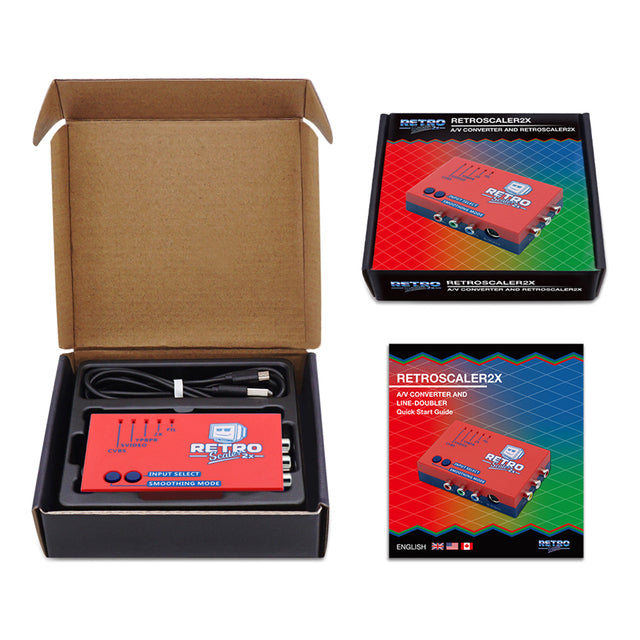
Choose from Red or Blue aluminium-style housings. Both colour variants include the same controls, connections, accessories and retail packaging.
Browse our complete range of retro gaming upscalers and HDMI adapters.
The RetroScaler2x is dispatched from UK stock with fast delivery, international tracked delivery to supported destinations and a 12-month Retrolize warranty.
Specifications
Specifications
Brand: RetroScaler
Product Name: RetroScaler2x AV To HDMI Converter & Line Doubler
Product Type: Analogue AV To HDMI Converter & 2x Video Line Doubler
Model: RetroScaler2x
Primary Use: Connecting Standard-Definition Analogue Retro Gaming Hardware To HDMI Displays
Composite Video Input: 1 Ă— RCA CVBS
S-Video Input: 1 Ă— 4-Pin Mini-DIN
Component Video Input: 3 Ă— RCA YPbPr
RGB / RGBS Input: Not Supported
RGB SCART Input: Not Supported
VGA / RGBHV Input: Not Supported
RF Input: Not Supported
Audio Input: 2 Ă— RCA Stereo Audio
Input Selection: Manual Push-Button Control
Simultaneous Inputs: Not Supported
Supported NTSC Inputs: 240p & 480i
Supported PAL Inputs: 288p & 576i
Unsupported Input Resolutions: 480p, 576p, 720p, 1080i & 1080p
PAL-M Compatibility: Not Guaranteed
240p Processing: Line-Doubled To 480p
288p Processing: Line-Doubled To 576p
480i Processing: Converted To Progressive 480p
576i Processing: Converted To Progressive 576p
Maximum Processed NTSC Output: 480p HDMI
Maximum Processed PAL Output: 576p HDMI
Pass-Through Output: Original Source Resolution Digitised Through HDMI
Output Connection: Full-Size HDMI
Audio Output: Stereo Audio Through HDMI
Processing Modes: Standard 2X, Filtered 2X & Pass-Through
Smoothing Filter: Selectable
Processing Latency: Manufacturer-Rated Zero-Lag Operation
PAL To NTSC Conversion: Not Supported
NTSC To PAL Conversion: Not Supported
Aspect-Ratio Control: Not Supported
Scanline Generator: Not Supported
Remote Control: Not Included
Installation: Plug & Play
Console Modification Required: No When The Source Provides A Supported Video Output
External Power Required: Yes
Power Input: Micro USB
Power Requirement: Regulated 5V DC, 0.5A Minimum
Television USB Power: Supported Where The Port Provides Suitable Regulated 5V Power
Power Switch: Integrated
Micro USB Power Cable Included: Yes
USB Mains Adapter Included: No
Console Video Cable Included: No
HDMI Cable Included: No
Device Dimensions: Approximately 110 Ă— 63 Ă— 28mm
Device Weight: Approximately 116g
Available Colours: Red & Blue
SKU – Red: RSC-2X-RED
SKU – Blue: RSC-2X-BLU
Supported Systems
Supported Systems
Supported Systems
Compatibility depends on the console model, region, available video output, selected resolution and cable used. Every source must provide composite, S-Video or YPbPr component at 240p, 288p, 480i or 576i.
Nintendo Systems
Nintendo Entertainment System / NES Front Loader: Composite Video Through The Console AV Output
Original Famicom: Supported With A Compatible Composite, S-Video Or Component-Output Modification
AV Famicom: Composite Video
NES-101 Top Loader: Supported With A Compatible AV-Output Modification
Super Nintendo Entertainment System: Composite Or S-Video Where Provided By The Console Model & Region
Super Famicom: Composite Or S-Video Where Provided By The Console Model
SNES Mini / SNS-101: Composite Video; Other Video Formats Require Modification
Super Famicom Jr: Composite Video; Other Video Formats Require Modification
Nintendo 64 PAL, NTSC-U & NTSC-J: Composite Video Or Compatible Regional S-Video
Nintendo GameCube DOL-001: Composite, Compatible Regional S-Video Or YPbPr Component At 480i / 576i
Nintendo GameCube DOL-101: Composite Or Compatible Regional S-Video
Nintendo Wii RVL-001: Composite, Compatible Regional S-Video Or YPbPr Component At 480i / 576i
Nintendo Wii Family Edition RVL-101: Composite, Compatible Regional S-Video Or YPbPr Component At 480i / 576i
Nintendo Wii Mini RVL-201: Composite Video
Sega Systems
Sega Master System Model 1: Composite Video
Sega Master System Model 2: Supported Where A Compatible Composite, S-Video Or Component Output Is Available
Mega Drive Model 1 & Model 2: Composite Video Or Compatible Active YPbPr Component Cable
Genesis Model 1 & Model 2: Composite Video Or Compatible Active YPbPr Component Cable
Mega-CD / Sega CD: Video Supplied Through The Connected Mega Drive Or Genesis
Sega 32X: Composite Video Or Compatible Active YPbPr Component Cable
Sega Saturn PAL, NTSC-U & NTSC-J: Composite, S-Video Or Compatible Active YPbPr Component Cable
Sega Dreamcast PAL, NTSC-U & NTSC-J: Composite, S-Video Or Compatible Component Output At 480i / 576i
Sony Systems
Original PlayStation / PS1: Composite Or S-Video
PS One: Composite Or S-Video
PlayStation 2 Fat & Slim: Composite, S-Video Or YPbPr Component At 240p / 288p / 480i / 576i
PlayStation 3: Composite, S-Video Or YPbPr Component At 480i / 576i
PSP Models With Television Output: Supported Only When The Console, Cable & Selected Mode Provide Composite, S-Video Or YPbPr At A Compatible Resolution
Microsoft Systems
Original Xbox: Composite, S-Video Or YPbPr Component At 480i / 576i
Xbox 360 Models With Analogue AV Output: Composite Or YPbPr Component At 480i / 576i
SNK & NEC Systems
Neo Geo AES: Composite Or S-Video Where Available
Neo Geo CD & CDZ: Composite Or S-Video
Neo Geo MVS: Supported Through A Properly Configured Supergun Or Consolised System Providing Consumer-Level Composite, S-Video Or YPbPr
PC Engine & CoreGrafx Family: Composite Video Through A Compatible Console Model, Accessory Or Modification
PC Engine Duo Family: Composite Video
TurboGrafx-16: Supported Through A Compatible Composite, S-Video Or Component-Output Accessory Or Modification
SuperGrafx: Composite Video Through A Suitable AV Accessory
Other Consoles & Computers
3DO Interactive Multiplayer: Composite Or S-Video
Philips CD-i: Composite Or S-Video Depending On The Player Model
Atari Jaguar: Composite Or S-Video
Atari 2600, Atari 5200 & Atari 7800: Supported Through A Suitable Composite, S-Video Or Component Modification
ColecoVision: Supported Through A Compatible AV-Output Modification
Intellivision: Supported Through A Compatible AV-Output Modification
Commodore 64: Composite Or Separated Luma / Chroma Through A Correctly Wired S-Video-Compatible Cable
Commodore VIC-20: Composite Video Through A Correctly Wired Model-Specific Cable
Compatible MSX Computers: Composite Or S-Video Where Provided By The Model
Other Compatible Retro Consoles & Computers: Supported When Providing Composite, S-Video Or YPbPr At 240p, 288p, 480i Or 576i
Video Signals & Output
CVBS Composite Video Input: Supported
4-Pin S-Video Input: Supported
YPbPr Component Video Input: Supported
240p NTSC Input: Supported
288p PAL Input: Supported
480i NTSC Input: Supported
576i PAL Input: Supported
480p, 576p, 720p, 1080i & 1080p Input: Not Supported
RGB, RGBS & RGB SCART Input: Not Supported
VGA & RGBHV Input: Not Supported
RF Input: Not Supported
240p To 480p Line Doubling: Supported
288p To 576p Line Doubling: Supported
480i To Progressive 480p Conversion: Supported
576i To Progressive 576p Conversion: Supported
Original-Resolution HDMI Pass-Through: Supported Subject To Connected Equipment
720p, 1080p & 4K Output: Not Supported
Stereo Audio Through HDMI: Supported
Connection Requirements
Compatible Composite, S-Video Or YPbPr Console Cable: Required & Not Included
Standard HDMI Cable: Required & Not Included
Regulated 5V USB Power Source Rated At 0.5A Or Higher: Required
Micro USB Power Cable: Included
USB Mains Adapter: Not Included
Only One Analogue Input Source Connected At A Time: Recommended
Display Support For 480p Or 576p: Required
Display Support For Source Resolution In Pass-Through Mode: Required
Hot Plugging: Not Supported
Critical Info
Critical Info
Supported Input Resolutions: The RetroScaler2x accepts 240p, 288p, 480i and 576i analogue video signals.
480p & Higher Inputs Are Not Supported: Do not configure the connected console or source to output 480p, 576p, 720p, 1080i or 1080p.
Maximum Processed Output: NTSC-format sources are output at 480p, while PAL-format sources are output at 576p. This is a 2x line doubler rather than a 720p, 1080p or 4K scaler.
No PAL To NTSC Conversion: The RetroScaler2x preserves the source video standard and refresh rate. It does not convert PAL 50Hz into NTSC 60Hz or NTSC into PAL.
PAL-M Compatibility: Compatibility with PAL-M consoles and equipment is not guaranteed.
Composite, S-Video & Component Only: The unit accepts CVBS composite, 4-pin S-Video and YPbPr component video.
YPbPr Is Not RGB: The red, green and blue RCA inputs accept YPbPr component video. They do not accept RGB, RGBS or RGB SCART signals.
RGB SCART, VGA & RF Not Supported: These signals cannot be connected directly. A passive connector adapter does not convert RGB, VGA or RF into a supported video format.
Only One Input At A Time: Connect and select either composite, S-Video or component. Disconnect unused sources where practical, even when those sources are switched off.
Pass-Through Display Compatibility: Pass-through mode digitises the original 240p, 288p, 480i or 576i signal without changing its resolution. Many modern displays, HDMI switches, AV receivers and capture devices cannot accept these resolutions through HDMI.
Interlaced-Video Processing: The RetroScaler2x converts 480i and 576i into progressive 480p or 576p output. Fine text, menus and horizontal details may still display visible flicker or deinterlacing artefacts.
Aspect Ratio: The RetroScaler2x does not include an aspect-ratio selector. Most classic games should be displayed at 4:3 using the television or monitor settings.
Video Quality Depends On The Source: Composite, S-Video and component provide different picture quality. The console, region, cable quality, original video signal and connected display will all affect the final image.
Console Video & HDMI Cables Required: A suitable composite, S-Video or YPbPr component cable and a standard HDMI cable are required. Neither is included.
External Power Required: Use the supplied Micro USB cable with a regulated 5V USB power source capable of supplying at least 0.5A. A USB mains adapter is not included.
Hot Plugging: Switch off the console, RetroScaler2x and connected display before inserting, removing or changing cables.
First-Time Setup
- Switch off the console, RetroScaler2x and connected display.
- Connect the console to one RetroScaler2x input using a compatible composite, S-Video or YPbPr component cable.
- Connect the stereo audio plugs to the red and white RCA audio inputs.
- Connect a standard HDMI cable between the RetroScaler2x and the television, monitor, projector or capture device.
- Connect the supplied Micro USB cable to a regulated 5V USB power source.
- Switch on the RetroScaler2x, display and console.
- Use the Input Select button to choose CVBS, S-Video or YPbPr.
- Start with standard 2X mode for the widest modern-display compatibility.
- Set the display to 4:3 for most classic games and enable Game Mode where available.
Processing Modes
Standard 2X Mode: Line-doubles 240p to 480p and 288p to 576p. Interlaced 480i and 576i sources are converted into progressive 480p or 576p output.
Filtered 2X Mode: Applies the smoothing filter to soften hard pixel edges and reduce visible aliasing. This can suit early polygonal 3D games and some flicker-prone interlaced content.
Pass-Through Mode: Digitises the original input resolution without line doubling. Use this only when the connected HDMI equipment explicitly supports the source resolution.
Package Includes
Package Includes
1 Ă— RetroScaler2x AV To HDMI Converter In The Selected Colour
1 Ă— Micro USB Power Cable
1 Ă— Quick Start Guide / Instruction Manual
1 Ă— Retail Box
Warranty Information
This RetroScaler2x AV To HDMI Converter is covered by a 12-month limited Retrolize warranty against manufacturing defects and hardware faults arising during normal use.
The warranty does not cover accidental damage, liquid damage, misuse, damaged connectors, forced insertion, hot plugging, unauthorised modification, excessive strain placed on the ports or damage caused by incompatible consoles, cables, displays or capture equipment.
Damage caused by an unsuitable, damaged or unregulated USB power supply is not covered. This includes damage caused by incorrect voltage, unstable power delivery or operation outside the stated regulated 5V requirement.
Differences caused by the original video signal, composite or S-Video picture quality, deinterlacing behaviour, filter selection, aspect-ratio settings, PAL-M compatibility or display support for pass-through resolutions are not considered product faults.
Compatibility with original-resolution pass-through mode cannot be guaranteed across every television, monitor, projector, HDMI switch, AV receiver or capture device.
Warranty claims remain subject to the full Retrolize warranty terms and are provided in addition to the customer’s statutory rights.
Additional Information
Is The RetroScaler2x A Resolution Upscaler?
It is primarily a 2x video line doubler. It converts 240p into 480p and 288p into 576p while converting interlaced 480i and 576i into progressive HDMI output. It does not produce 720p, 1080p or 4K.
Which Input Provides The Best Picture Quality?
YPbPr component generally provides the strongest picture quality supported by the unit, followed by S-Video and then composite. Results still depend on the console, video cable and original signal.
Can I Connect RGB SCART?
No. The RetroScaler2x does not accept RGB SCART or RGBS. A passive SCART adapter does not convert RGB into composite, S-Video or YPbPr component.
Can I Connect A 480p Component Source?
No. Component sources must remain configured for 240p, 288p, 480i or 576i. Progressive 480p and higher-resolution inputs are not supported.
Does The RetroScaler2x Add Input Lag?
The manufacturer rates the video processing as zero lag. The connected television or monitor may still add its own display processing delay, so Game Mode should be enabled where available.
What Is Pass-Through Mode?
Pass-through mode converts the selected analogue input into HDMI without changing the source resolution. It requires HDMI equipment capable of accepting unusual resolutions such as 240p or 288p.
Should I Use The Smoothing Filter?
That is a matter of preference. Standard unfiltered mode normally provides the sharpest presentation for 2D pixel-art games, while smoothing can suit early 3D graphics and some interlaced software.
Does It Support Both PAL & NTSC Consoles?
Yes, supported PAL and NTSC signals can be processed. The unit does not convert between PAL and NTSC, and PAL-M compatibility is not guaranteed.
Does It Change The Aspect Ratio?
No. The connected display controls the final aspect ratio. Select 4:3 for most classic console games unless the software was specifically designed for widescreen output.
Can It Be Used With A Capture Card?
Yes, provided the capture card accepts the selected 480p or 576p output. Original-resolution pass-through compatibility varies considerably between capture devices.
Does It Need External Power?
Yes. Use the supplied Micro USB cable with a regulated 5V USB source capable of supplying at least 0.5A. A mains USB adapter is not included.
Are Console & HDMI Cables Included?
No. The package contains the Micro USB power cable, but the console video cable and HDMI cable must be supplied separately.
How Does It Compare With The GBSC Pro & OSSC?
The RetroScaler2x provides a simpler plug-and-play solution for composite, S-Video and standard-definition YPbPr component sources.
The RetroScaler GBSC Pro adds RGB SCART, VGA, higher-resolution HDMI output, advanced picture controls and more sophisticated deinterlacing.
The BitFunx OSSC V1.8 provides extensive RGB SCART, component and VGA line-multiplication controls but does not accept standard composite or S-Video directly.
Is International Delivery Available?
Yes. International tracked delivery is available to supported destinations, with available services calculated at checkout.
Share