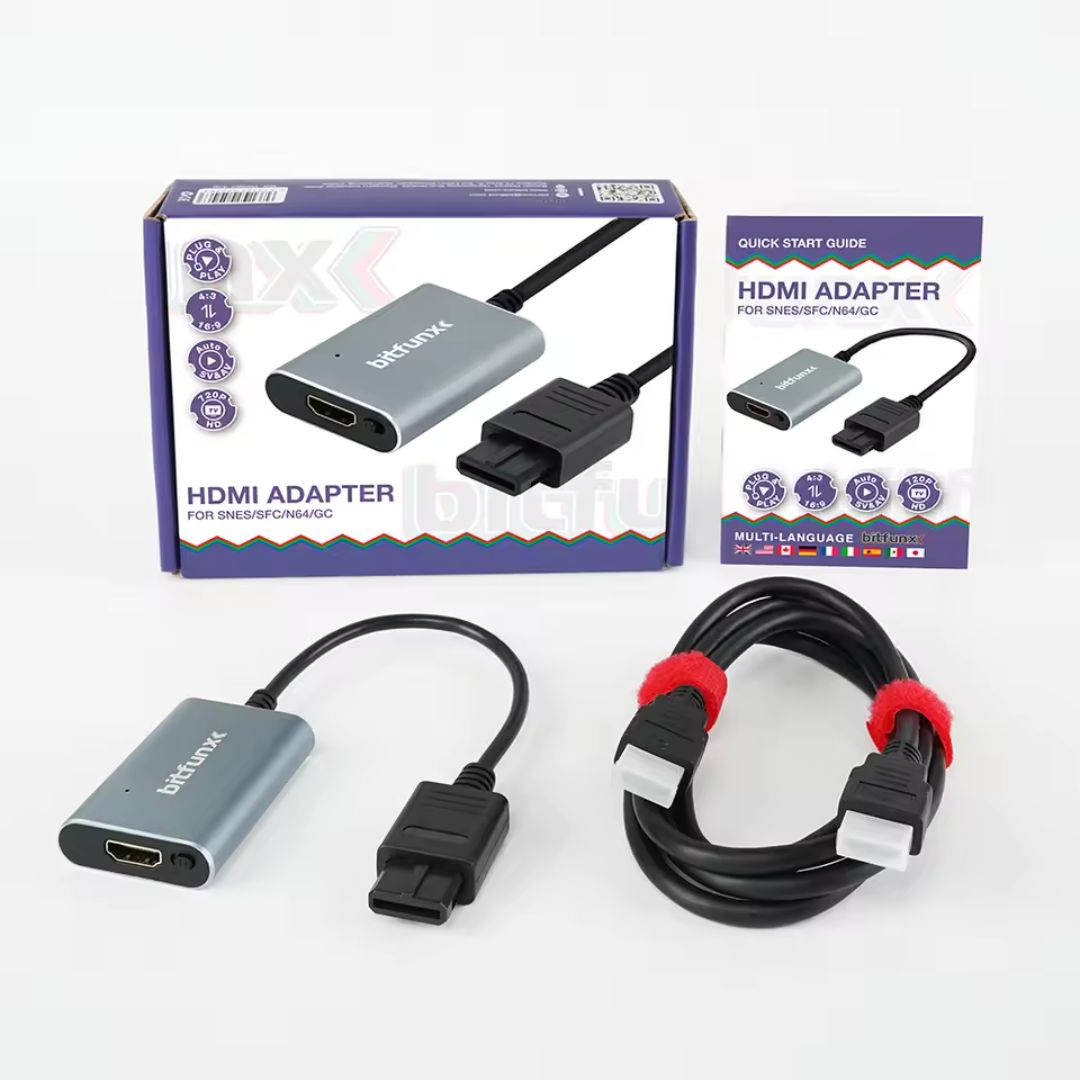
Bitfunx HDMI Adapter / Upscaler - SNES/SFC/N64/GC - Super Nintendo / Super Famicom / Nintendo 64 / GameCube
📺 Converts Classic Nintendo Consoles To 720p HDMI 📺
🎮 SNES, Super Famicom, N64 & GameCube Support 🎮
🔄 Automatic S-Video & Composite Signal Detection 🔄
🖥️ Switchable 4:3 & 16:9 Display Modes 🖥️
⚡ Low-Latency Plug & Play Conversion ⚡
🔊 Video & Stereo Audio Through HDMI 🔊
🎲 GameCube DOL-001 & DOL-101 Compatible 🎲
🔌 No Power Supply Required 🔌
📦 1.5-Metre HDMI Cable Included 📦
🛡️ 12-Month Retrolize Warranty 🛡️
Couldn't load pickup availability
Description
Description
Connect your original Super Nintendo, Super Famicom, Nintendo 64 or Nintendo GameCube to a modern HDMI television, monitor or projector with the BitFunx HDMI Adapter and 720p Upscaler.
Designed for classic Nintendo consoles that use the Nintendo Analogue AV Multi Out connection, this adapter converts the console’s original S-Video or composite video signal into a convenient 720p HDMI output. Stereo audio is also carried through HDMI, allowing video and sound to reach your display through a single cable.
Whether you need an N64 HDMI adapter, an SNES HDMI converter or a simple HDMI solution for an original Nintendo GameCube, the BitFunx adapter provides straightforward plug-and-play installation without modifying the console. Connect the adapter to the console, attach the included HDMI cable and select the correct HDMI input on your display.
The adapter automatically detects whether the connected console is providing S-Video or composite video. S-Video is used when it is available from the console, providing a cleaner image than composite video. When S-Video is unavailable, the adapter automatically switches to the console’s standard composite signal.
A physical selector switch lets you choose between 4:3 and 16:9 display modes. The original 4:3 setting is recommended for most SNES, Super Famicom, Nintendo 64 and GameCube games because it preserves the intended shape and proportions of the picture. The optional 16:9 mode stretches the image to fill a modern widescreen display.
The original analogue signal is converted and scaled to a stable 720p HDMI output, improving compatibility with televisions that no longer include older composite or S-Video connections. Processing is designed to keep latency low, making the adapter suitable for platform games, fighting games, racing games and other timing-sensitive retro titles.
Housed inside a compact aluminium-alloy enclosure, the adapter also benefits from improved heat dissipation and protection from signal interference. No drivers, software or external power supply are required, making it a clean and practical HDMI upgrade for original Nintendo hardware.
Specifications
Specifications
Product Type: S-Video/composite to HDMI converter and 720p upscaler
Brand: BitFunx
Compatible Consoles: SNES, Super Famicom, Nintendo 64 and Nintendo GameCube
Console Connection: Nintendo Analogue AV Multi Out
Video Input: S-Video or composite video
Signal Detection: Automatic S-Video and composite detection
Output Connection: HDMI
HDMI Output Resolution: 720p
Aspect Ratio Modes: 4:3 and 16:9
Aspect Ratio Control: Physical selector switch
Audio Input: Analogue stereo audio through the console connection
Audio Output: Stereo audio carried through HDMI
Latency: Manufacturer-rated zero-latency processing
External Power Required: No
Drivers Required: No
Installation: Plug and play
Status Indicator: Power LED
Housing Material: Aluminium alloy
Adapter Dimensions: Approximately 60 × 42 × 13mm
Adapter Weight: Approximately 42g
Integrated Cable Length: Approximately 24cm
HDMI Cable Length: Approximately 1.5 metres
Colour: Silver
Supported Systems
Supported Systems
Super Nintendo Entertainment System – PAL: Supported
Super Nintendo Entertainment System – NTSC-U: Supported
Super Famicom – NTSC-J: Supported
Nintendo 64 – PAL: Supported
Nintendo 64 – NTSC-U: Supported
Nintendo 64 – NTSC-J: Supported
Nintendo GameCube DOL-001 – PAL: Supported
Nintendo GameCube DOL-001 – NTSC-U: Supported
Nintendo GameCube DOL-001 – NTSC-J: Supported
Nintendo GameCube DOL-101 – PAL: Supported
Nintendo GameCube DOL-101 – NTSC-U: Supported
Nintendo GameCube DOL-101 – NTSC-J: Supported
BitFunx lists PAL and NTSC compatibility across the Nintendo 64, GameCube, SNES and Super Famicom. The adapter uses the GameCube Analogue AV Out connection, which is available on both DOL-001 and DOL-101 consoles.
Critical Info
Critical Info
720p Upscaler Rather Than A Line Doubler: This adapter converts the original S-Video or composite signal into a 720p HDMI output. BitFunx does not document this model as a selectable 2x line doubler producing 480p or 576p output.
Original Signal Quality Still Matters: The adapter converts and scales the picture but cannot add graphical detail that was not present in the console’s original video signal.
Automatic S-Video And Composite Detection: The adapter uses S-Video when the connected console and regional hardware provide a compatible S-Video signal. It automatically falls back to composite video when S-Video is unavailable.
Picture Quality Can Vary Between Consoles: Differences in console revision, region, original video output and game resolution can affect the final HDMI picture.
4:3 Is Recommended For Most Games: Most SNES, Super Famicom, Nintendo 64 and GameCube games were designed for a 4:3 display. The 16:9 option stretches the original image horizontally and may distort its intended proportions.
GameCube Uses Analogue AV: This adapter connects through the Nintendo GameCube Analogue AV Out port. It does not use the Digital AV Out connection found on DOL-001 consoles.
GameCube DOL-001 And DOL-101 Supported: Both GameCube revisions include the required Analogue AV Out connection.
No GameCube Progressive Scan: The adapter does not receive the GameCube’s digital 480p progressive-scan signal. DOL-001 owners wanting direct digital 480p output require a compatible Digital AV Out HDMI adapter.
No External Power Required: The adapter receives the power required for normal operation through the console connection. No USB cable or separate mains power supply is required.
HDMI Cable Included: A 1.5-metre HDMI cable is supplied with the adapter.
Nintendo Wii Not Supported: The Wii uses a different AV connector and is not compatible with this adapter.
Display Compatibility: The connected television, monitor, projector, HDMI switch or capture device must accept a 720p HDMI signal.
Connect With The Console Switched Off: Switch off the console before connecting or removing the adapter to help protect the console AV port.
Package Includes
Package Includes
1 × BitFunx HDMI Adapter / 720p Upscaler
1 × 1.5-Metre HDMI Cable
1 × Multi-Language Quick Start Guide
Warranty Information
This BitFunx HDMI Adapter is covered by a 12-month limited Retrolize warranty against manufacturing defects and hardware faults arising during normal use.
The warranty does not cover accidental damage, liquid damage, misuse, damaged connectors, excessive strain placed on the console AV port, unauthorised modification or faults caused by an incompatible console, HDMI cable or display.
Differences in picture quality caused by S-Video or composite availability, console revision, system region, original source resolution, aspect-ratio selection or television processing are not considered product faults.
Warranty claims remain subject to the full Retrolize warranty terms.
Share